# Welcome to vBase

Your data's value, made credible

vBase helps producers of predictive data demonstrate its value. Trading signals, alternative data, forecasts, research, models — anything evaluated on its historical record can be made independently verifiable.

vBase creates point-in-time audit trails that let investors and other data consumers validate historical records directly. This enables them to evaluate the underlying data or strategy without worrying about potential revisions, uncertain timestamps, or selective presentation.

Because a point-in-time vBase record is easy to build and impossible to generate after the fact, it lets a producer send an inexpensive but highly credible signal about their work.

**The data can remain entirely private.** vBase uses cryptographic fingerprints (hashes) of the data to build audit trail records. Users can choose workflows in which the underlying data is **never sent to vBase.**

## Why verifiable history matters

Many predictive products — including trading strategies — are evaluated by how well their past predictions performed.

The problem is that a genuine historical record is often indistinguishable from one that has been backdated, revised, or selectively presented. Because a consumer cannot easily tell the difference, valuable data gets discounted.

Traditionally, producers address this problem by building trust one relationship at a time or, in some industries, through expensive third-party audits.

vBase replaces much of this complex diligence with a standard, auditable verification process. The same historical record can be independently checked by different consumers, allowing each to focus on evaluating the data rather than the data producer.

## An example

Suppose I tell you that I built a model that predicts whether gold prices will rise or fall each day. To demonstrate its value, I send you a spreadsheet of the model's daily predictions for the past five years — every one of them correct.

To evaluate my model, you would reasonably want to know: Were those predictions really made when the spreadsheet says they were? Were any revised later? Am I showing you every prediction the model made? Did I test many models and present only the best one?

If the history I present is genuine and not selectively presented, my model is extraordinarily valuable. If the history was revised after the fact or cherry-picked, my model may have little or no value.

Both sides struggle with this problem. It is difficult for me to prove that the history I present is genuine, and difficult for you to independently verify any history I send you.

vBase lets me present my prediction history in an independently verifiable form, allowing you to answer every one of those questions directly and evaluate my model on its own merits.

## What vBase makes verifiable

Depending on how vBase is used, an audit trail can provide independently verifiable evidence of:

* **Timing** — what data existed and by when
* **Integrity** — whether the data is unchanged from when its audit trail record was created
* **Completeness** — whether the dataset, time series, or strategy being presented matches the full history previously recorded in its Collection
* **Presentation context** — visibility into all audit trails recorded under a producer's identity, making selective presentation assessable

vBase does not determine whether the underlying data or prediction is good. It makes the history used to evaluate it independently verifiable.

[Learn how vBase works](/overview/how-vbase-works)

## Common use cases

vBase can be used anywhere the credibility of historical data matters. Common examples include:

* **Trading strategies and signals** — build a verifiable track record
* **Alternative and predictive data** — establish point-in-time history for buyer evaluation and backtesting
* **Forecasts and research** — demonstrate when predictions, recommendations, or research outputs existed
* **Models and AI systems** — maintain a verifiable history of model outputs and predictive claims

[See more example use cases](/overview/example-use-cases)

## Get started

Use the [**Web App**](/get-started/web-app-overview) for browser-based stamping and verification, the [**Python API Client**](/get-started/api-py-quickstart) for most Python workflows, or the [**REST API**](/rest-api/rest-api-user-guide) for direct integration from other systems.

* [Choose how to use vBase](/get-started/choose-how-to-use-vbase)
* [Create a vBase account](/get-started/create-a-vbase-account)
* [How vBase works](/overview/how-vbase-works)


# How vBase Works

How vBase creates independently verifiable audit trails that show what data existed and by when

vBase creates independently verifiable audit trails that show **what data existed and by when**.

As a data producer generates data over time, vBase creates audit trail records (**Stamps**) for the data and publishes these Stamps to a public blockchain. Related Stamps can be grouped into **Collections**, so a full dataset, trading strategy, or other body of work has a single audit trail.

Later, vBase lets data consumers compare the historical data they receive with the public audit trail to verify that the data corresponds to audit trail records that were published over time.

**The underlying data itself is not published to the blockchain and need not be shared with vBase in order to create the audit trail.**

## Building and verifying an audit trail

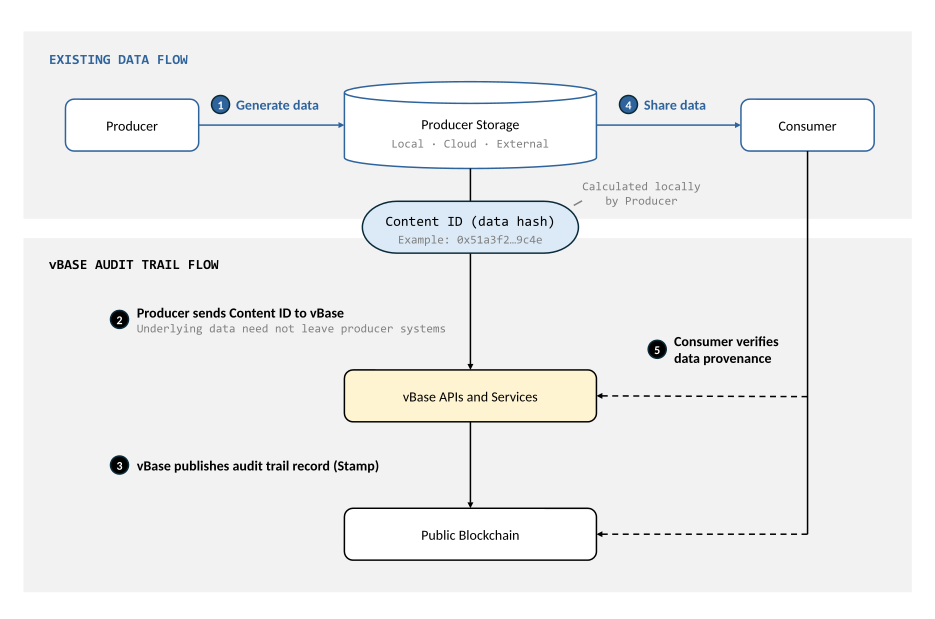
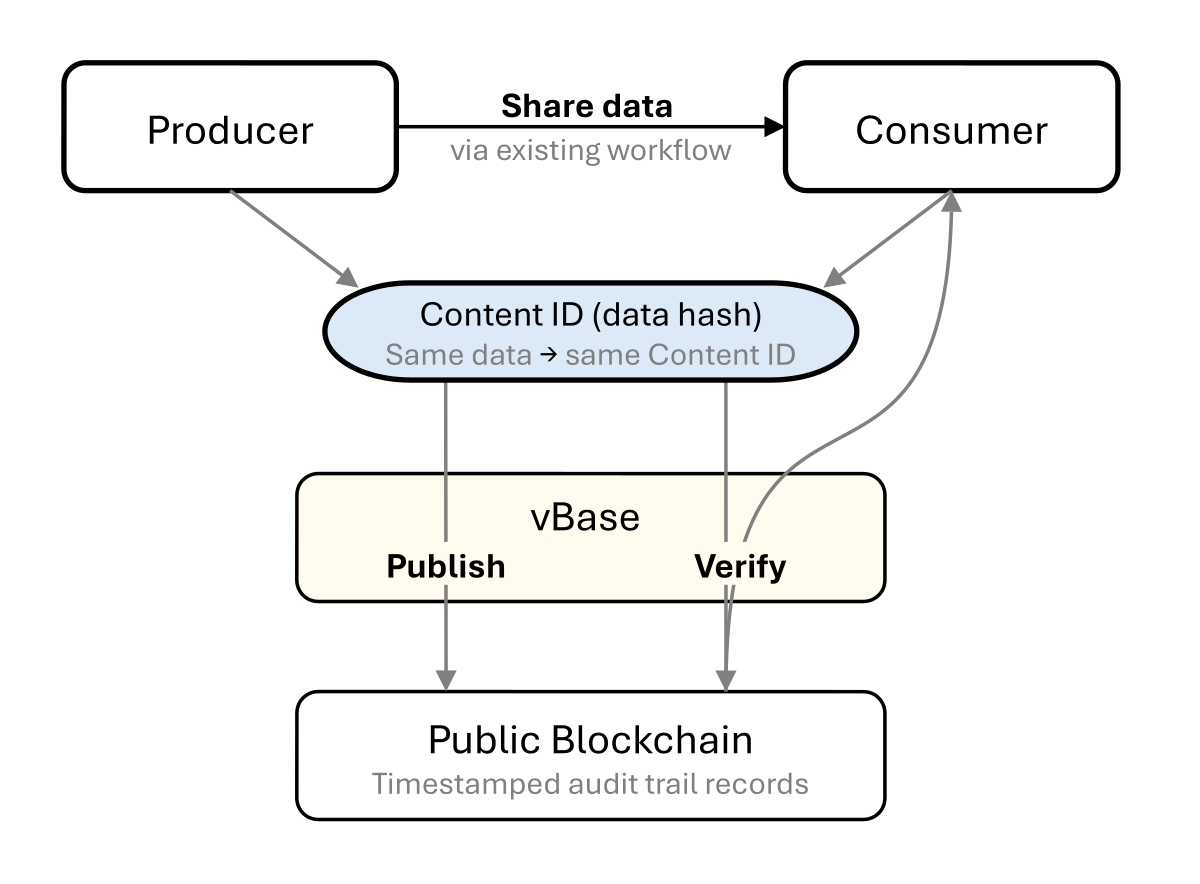
vBase leaves the producer's existing data sharing workflow unchanged while creating an external public audit trail that consumers can use for provenance verification.

<figure><img src="https://4101148087-files.gitbook.io/~/files/v0/b/gitbook-x-prod.appspot.com/o/spaces%2Fq4MLOHYMJWnZwBvFYFky%2Fuploads%2Fgit-blob-a927083ffa35104af06aa5777d101249a9aab703%2Fhow_vbase_works_diagram.svg?alt=media" alt="How vBase creates and verifies data audit trails" width="81%"><figcaption><p>Producers share data through their existing workflows while vBase publishes and helps verify the corresponding public audit trail records.</p></figcaption></figure>

### Building the audit trail

As data is produced, vBase helps producers publish a **Stamp** for each update or release. Each Stamp contains a **Content ID**: a cryptographic fingerprint (hash) that identifies the underlying data without revealing it.

When a Stamp is published to a public blockchain, the resulting record receives a publicly verifiable publication timestamp. Over time, these records create a point-in-time audit trail showing what data existed by each record's timestamp.

Because Stamps are published to a public ledger, their contents and timestamps can be inspected independently of vBase. vBase provides tools and services that make building and verifying audit trails easy, but the underlying audit trail does not depend on vBase as the source of truth.

### Verifying the audit trail

The same data always produces the same **Content ID**. To verify data against the audit trail, the consumer recalculates its Content ID, and looks up matching Stamps either through vBase tools or directly via the blockchain records.

When the Content IDs match, the consumer can establish that the data they're reviewing is the same data represented by the producer's Stamp.

At the Collection level, consumers can verify that a complete dataset matches the audit trail records in a Collection. This can establish both the point-in-time integrity of individual records and the completeness of the presented history relative to the full set of Stamps in the Collection.

## What the audit trail can establish

Depending on how vBase is used, the audit trail can provide independently verifiable evidence of:

* **Timing** — what data existed and by when
* **Integrity** — whether the data being reviewed matches the data represented by an earlier Stamp
* **Completeness** — whether a dataset or other history corresponds one-to-one to the public audit trail records in a Collection
* **Context** — other audit trails associated with the same Stamper address are also public, this helps consumers assess the broader set of datasets, strategies, or other products that identity has recorded

Because the audit trail uses standardized publicly accessible records, the same historical evidence can be verified by different consumers at different times.

For a more detailed explanation of what vBase verification establishes and its limits, see [Verification and Trust Model](/concepts-and-architecture/verification-and-trust-model).

## Next steps

* [Example Use Cases](/overview/example-use-cases) — see how vBase is used with datasets, trading strategies, research, models, and other data products
* [Stamps and Collections](/concepts-and-architecture/stamps-and-collections) — how vBase audit trails are built and organized
* [Choose How to Use vBase](/get-started/choose-how-to-use-vbase) — start creating an audit trail
* [Technical Architecture](/concepts-and-architecture/technical-architecture) — how vBase fits into existing data workflows


# Example Use Cases

Example use cases for vBase across financial and non-financial domains

vBase creates independently verifiable, point-in-time audit trails for data, models, trading strategies, research outputs, and other digital content.

Individual audit trail records, or **Stamps**, can be grouped into **Collections**, allowing users to verify the history of an entire dataset, strategy, portfolio, or other body of work.

Below are some common financial and non-financial applications.

## Financial applications

Financial products are often evaluated by looking at historical data, predictions, or decisions. vBase helps make those histories independently verifiable.

### Alternative data providers

Stamp dataset deliveries such as sentiment scores, macro indicators, developer activity, mobility data, or other predictive data to make them verifiably point-in-time.

> **Purpose:** Create a point-in-time history that buyers can verify for evaluation and backtesting.

**Example:** A provider stamps each daily delivery into a Collection. A client can later compare the dataset with the corresponding audit trail to verify the point-in-time integrity and completeness of the data.

### Trading strategies, signals & models

Stamp trading signals, model forecasts, portfolio weights, or rebalance files as they are produced.

> **Purpose:** Build a verifiable history showing what a model or strategy produced and by when.

**Example:** A model builder stamps each weekly signal file in a Collection, creating a continuous point-in-time record that future investors can independently verify.

### Investment managers

Create verifiable histories for model portfolios, fund sleeves, SMAs, or other investment strategies.

> **Purpose:** Support independent substantiation of reported strategy or portfolio histories.

**Example:** An investment manager stamps each portfolio update as it occurs. Investors can later compare reported historical positions or performance with the point-in-time record.

### Forecasts & research

Stamp forecasts, recommendation histories, research models, valuation frameworks, or investment memos as they are produced.

> **Purpose:** Document when predictions, recommendations, or research outputs existed and whether they were subsequently revised.

**Example:** An analyst stamps each published recommendation into a Collection, creating a verifiable history that can later be evaluated against subsequent outcomes.

### Index providers & calculation agents

Stamp index methodologies, constituent files, weights, and rebalance outputs.

> **Purpose:** Create an independently verifiable history of index construction, constituent changes, weights, and methodology versions.

**Example:** An index provider stamps each rebalance file and relevant methodology version, allowing future users to verify the index's recorded history.

### Backtests and live performance

Stamp model specifications, configuration files, or backtest results before subsequent performance occurs.

> **Purpose:** Document what research, parameters, or strategy definitions existed at a particular point in time and create a clear boundary between historical research and later forward performance.

**Example:** A researcher stamps a model specification and backtest before beginning a live evaluation period. Later performance can then be assessed relative to the model definition that was recorded at the start of the period.

## Non-financial applications

vBase is domain-agnostic. Any field that produces data, predictions, research, or other digital records over time can benefit from independently verifiable history.

### AI & machine learning

Stamp model outputs, prediction batches, evaluation results, or model versions over time.

> **Purpose:** Create a point-in-time history of model behavior for evaluation, auditability, and reproducibility.

**Example:** A model developer uses a Collection to record successive evaluation outputs across model versions or retraining cycles.

### Research & academia

Stamp datasets, manuscripts, experimental results, or research outputs.

> **Purpose:** Document when research materials or results existed and create a verifiable history of subsequent revisions.

**Example:** A research team stamps datasets and experimental outputs as they are produced, creating an independently verifiable record of the research process.

### Media & publishing

Stamp articles, images, reports, press releases, or other original content.

> **Purpose:** Document that specific content existed by a particular time and under a particular identity.

**Example:** A publisher stamps an original research report before distribution, allowing its publication history to be independently verified later.

### Legal, compliance & recordkeeping

Stamp contracts, filings, policies, risk reports, valuation reports, or other important records.

> **Purpose:** Create an independently verifiable record of document integrity and timing.

**Example:** An organization stamps recurring compliance or risk reports into a Collection, creating a point-in-time history of what was recorded at each reporting interval.

### Project & client deliverables

Stamp datasets, analyses, reports, or other deliverables as they are completed or handed off.

> **Purpose:** Create a shared, independently verifiable history of project outputs between teams, clients, or other counterparties.

**Example:** A service provider stamps each major client deliverable into a Collection, creating a record of what was delivered and by when.

## Summary

vBase can be useful anywhere historical data, predictions, or digital records need to be evaluated based on **what existed and by when**.

The underlying content can remain private while its history becomes independently verifiable.

## Next steps

* [Choose how to use vBase](/get-started/choose-how-to-use-vbase)
* [How vBase works](/overview/how-vbase-works)
* [Use the vBase web app](/get-started/web-app-overview)
* [Python API quickstart](/get-started/api-py-quickstart)


# Choose How to Use vBase

Compare the Web App, Python clients, REST API, CLI, and Excel tools to pick the right vBase integration

vBase can stamp and verify predictive datasets, alternative data, portfolios, and other files. It works from the browser, Python, the command line, and Excel. Pick the path that fits your environment.

| What you want to do                   | Recommended option                                      |
| ------------------------------------- | ------------------------------------------------------- |
| Stamp or verify in your browser       | [Web App](/get-started/web-app-overview)                |
| Automate from Python                  | [`vbase-api`](/get-started/api-py-quickstart)           |
| Integrate from another language       | [REST API](/rest-api/rest-api-user-guide)               |
| Explore REST endpoints interactively  | [Swagger UI](https://app.vbase.com/swagger/)            |
| Stamp from Excel                      | [Excel and COM Tools](/other-sdks-and-tools/user-guide) |
| Run command-line workflows            | [CLI](/other-sdks-and-tools/index)                      |
| Low-level or direct blockchain access | [`vbase`](/python-blockchain-sdk-vbase-advanced/api)    |

## Web App

Use [app.vbase.com](https://app.vbase.com) to manage Collections and create or verify Stamps without installing software. [Get started by making an account](/get-started/create-a-vbase-account).

## `vbase-api`: Python REST client

The recommended option for Python users. It handles REST authentication, file uploads, and response parsing. Its package name is `vbase-api`; its import name is `vbase_api`.

```bash
pip install vbase-api
```

* Package: [`vbase-api` on PyPI](https://pypi.org/project/vbase-api/)
* Source: [`validityBase/vbase-api-py` on GitHub](https://github.com/validityBase/vbase-api-py)
* Docs: [Python client API reference](/python-api-client/index)
* Quickstart: [Python REST Client Quickstart](/get-started/api-py-quickstart)
* Private stamping: [Private Stamping with Delayed Reveal](/use-case-how-tos/private-stamping)

## REST API

The REST API works with any language or tool that can make HTTP requests, including R, JavaScript, C#, and shell scripts. `vbase-api` wraps this interface; the lower-level `vbase` SDK does not.

* Base URL: `https://app.vbase.com/api/v1/`
* Swagger UI: [app.vbase.com/swagger/](https://app.vbase.com/swagger/)
* Docs: [REST API User Guide](/rest-api/rest-api-user-guide)

## Excel and COM tools

Stamp and verify from Excel or another COM-compatible application. See the [COM Library Overview](/other-sdks-and-tools/user-guide).

## CLI

Stamp and verify from a terminal or shell script. See the [Command Line Interface](/other-sdks-and-tools/index).

## `vbase`: Core Python SDK

Use `vbase` for direct, low-level access to commitment services and blockchains. It supports Content ID (CID) computation, sets and objects, batch operations, point-in-time simulation, and typed objects. Most users should use `vbase-api`.

Appropriate use cases:

* Custom CID computation and typed data
* Batch commitments
* Point-in-time simulation
* Low-level integrations that do not use the REST API

```bash
pip install vbase
```

* Package: [`vbase` on PyPI](https://pypi.org/project/vbase/)
* Source: [`validityBase/vbase-py` on GitHub](https://github.com/validityBase/vbase-py)
* Docs: [`vbase` API reference](/python-blockchain-sdk-vbase-advanced/api)


# Create a vBase Account

Sign up for vBase and get the credentials needed for the Web App and authenticated API access

Create a vBase account to use the Web App and authenticated developer APIs.

After signing up, you can stamp and verify content in the browser or obtain an API key for programmatic access.

## Create your account

1. Go to the [vBase sign-up page](https://app.vbase.com/accounts/signup/).
2. Enter your email address, display name, and password, or select **Sign Up with Google**.
3. Complete the sign-up process.
4. Open the confirmation email from vBase and follow the link to verify your email address.
5. Go to [app.vbase.com](https://app.vbase.com/) and sign in.

Your account is now ready to use.

## Before creating test Stamps

vBase Stamps create permanent blockchain records associated with your account. Before using vBase for production data, decide how you want to separate testing from live activity.

You can either:

* Use one account for testing and create a separate account when you are ready to begin a live, verifiable record; or
* Create a Collection named `TEST` and place your test Stamps there.

This helps keep experimental activity clearly separated from the Collections and audit trail records you may later share with clients, investors, or other verifiers.

## Find your account settings

After signing in:

1. Open the account menu in the upper-right corner of the Web App.
2. Select **User Profile**.
3. Open the **Account Settings** tab.

Your account settings include information associated with your vBase account and the credentials needed for authenticated API access.

## Get your API key

You need an API key to use the vBase Python API Client or REST API.

From **Account Settings**:

1. Locate your API key.
2. Copy it and store it securely.
3. Use it as a bearer token when authenticating API requests.

Do not share your API key publicly or commit it to source control. For local development, store it in an environment variable or another secure secrets-management system.

For example:

```bash
export VBASE_API_KEY="your-api-key"
```

Windows PowerShell:

```powershell
$env:VBASE_API_KEY="your-api-key"
```

## Next steps

Choose the interface or integration that fits your workflow:

* [Use the vBase Web App](/get-started/web-app-overview)
* [Start with the Python API Client](/get-started/api-py-quickstart)
* [Read the REST API Guide](/rest-api/rest-api-user-guide)
* [Choose How to Use vBase](/get-started/choose-how-to-use-vbase)


# Web App Overview

Create and verify Stamps, manage Collections, and configure your vBase account from the browser

Create and verify blockchain-backed records, manage Collections, and configure your vBase account directly from your browser.

{% hint style="info" %}
**Account requirements**

An account is required to create Stamps, manage Collections, and verify Collections.

You can verify a file, Content ID, or user without signing in.

[Create a vBase account](/get-started/create-a-vbase-account)
{% endhint %}

## Create a Stamp

Create a permanent, independently verifiable record of content.

| Workflow                                                           | Description                                  |
| ------------------------------------------------------------------ | -------------------------------------------- |
| [Stamp a file](https://app.vbase.com/stamp/?method=file)           | Stamp the Content ID calculated from a file  |
| [Stamp text](https://app.vbase.com/stamp/?method=text)             | Enter and stamp text directly in the browser |
| [Stamp a Content ID](https://app.vbase.com/stamp/?method=hash)     | Stamp an existing Content ID                 |
| [Stamp a portfolio](https://app.vbase.com/stamp/?method=portfolio) | Create a Stamp using the portfolio workflow  |

During any regular stamping workflow, you can optionally assign the Stamp to an existing Collection.

[Read the Stamper guide](/web-app/how-to-use-vbase-stamper)

## Verify a record

Check previously created records and review the available Stamp details.

| Workflow                                                                                                        | Description                                                 |
| --------------------------------------------------------------------------------------------------------------- | ----------------------------------------------------------- |
| [Verify a file](https://app.vbase.com/verify/?method=file)                                                      | Calculate a file’s Content ID and find matching Stamps      |
| [Verify a Content ID](https://app.vbase.com/verify/?method=hash)                                                | Search directly using a known Content ID                    |
| [Verify a user](https://app.vbase.com/verify/?method=user)                                                      | Review records associated with a user or blockchain address |
| [Verify a Collection from ZIP](https://app.vbase.com/verify/?method=collection\&collectionMethod=archive)       | Compare a ZIP archive with a Collection record              |
| [Verify a Collection from S3](https://app.vbase.com/verify/?method=collection\&collectionMethod=s3-credentials) | Verify a Collection using an S3 URI and credentials         |

[Read the Verify guide](/web-app/how-to-use-vbase-verify)

## Manage Collections and settings

Use your Profile to manage your account and organize related Stamps.

| Area                                                                | What you can do                                                    |
| ------------------------------------------------------------------- | ------------------------------------------------------------------ |
| [Collections](https://app.vbase.com/profile/#collections)           | Create and manage Collections that can be selected during stamping |
| [Account Settings](https://app.vbase.com/profile/#account_settings) | Manage API credentials and available account preferences           |

## Automate your workflow

For recurring or programmatic stamping and verification, use the [Python API Client](/get-started/api-py-quickstart), our [REST API](/rest-api/rest-api-user-guide) or one of our [other automation interfaces](/get-started/choose-how-to-use-vbase).


# Python API Quickstart

Install the vbase-api Python client, configure your API key, and create your first Stamp

Use the `vbase-api` Python client to stamp any file through the REST API. This example uses demand forecasts, but the same process applies to other predictive datasets, alternative data, portfolios, research results, and other files. For raw HTTP, see [Using the REST API directly](#using-the-rest-api-directly).

## Prerequisites

1. Sign up at [app.vbase.com](https://app.vbase.com).
2. Go to [Account Settings](https://app.vbase.com/profile/#account_settings) and copy your API key.

**Test first.** Verify the workflow with a separate test account. Collections are account-specific, so re-create them in production before switching API keys.

## Install

```bash
pip install vbase-api
```

Requires Python 3.8 or later. The package installs as `vbase-api` and imports as `vbase_api`. The similarly named `vbase` package is the lower-level core SDK.

## Configure your API key

Store the key in an environment variable. Never commit it to version control.

macOS/Linux:

```bash
export VBASE_API_KEY="your-api-key"
```

Windows PowerShell:

```powershell
$env:VBASE_API_KEY="your-api-key"
```

## Create a client

```python
import os
from vbase_api import VBaseAPIClient

client = VBaseAPIClient(api_key=os.environ["VBASE_API_KEY"])
```

## Create a Collection

A Collection groups related Stamps. You might use one Collection for versions of a dataset, a series of predictions, an alternative data feed, or a portfolio history. Create it once; duplicate names return a conflict error.

```python
client.create_collection(
    name="daily-demand-forecasts",
    description="Daily demand forecasts by region",
)
```

You can also create and manage Collections at [app.vbase.com/profile/#collections](https://app.vbase.com/profile/#collections).

## Prepare a file

Ordinary file stamping does not require a particular format. For this example, save the following CSV as `demand_forecast_2025-01-31.csv`:

```
as_of,region,predicted_demand
2025-01-31,north,127.4
2025-01-31,south,141.8
```

The file does not need to be a CSV or use specific columns. If you are preparing a portfolio for vBase portfolio tools, see the [portfolio format requirements](/use-case-how-tos/verified-track-record/stamping-portfolios). Those requirements apply to that specific portfolio use case.

## Stamp the file

Pass the file path and Collection name. By default, vBase records its content ID and timestamp on-chain and stores the file.

```python
stamp = client.create_stamp(
    file="demand_forecast_2025-01-31.csv",
    collection_name="daily-demand-forecasts",
)

print(stamp.commitment_receipt.timestamp)
print(stamp.commitment_receipt.transaction_hash)
```

Stamp each version that you want to include in the record.

Resending identical content is idempotent for 3,600 seconds by default. See [Idempotency](/python-api-client/api-py-guide#idempotency) before changing this behavior.

Close the client's HTTP session when the script is finished:

```python
client.close()
```

## Using the REST API directly

If you prefer curl or another HTTP client, the base URL is `https://app.vbase.com/api/v1/`. Authenticate with a `Bearer` token.

**Create a Stamp:**

```bash
curl -X POST https://app.vbase.com/api/v1/stamps \
  -H "Authorization: Bearer $VBASE_API_KEY" \
  --form-string 'collection_name=daily-demand-forecasts' \
  -F 'file=@demand_forecast_2025-01-31.csv' \
  --form-string 'store_stamped_file=true'
```

Full interactive documentation is available at [app.vbase.com/swagger/](https://app.vbase.com/swagger/).

## Next steps

* [Python REST Client Guide](/python-api-client/api-py-guide) covers common operations and behavior.
* [Python client API reference](/python-api-client/index) lists every method and response model.
* [Private Stamping with Delayed Reveal](/use-case-how-tos/private-stamping) explains how to stamp a file without sending its contents to vBase.
* [Portfolio Format](/use-case-how-tos/verified-track-record/stamping-portfolios) covers the specific requirements for vBase portfolio tools.
* [Verified Track Record](/use-case-how-tos/verified-track-record) is a portfolio-specific example of sharing a stamped history.


# Stamp an Object

Create Stamps for files, text, Content IDs, and portfolios directly from your browser

The **vBase Stamper** lets you create independently verifiable audit trail records directly from your browser.

You can stamp:

* A file
* Text entered directly in the Web App
* An existing Content ID
* A portfolio

A vBase account is required to create Stamps.

[Open the vBase Stamper](https://app.vbase.com/stamp/)

For a quick overview, [watch the how-to video](https://www.youtube.com/watch?v=wRJCNvDkKR8).

## Stamp a file

[Open the File Stamper](https://app.vbase.com/stamp/?method=file)

1. Sign in to your vBase account.
2. Drag a file into the upload area or click **Browse for File** and select the file.
3. Optionally, assign the Stamp to an existing **Collection**.
4. Click **Make a Stamp**.

Once the Stamp is created, vBase displays the resulting Stamp (audit trail record).

### File storage

By default, the Web App can retain a backup copy of files you stamp. You can manage this preference in your [Account Settings](https://app.vbase.com/profile/#account_settings).

If file storage is disabled, the file's Content ID is calculated locally in your browser and the underlying file does not need to be uploaded to vBase.

If you choose not to store a backup through vBase, retain the exact original file yourself. You will need it to verify the file against the Stamp later.

## Stamp text

[Open the Text Stamper](https://app.vbase.com/stamp/?method=text)

1. Sign in to your vBase account.
2. Select the **Text** stamping workflow.
3. Enter and format the text you want to stamp.
4. Optionally, assign the Stamp to an existing Collection.
5. Create the Stamp.

The formatting you apply is part of the stamped content, so changes to the text or its formatting will produce a different Content ID.

When you create the Stamp, vBase generates an HTML version of the content. You can download that HTML file for your own records, and vBase also saves a copy of the HTML to your vBase account.

## Stamp a Content ID

[Open the Content ID Stamper](https://app.vbase.com/stamp/?method=hash)

If you have already calculated a Content ID for your data, you can stamp the Content ID directly without submitting the underlying data.

1. Sign in to your vBase account.
2. Select the **Content ID** stamping workflow.
3. Enter the Content ID.
4. Optionally, assign the Stamp to an existing Collection.
5. Create the Stamp.

{% hint style="warning" %}
**Stamping a Content ID directly is an advanced workflow.**

You are responsible for retaining the underlying data corresponding to the Content ID. If you do not retain the exact original data, you may not be able to verify the underlying data against the Stamp later.
{% endhint %}

## Stamp a portfolio

[Open the Portfolio Stamper](https://app.vbase.com/stamp/?method=portfolio)

The portfolio workflow is designed for creating point-in-time records of investment portfolios and strategy positions.

1. Sign in to your vBase account.
2. Open the **Portfolio** stamping workflow.
3. Follow the portfolio workflow to prepare and stamp your portfolio.
4. Repeat the process at the cadence appropriate for your strategy, such as at each rebalance.

For portfolio formats, Collection setup, stamping cadence, and strategy-specific guidance, see [Stamping a Portfolio](/use-case-how-tos/verified-track-record/stamping-portfolios).

## Manage Collections

Collections group related Stamps under a shared identifier and make it possible to build a verifiable history for an entire dataset, strategy, portfolio, or other body of work.

If the content you are stamping belongs to an existing Collection, select that Collection during the stamping workflow. Collections are optional; content stamped without a Collection still receives its own independently verifiable Stamp.

[Create or manage Collections](https://app.vbase.com/profile/#collections)

Once created, the Collection will be available for selection from the Collection dropdown in the regular stamping workflow.

## What happens next

Creating a Stamp records the content's Content ID, the Stamper address, a publicly verifiable timestamp, and, when applicable, its Collection relationship in the vBase audit trail.

[Learn how vBase works](/overview/how-vbase-works).

## Verify your Stamp

After creating a Stamp, you or another user can verify the corresponding content against its audit trail record using vBase Verify or another verification method. You can also test the workflow yourself by stamping a file and then verifying it.

[Learn how to use vBase Verify](/web-app/how-to-use-vbase-verify).


# Verify an Object

Check files, Content IDs, users, and Collections against vBase audit trails directly from your browser

**vBase Verify** lets you check content and historical records against vBase audit trails directly from your browser.

You can verify:

* A file
* An existing Content ID
* A user or blockchain address
* A Collection using a ZIP archive
* A Collection using Amazon S3

You do not need a vBase account to verify a file, Content ID, or user. You must sign in to verify a Collection.

[Open vBase Verify](https://app.vbase.com/verify/)

For a quick overview, [watch the how-to video](https://youtu.be/nzbC3UphfGM).

## Verify a file

[Open File Verification](https://app.vbase.com/verify/?method=file)

Use File Verification when you have a copy of a file and want to determine whether, when, and by whom the exact same content was previously stamped.

1. Open the **File** verification workflow.
2. Select the file you want to verify.
3. vBase calculates the file's Content ID locally in your browser.
4. vBase searches the public ledger records for matching Stamps.
5. Review the matching audit trail records.

The file itself is not uploaded to vBase during verification.

### What the results show

When a matching Stamp is found, vBase displays a verification summary showing the key information associated with the record.

Depending on the Stamp, this may include:

* **Timestamp** — when the Stamp was recorded
* **User** — the vBase account associated with the Stamp
* **User Identity** — whether that user has a verified identity, and since when
* **Collection** — the Collection associated with the Stamp, if applicable

If the same content has been stamped more than once, vBase indicates this and displays the earliest matching Stamp by default. Other matching Stamps may have been created by different users or associated with different Collections.

The **Stamp Details** section provides the underlying technical record:

| Field                        | Description                                                |
| ---------------------------- | ---------------------------------------------------------- |
| **Blockchain Address**       | The blockchain address associated with the Stamper         |
| **Content ID (SHA3-256)**    | The cryptographic fingerprint of the verified content      |
| **Collection ID (SHA3-256)** | The identifier of the associated Collection, if applicable |
| **Public Blockchain Record** | A link to the underlying blockchain transaction            |

You can also download a **Stamp Certificate PDF** summarizing the verification record.

[Learn how vBase verification works](/overview/how-vbase-works).

### If the file does not match

A file must match the stamped content exactly.

Any change to the file will produce a different Content ID. If no matching Stamp is found, confirm that you are using the exact version of the file that was originally stamped.

## Verify a Content ID

[Open Content ID Verification](https://app.vbase.com/verify/?method=hash)

If you already know the Content ID of the content you want to check, you can search for it directly without providing the underlying data.

1. Open the **Content ID** verification workflow.
2. Enter the Content ID.
3. Search for matching Stamps.
4. Review the available audit trail records.

This workflow is useful when a Content ID has been calculated independently or provided as part of another vBase workflow.

## Verify a user

[Open User Verification](https://app.vbase.com/verify/?method=user)

User Verification lets you review audit trail activity associated with a vBase user or blockchain address.

1. Open the **User** verification workflow.
2. Enter the user or blockchain address you want to review.
3. Search for the user.
4. Review the available Stamps, Collections, and identity information associated with that vBase identity.

This provides broader context around the audit trails maintained under the same vBase identity.

Activity conducted under another identity or outside vBase will not appear in that user's vBase history.

## Verify a Collection

A Collection groups related Stamps into a larger audit trail. Collection verification lets you compare a presented dataset or group of files with the history previously recorded in that Collection.

A vBase account is required to verify Collections.

### Verify a Collection using a ZIP archive

[Open Collection ZIP Verification](https://app.vbase.com/verify/?method=collection\&collectionMethod=archive)

Use this workflow when the content you want to verify is available as a ZIP archive.

1. Sign in to your vBase account.
2. Open the **Collection — ZIP Archive** verification workflow.
3. Select the Collection you want to verify.
4. Provide the ZIP archive containing the files to compare with the Collection.
5. Run the verification.
6. Review the results.

Collection verification compares the submitted content with the audit trail previously recorded for the Collection and identifies whether the presented objects correspond to the Stamps in the Collection.

### Verify a Collection using Amazon S3

[Open Collection S3 Verification](https://app.vbase.com/verify/?method=collection\&collectionMethod=s3-credentials)

Use this workflow when the content to be verified is stored in Amazon S3.

1. Sign in to your vBase account.
2. Open the **Collection — S3** verification workflow.
3. Select the Collection you want to verify.
4. Provide the requested S3 location and credentials.
5. Run the verification.
6. Review the results.

{% hint style="warning" %}
**Use read-only S3 credentials.** vBase does not store the S3 credentials you provide for Collection verification. However, because credentials are entered into the browser and used to access the S3 bucket data, they should still be treated as sensitive. Use credentials scoped only to the bucket or prefix being verified, with the minimum permissions required to read the relevant files. Avoid using credentials with write, delete, or administrative permissions.
{% endhint %}

This allows a Collection to be checked directly against content stored in S3 rather than first assembling the files into a ZIP archive.

{% hint style="info" %}
Collection verification is different from verifying a single file. File verification asks whether a particular object matches an earlier Stamp. Collection verification compares a group of objects with the recorded history of a Collection.
{% endhint %}

## Understanding verification

A successful verification establishes that the content being reviewed corresponds to content represented by the earlier vBase audit trail record.

It does not, by itself, establish whether the underlying data is accurate, useful, or valuable.

For details on what Stamps, Content IDs, Collections, and verification can establish, see [How vBase Works](/overview/how-vbase-works).

## Verify programmatically

For recurring or automated verification workflows, use the vBase developer APIs:

* [Python API Client](/get-started/api-py-quickstart)
* [REST API](/rest-api/rest-api-user-guide)
* [Choose another vBase integration](/get-started/choose-how-to-use-vbase)

## Create a Stamp

You can test the complete workflow yourself by stamping a file and then verifying the same file through vBase Verify.

[Learn how to use the vBase Stamper](/web-app/how-to-use-vbase-stamper).


# Guide and Examples

Create Collections, stamp and verify data, and manage stored files with the vbase-api Python client

`vbase-api` (`pip install vbase-api`; `import vbase_api`) is the Python client for the REST API. You can use it to stamp and verify files or structured data and to manage Collections. See the [quickstart](/get-started/api-py-quickstart) for setup.

## Verify your connection

After creating a client, confirm your key is valid before proceeding:

```python
user = client.get_current_user()
print(f"Connected as: {user.email}")
print(f"Blockchain address: {user.last_address}")
```

## Collections

### Create a Collection

```python
collection = client.create_collection(
    name="daily-demand-forecasts",
    description="Daily demand forecasts by region",
)
print(f"Collection CID: {collection.cid}")
```

### Retrieve Collections

```python
collections = client.get_collections()
for c in collections:
    print(f"{c.name}: {c.cid}")
```

Filter by pinning status:

```python
pinned = client.get_collections(is_pinned=True)
```

Retrieve Collections for a specific blockchain address:

```python
user_collections = client.get_collections(user_address="0x...")
```

## Stamping

The examples below use demand forecasts. The same calls work with other predictive datasets, alternative data, portfolios, research results, and other files.

### Stamp a file

```python
stamp = client.create_stamp(
    file="demand_forecast_2025-01-31.csv",
    collection_name="daily-demand-forecasts",
)
print(stamp.commitment_receipt.timestamp)
print(stamp.commitment_receipt.transaction_hash)
```

`store_stamped_file=False` prevents vBase from retaining the file, but the file is still uploaded for Content ID (CID) calculation:

```python
stamp = client.create_stamp(
    file="demand_forecast_2025-01-31.csv",
    collection_name="daily-demand-forecasts",
    store_stamped_file=False,
)
```

Use `upload_stamped_file` to store it later. If the file must not leave your machine before reveal, see [Private Stamping with Delayed Reveal](/use-case-how-tos/private-stamping).

### Stamp structured data

Pass a Python dict or string as `data`. The client serializes dicts with `json.dumps` before sending them.

```python
stamp = client.create_stamp(
    data={
        "as_of": "2025-01-31",
        "forecasts": [
            {"region": "north", "demand": 127.4},
            {"region": "south", "demand": 141.8},
        ],
    },
    file_name="demand_forecast_2025-01-31.json",
    collection_name="daily-demand-forecasts",
)
```

`file_name` sets the stored filename for `data`. Specify `collection_name` or `collection_cid`, not both.

### Commitment receipt

Every successful Stamp returns a commitment receipt:

```python
receipt = stamp.commitment_receipt
print(receipt.object_cid)        # content identifier
print(receipt.timestamp)          # blockchain timestamp
print(receipt.transaction_hash)   # on-chain transaction
print(receipt.user_address)       # your blockchain address
```

### Idempotency

By default, resending identical content within 3,600 seconds can return the existing receipt. Set `idempotent=False` only when identical content needs a new timestamp.

## Verifying Stamps

Look up existing Stamps by Content ID:

```python
verification = client.verify_stamps(
    cids=[receipt.object_cid],
    filter_by_user=True,
)
for s in verification.stamp_list:
    print(f"{s.timestamp}  {s.object_cid}")
```

`filter_by_user=True` limits results to the authenticated user; the default searches all users. Pass multiple Content IDs in one call:

```python
verification = client.verify_stamps(
    cids=[cid_1, cid_2, cid_3],
)
```

## Uploading a previously stamped file

If you stamped with `store_stamped_file=False` or `data_cid`, you can upload the file later. The authenticated user must own the Collection, and the file's CID must match a Stamp in that Collection:

```python
result = client.upload_stamped_file(
    collection_name="daily-demand-forecasts",
    file="demand_forecast_2025-01-31.csv",
)
print(f"Uploaded: {result.file_object.file_name}")
```

## Client lifecycle

Use the client as a context manager to close its HTTP session automatically:

```python
import os
from vbase_api import VBaseAPIClient

with VBaseAPIClient(api_key=os.environ["VBASE_API_KEY"]) as client:
    stamp = client.create_stamp(
        file="demand_forecast_2025-01-31.csv",
        collection_name="daily-demand-forecasts",
    )
    print(stamp.commitment_receipt.timestamp)
```

If you do not use a `with` block, call `client.close()` when finished.

## Reference

* [`vbase-api` on PyPI](https://pypi.org/project/vbase-api/)
* [`validityBase/vbase-api-py` on GitHub](https://github.com/validityBase/vbase-api-py)
* [Python client API reference](/python-api-client/index)
* [REST API User Guide](/rest-api/rest-api-user-guide)
* [Swagger UI](https://app.vbase.com/swagger/)


# API Reference

## vBase API Python Client Documentation

## API Client

* [vBase REST API Client](https://github.com/validityBase/docs/tree/main/vbase-api-py/vbase_api_client.md)
* [vBase API models](https://github.com/validityBase/docs/tree/main/vbase-api-py/vbase_api_models.md)


# Data Provider Workflow

How data providers set up and maintain an audit trail

Data providers, particularly those selling predictive data to investors, benefit from showing that their dataset's history is a complete, point-in-time representation of what the consumer would have received live. See [Why Quants Pay More for Point-in-Time Data](https://www.vbase.com/blog/why-quants-pay-more-for-point-in-time-data/) for more on why this matters.

A vBase audit trail gives data providers independently verifiable evidence that a dataset is point-in-time and complete — with no missing, extra, or altered data relative to the point-in-time audit trail records.

Providers can also share the audit trail with consumers as proof of point-in-time data integrity. vBase enables data consumers to quickly compare a presented dataset with its audit trail during diligence.

## How an audit trail is created

As a provider stores or delivers data, vBase creates and publishes **Stamps**, publicly timestamped audit trail records that contain the data's fingerprint (Content ID) to an immutable public ledger.

**These Stamps do not contain the underlying data itself** and audit trails can be built without changing how providers produce, store, or deliver data.

<figure><img src="https://4101148087-files.gitbook.io/~/files/v0/b/gitbook-x-prod.appspot.com/o/spaces%2Fq4MLOHYMJWnZwBvFYFky%2Fuploads%2Fgit-blob-ab2c65599e851c71d1cc995250b80697c06fe61e%2Fdata-provider-workflow.svg?alt=media" alt="vBase data provider workflow" width="60%"><figcaption><p>The provider's existing data flow runs alongside the vBase audit trail flow.</p></figcaption></figure>

If you are new to vBase, see [How vBase Works](/overview/how-vbase-works) and [Stamps and Collections](/concepts-and-architecture/stamps-and-collections).

For what an audit trail enables a data consumer to verify, see [What the Audit Trail Can Establish](/overview/how-vbase-works#what-the-audit-trail-can-establish).

## One-time setup

### 1. Create a vBase account

Create a vBase account at <https://app.vbase.com/accounts/signup/>. The account establishes the audit trail's creator identity.

For a step-by-step guide, see [Create a vBase Account](/get-started/create-a-vbase-account).

### 2. Create a Collection for the dataset

Create a **Collection** for each dataset or product whose history will form a single audit trail.

Create Collections [via the vBase Web App](https://app.vbase.com/profile/#collections) or [the API](/get-started/api-py-quickstart).

## Ongoing workflow

### 1. Stamp each update or revision

#### How to stamp

For most recurring data pipelines, we recommend automating stamping through the [Python API Client](/get-started/api-py-quickstart) or [REST API](/rest-api/rest-api-user-guide).

Other options include the browser-based [vBase Web App](/get-started/web-app-overview) and managed workflows using email, S3, SFTP, or other integrations.

See [Choose How to Use vBase](/get-started/choose-how-to-use-vbase) for an overview of available stamping methods and interfaces.

#### What to stamp

A properly built audit trail answers: **Had the data consumer been receiving this dataset live all along, what would they have seen at each point in time?**

Stamp the production data a consumer would actually have received at that point in time: a file, a full dataset snapshot, a model, or another digital object. Create the Stamp as close as possible to the time that the data is stored or delivered. The Stamp's timestamp shows by when the data was available, so earlier is better.

Stamp every release, revision, and correction for the dataset using the same Collection. For example:

```
Dataset: DAILY-DEMAND-DATA

Jan 5   Production release → Stamp A | Collection: DAILY-DEMAND-DATA
Jan 6   Production release → Stamp B | Collection: DAILY-DEMAND-DATA
Jan 7   Jan 5 revision     → Stamp C | Collection: DAILY-DEMAND-DATA
Jan 7   Production release → Stamp D | Collection: DAILY-DEMAND-DATA

All Stamps share the same stamping address and Collection
```

Together, these Stamps form the point-in-time audit trail for the `DAILY-DEMAND-DATA` dataset.

For more stamping best practices, see [Building a Verifiable History](/concepts-and-architecture/building-a-verifiable-history).

### 2. Keep an exact copy of the stamped data

An audit trail can only be verified against an exact copy of the data. If no exact copy of stamped data is available, the Stamps will still exist, but they cannot be matched to the underlying data.

In many managed workflows vBase stores a backup copy of each stamped object. If the underlying data is not stored with vBase, providers should save the stamped content themselves.

### 3. Share the audit trail with consumers

Once the audit trail is accumulating records, the provider can share it with data consumers as part of diligence.

Consumers can either use vBase tools or inspect audit trail records independently to compare a dataset with its public audit trail and verify that the data matches the audit trail records, thus verifying that the dataset is point-in-time and complete.

Consumers can also view other audit trails published by the same vBase identity, providing broader context around the provider's audit trail history.

Providers that want additional support with verification can also use vBase's managed verification services and third-party verification reports.

See [How to Use vBase Verify](/web-app/how-to-use-vbase-verify) for the verification workflow and [Verification and Trust Model](/concepts-and-architecture/verification-and-trust-model) for how to verify datasets and what the resulting verification establishes.

## Common questions

### Do I need to change my production or delivery pipeline?

Usually not. vBase operates alongside the provider's existing production, storage, and delivery workflow. Data can continue to be generated and distributed through the same systems used today.

### Does vBase need access to my underlying data?

No. Providers can build and verify audit trails using only Content IDs, without sharing data with vBase. In many managed workflows, however, vBase saves a backup copy of the data to support managed verification and delivery services.

See [Privacy and Data Handling](/concepts-and-architecture/privacy-and-data-handling) for more info.

### Does vBase provide support for verification?

Yes. vBase provides tools that consumers can use to verify datasets against their audit trails.

For users who want additional support during diligence or verification, vBase can also provide managed verification services and dataset-specific point-in-time integrity reports.

Contact <support@vbase.com> for more information.

## Learn more

* [Building a Verifiable History](/concepts-and-architecture/building-a-verifiable-history) — best practices for deciding what and when to stamp
* [Stamps and Collections](/concepts-and-architecture/stamps-and-collections) — how vBase audit trails are organized
* [Choose How to Use vBase](/get-started/choose-how-to-use-vbase) — available stamping methods and interfaces
* [Private Stamping with Delayed Reveal](/use-case-how-tos/private-stamping) — workflows where data is stamped before it is disclosed
* [Technical Architecture](/concepts-and-architecture/technical-architecture) — how the audit trail fits alongside existing production, storage, and delivery systems


# Private Stamping with Delayed Reveal

Stamp a file's Content ID without revealing the data, then reveal and verify it later

Stamp sensitive information before you are ready to disclose it. This workflow applies to predictive datasets, alternative data, research results, portfolios, and other files that you may share later. A recipient can match the exact file to the public blockchain record and confirm when it was stamped.

The process has two steps:

1. **Stamp privately.** Calculate the file's Content ID (CID) on your computer and stamp the CID without uploading the file.
2. **Reveal when ready.** Share the exact file with selected recipients for verification, or upload it to vBase if you want vBase to store it.

## How it works

A Content ID is the SHA3-256 hash of the file, written as a `0x`-prefixed hexadecimal string. The API sends the CID and stamp details to vBase, but it does not send the file. The CID is public, so anyone with the exact file can hash it and find the matching stamp.

A CID is a hash, not encryption. Someone who can guess the exact contents can hash each guess and compare the results with the public CID. This workflow is suitable for detailed files whose exact bytes are hard to guess. A short value drawn from a predictable set needs a separate privacy method.

When you upload the file, vBase calculates its CID and confirms that your account stamped it in the same Collection. Any change to the file, including whitespace, line endings, or encoding, creates a different CID and prevents a match.

If you start with structured data rather than a file, save the data to a file before calculating the CID. Keep that exact file for later verification. Writing the same values again with different spacing, field order, encoding, or line endings will produce a different CID.

## Prerequisites

* Python 3.8 or later with `vbase-api` installed (`pip install vbase-api`)
* A vBase API key stored in `VBASE_API_KEY`; see [Configure your API key](/get-started/api-py-quickstart#configure-your-api-key)
* An existing Collection. This portfolio example uses `global-macro-2025`. Create it first or replace that name in every example with the name of your Collection. See [Create a Collection](/get-started/api-py-quickstart#create-a-collection).
* A separate account for testing before you use your main account

If you are stamping a portfolio for use with vBase portfolio tools, the CSV must meet the [portfolio format requirements](/use-case-how-tos/verified-track-record/stamping-portfolios#what-counts-as-a-valid-portfolio-upload). This requirement applies only to that portfolio use case.

## Step 1: Stamp privately

Calculate the CID on your computer and pass it as `data_cid`. No part of the file leaves your machine during this step.

The following example uses a private portfolio file. The same process applies to predictive datasets, alternative data, research results, and other files.

```python
import hashlib
import os
from pathlib import Path
from vbase_api import VBaseAPIClient

portfolio_file = Path("portfolio_2025-01-31.csv")
cid = "0x" + hashlib.sha3_256(portfolio_file.read_bytes()).hexdigest()

with VBaseAPIClient(api_key=os.environ["VBASE_API_KEY"]) as client:
    stamp = client.create_stamp(
        data_cid=cid,
        collection_name="global-macro-2025",
        store_stamped_file=False,
    )

print(f"Stamped at:  {stamp.commitment_receipt.timestamp}")
print(f"Transaction: {stamp.commitment_receipt.transaction_hash}")
```

**Using curl:**

```bash
CID=$(openssl dgst -sha3-256 portfolio_2025-01-31.csv | awk '{print "0x"$2}')

curl -X POST https://app.vbase.com/api/v1/stamps \
  -H "Authorization: Bearer $VBASE_API_KEY" \
  --form-string "data_cid=$CID" \
  --form-string 'collection_name=global-macro-2025' \
  --form-string 'store_stamped_file=false'
```

A successful stamp returns a commitment receipt:

```json
{
  "commitment_receipt": {
    "object_cid": "0x...",
    "set_cid": "0x...",
    "user_address": "0x...",
    "transaction_hash": "0xabc...",
    "timestamp": "2025-01-31T21:00:00Z",
    "chain_id": 8453
  }
}
```

Keep the file exactly as it was when you calculated the CID. You need this file to show that it matches the stamp or to upload it later.

## Step 2: Reveal when ready

### Share with a recipient

Send the file to the person who needs to verify it. They can use [vBase Verify](https://app.vbase.com/verify/). The app hashes the file in their browser and finds the matching stamp. It does not upload the file, and the person does not need a vBase account.

See [Verification Methods](/concepts-and-architecture/verification-and-trust-model) for other ways to verify a stamp.

### Store the file with vBase

Upload the file if you want vBase to store it or use it with a feature that requires stored files. Use the same account and Collection that you used for the Stamp. vBase checks that the file's CID matches a Stamp in that Collection before storing it.

```python
import os
from vbase_api import VBaseAPIClient

with VBaseAPIClient(api_key=os.environ["VBASE_API_KEY"]) as client:
    result = client.upload_stamped_file(
        collection_name="global-macro-2025",
        file="portfolio_2025-01-31.csv",
    )

print(f"Uploaded: {result.file_object.file_name}")
```

**Using curl:**

```bash
curl -X POST https://app.vbase.com/api/v1/stamps/upload-stamped-file \
  -H "Authorization: Bearer $VBASE_API_KEY" \
  --form-string 'collection_name=global-macro-2025' \
  -F 'file=@portfolio_2025-01-31.csv'
```

You can upload files in any order. Uploading or sharing a file does not change its stamp time.

## Portfolio-specific dashboard example

This section applies only to portfolios. Email <portfolios@vbase.com> with the Collection name to set up portfolio dashboards and analytics. See [Verified Track Record](/use-case-how-tos/verified-track-record) for an example of sharing a portfolio history with allocators.


# Verified Investment Track Records

How investment managers and signal producers build independently verifiable track records

Investment managers, researchers, and signal producers can use vBase to build independently verifiable track records for trading strategies and signals.

A verified track record is more than a verified return series. Because the underlying portfolio history is independently verifiable, allocators can move beyond simple performance audits and evaluate verified analytics on underlying portfolio risks and sources of returns — the questions a return series alone does not answer.

The approach works across strategies and asset classes, but is not designed for high-frequency trading workflows that require recording large numbers of sub-second events.

For supported asset classes such as equities, commodities, futures, and crypto, vBase can also build live, shareable strategy tearsheets from verified portfolio histories, [like this example](https://portfolios.vbase.com/?sym=ASGSP5DR).

If you are new to vBase, see [How vBase Works](/overview/how-vbase-works) and [Stamps and Collections](/concepts-and-architecture/stamps-and-collections).

## Choose what kind of track record you want to build

As a strategy generates outputs — such as portfolio weights, trades, or model parameters — the producer stamps those outputs into a **Collection**, creating a point-in-time audit trail. This audit trail enables fast and simple validation that the strategy's track record is based on the **complete**, **unrevised** set of **publicly timestamped** outputs, and provides context around selective presentation and cherry-picking.

Common track-record representations are:

* **Portfolio weights**
* **Trades**
* **Other strategy outputs**

Choose the representation that best matches what a broker or index calculator is receiving or would have received live. The stamped data should naturally support calculation of investment performance. A strategy can maintain more than one type of track record audit trail where useful.

### Portfolio weights

Stamp portfolio weights or holdings at each rebalance or update. This is the representation you want if you want to build live performance tearsheets for your strategies.

See [Stamping a Portfolio](/use-case-how-tos/verified-track-record/stamping-portfolios) for the required format and implementation guidance.

### Trades and other strategy-output track records

For trades, signals, scores, rankings, model parameters, target prices, or other outputs, stamp the production outputs as they are generated.

Use a stable format that preserves what you may want to validate later.

A strategy can maintain multiple Collections for different representations of the same track record, such as one for portfolio weights and another for trades.

## Recommended workflow

### One-time setup

#### 1. Create a vBase account

Create the vBase account that will be used to stamp the strategy.

The account establishes the vBase identity under which the strategy's audit trail will be created.

See [Create a vBase Account](/get-started/create-a-vbase-account).

#### 2. Create a Collection for the strategy

Create a separate **Collection** for each strategy and track record representation whose history should form a single audit trail. The Collection groups the strategy's stamped outputs so consumers can verify its history as a whole.

For more detail, see [Stamps and Collections](/concepts-and-architecture/stamps-and-collections).

### Ongoing workflow

#### 3. Stamp each strategy update

Stamp each new production output as the strategy is traded or rebalanced, as close as practical to the time it would have been communicated to a broker.

The guiding question is: **What is a broker or index calculator receiving if these are live actual execution instructions?**

Over time, the stamped outputs accumulate into the strategy's point-in-time audit trail. For example, a daily-rebalanced strategy would build a record like:

```
Collection: US-EQUITY-MARKET-NEUTRAL

2026-09-01 20:05 UTC   portfolio_2026-09-01.csv → stamped
2026-09-02 20:05 UTC   portfolio_2026-09-02.csv → stamped
2026-09-03 20:05 UTC   portfolio_2026-09-03.csv → stamped
2026-09-04 20:05 UTC   portfolio_2026-09-04.csv → stamped

All records share the same user address and Collection ID.
```

For most recurring systematic strategies, we recommend automating stamping through the [Python API Client](/get-started/api-py-quickstart) or [REST API](/rest-api/rest-api-user-guide). vBase also supports direct integrations with [Interactive Brokers](/use-case-how-tos/verified-track-record/linking-interactive-brokers) and [QuantConnect](/use-case-how-tos/verified-track-record/linking-quantconnect), as well as a browser-based [Web App](/get-started/web-app-overview) and managed integrations. See [Choose How to Use vBase](/get-started/choose-how-to-use-vbase) for a discussion of available stamping methods and interfaces.

#### 4. Preserve the stamped strategy data

vBase can optionally store stamped data in supported workflows. If the underlying strategy data is not stored with vBase, preserve the exact stamped content in your own archive so it remains available for later validation.

## Sharing the track record

Once the strategy has accumulated a live history, the producer can share its audit trail with investors, allocators, or other diligence counterparties.

Investors can compare the historical track record with the public audit trail and independently verify the point-in-time series of strategy outputs, using [vBase Verify](/web-app/how-to-use-vbase-verify) or by inspecting the underlying public records directly. Consumers can also view other Collections associated with the producer's vBase identity, providing context around whether a track record is being selected from among many parallel recorded strategies.

For supported portfolio strategies, producers can also share a verified live performance tearsheet like [this example](https://portfolios.vbase.com/?sym=ASGSP5DR) — tearsheets are served at `portfolios.vbase.com/?sym=YOUR_TICKER`.

<figure><img src="https://4101148087-files.gitbook.io/~/files/v0/b/gitbook-x-prod.appspot.com/o/spaces%2Fq4MLOHYMJWnZwBvFYFky%2Fuploads%2Fgit-blob-9a69708353ae402673acbd7aefc504dd47fb3946%2Ftearsheet-example.png?alt=media" alt="Live verified strategy tearsheet" width="70%"><figcaption><p>A live verified tearsheet — the "Live on vBase" marker separates backfilled history from the independently verifiable live record (<a href="https://portfolios.vbase.com/?sym=ASGSP5DR">view live</a>).</p></figcaption></figure>

To activate a tearsheet for your strategy, follow [Stamping a Portfolio](/use-case-how-tos/verified-track-record/stamping-portfolios) when setting up the strategy so the required portfolio data is properly recorded, then email <portfolios@vbase.com> with your Collection name and preferred TICKER to receive your dashboard link.

## Common questions

### What data does vBase make public?

vBase publishes **Stamps**, which contain Content IDs, the user's blockchain address, and the Collection ID where applicable. **The underlying stamped data is not published to the blockchain.**

See [Privacy and Data Handling](/concepts-and-architecture/privacy-and-data-handling).

### Can I build a track record without sharing my data with vBase?

Yes. Content IDs can be calculated locally and submitted to vBase without sharing the underlying strategy data.

Some optional services, including performance tearsheets, require vBase to receive the relevant portfolio data.

See [Privacy and Data Handling](/concepts-and-architecture/privacy-and-data-handling).

### Can I stamp a backtest?

Yes, but a Stamp created today establishes only that the backtest existed **by the Stamp timestamp**. It does not establish that the backtest existed during the historical period it covers.

Historical and backtested performance can be displayed in the vBase performance tearsheets. The strongest evidence of live predictive performance comes from Stamps created prospectively as strategy outputs are generated.

## Next steps

* [Stamping a Portfolio](/use-case-how-tos/verified-track-record/stamping-portfolios) — build a portfolio-based track record and live performance tearsheet
* [Building a Verifiable History](/concepts-and-architecture/building-a-verifiable-history) — best practices for maintaining a prospective audit trail
* [Verification and Trust Model](/concepts-and-architecture/verification-and-trust-model) — what track-record verification establishes and its limits
* [Privacy and Data Handling](/concepts-and-architecture/privacy-and-data-handling) — how strategy data is handled in different workflows


# Stamping a Portfolio

Format and stamp portfolio weights as part of a verified investment track record

This page covers the **portfolio-weights workflow** described in [Verified Investment Track Records](/use-case-how-tos/verified-track-record).

Use this approach when portfolio weights or holdings are the representation you want to preserve as the strategy's track record. It is also the required representation if you want vBase to calculate a live performance tearsheet.

Before starting, create the vBase account and Collection for the strategy as described in the [recommended track-record workflow](/use-case-how-tos/verified-track-record#recommended-workflow).

A portfolio track record is built by stamping a standardized representation of the portfolio at each rebalance or update. Over time, those Stamps create an independently verifiable history of the portfolio weights that would have been used to trade or calculate the strategy.

## 1. Format the portfolio

Each portfolio is a two-column table with one row per security:

* **Identifier** — a ticker (such as `AAPL` or `BTCUSD`) or a FIGI
* **Weight** — the position's portfolio weight as a decimal, so `0.21` means 21%

For example:

```csv
Ticker,Weight
AAPL,0.21
MSFT,0.19
NVDA,-0.10
BTCUSD,0.15
NFLX,-0.10
ORCL,0.15
AMZN,0.10
```

{% file src="/files/eM4KsKxAvtbXW1KbFsvB" %}
Example portfolio CSV
{% endfile %}

The standard format follows these rules:

* **Headers** — The header row is optional. Without one, the first column is treated as the identifier and the second as the weight. Common headers such as `Ticker`, `Symbol`, `FIGI`, `Weight`, and `Wt` are supported.
* **Short positions** — Use a negative weight, for example `MSFT,-0.20`.
* **Weight totals** — Weights do not need to sum to 1.
* **Cash and leverage** — There is no cash row. Any portion of the portfolio not allocated to securities is treated as cash. A sum of absolute portfolio weights greater than 1 represents gross leverage.

**To build a live performance tearsheet, stamp portfolio weights in this format.**

The [Portfolio Stamping tool](https://app.vbase.com/stamp/?method=portfolio) can be useful if you want to test or normalize your source data against this format before implementing your production workflow.

## 2. Stamp each portfolio update

Stamp the portfolio at each rebalance or update using the **same Collection established for the strategy in the parent workflow**.

The resulting history might look like:

```
Collection: DIVERSIFIED-LONG-SHORT-STRATEGY

2026-09-01 19:55 UTC   portfolio_2026-09-01.csv → stamped
2026-09-05 19:55 UTC   portfolio_2026-09-05.csv → stamped
2026-09-09 19:55 UTC   portfolio_2026-09-09.csv → stamped

All records share the same user address and Collection ID.
```

Each Stamp gives that portfolio update a publicly verifiable timestamp.

For live tearsheet calculations, a stamped portfolio takes effect at the next applicable market close. For example, a portfolio stamped at 2pm ET on a trading day takes effect at that day's close; a portfolio stamped after the close takes effect at the next trading-day close.

Stamping does **not** publish the portfolio itself. The public Stamp contains the Content ID and other audit trail identifiers, not the underlying positions. See [Privacy and Data Handling](/concepts-and-architecture/privacy-and-data-handling).

### Choose how to stamp

There are two common approaches:

* **Stamp the standard portfolio representation directly** — if your portfolio is already in the format described above, stamp that representation through the [File Stamping tool](https://app.vbase.com/stamp/?method=file), [Python API Client](/get-started/api-py-quickstart), [REST API](/rest-api/rest-api-user-guide), or another integration.
* **Normalize and stamp** — if your source data needs validation or normalization, use the [Portfolio Stamping tool](https://app.vbase.com/stamp/?method=portfolio). The tool converts supported portfolio inputs into the standard vBase representation and stamps the normalized portfolio directly through the browser.

vBase also supports automated portfolio workflows through [Interactive Brokers](/use-case-how-tos/verified-track-record/linking-interactive-brokers), [QuantConnect](/use-case-how-tos/verified-track-record/linking-quantconnect), and managed integrations.

Regardless of the method, each Stamp should represent the portfolio using the standard format described above.

## 3. Preserve the stamped portfolio

Preserve the exact portfolio representation associated with each Stamp so that it remains available for later validation.

If you stamp the standard portfolio representation directly, preserve that exact file or data representation.

If you use the Portfolio Stamping tool, preserve the **normalized portfolio produced by the tool**, because that normalized representation — not the original input — is what is stamped.

In supported workflows, vBase can optionally retain a backup copy of the stamped portfolio. Otherwise, retain the stamped portfolio in your own archive.

## 4. Activate a tearsheet

vBase live performance tearsheets are calculated from the stamped portfolio history.

**To calculate the performance shown in the tearsheet, vBase must have access to the stamped portfolio weights**, either through vBase backup storage or by receiving the stamped files separately.

The live tearsheet displays performance only; it does **not** display the underlying portfolio weights.

See an example: [ASGSP5DR](https://portfolios.vbase.com/?sym=ASGSP5DR).

Once portfolio stamping is set up, contact <portfolios@vbase.com> with your Collection name and preferred tearsheet symbol to activate a tearsheet.

## Learn more

* [Verified Investment Track Records](/use-case-how-tos/verified-track-record) — the overall workflow for building a verified strategy track record
* [Linking with Interactive Brokers](/use-case-how-tos/verified-track-record/linking-interactive-brokers) — automate portfolio stamping from Interactive Brokers
* [Linking with QuantConnect](/use-case-how-tos/verified-track-record/linking-quantconnect) — automate portfolio stamping from QuantConnect
* [Building a Verifiable History](/concepts-and-architecture/building-a-verifiable-history) — best practices for maintaining a point-in-time history


# Linking with Interactive Brokers

Link your IBKR account to validityBase to create a verifiable, live performance record and dashboard of your trading

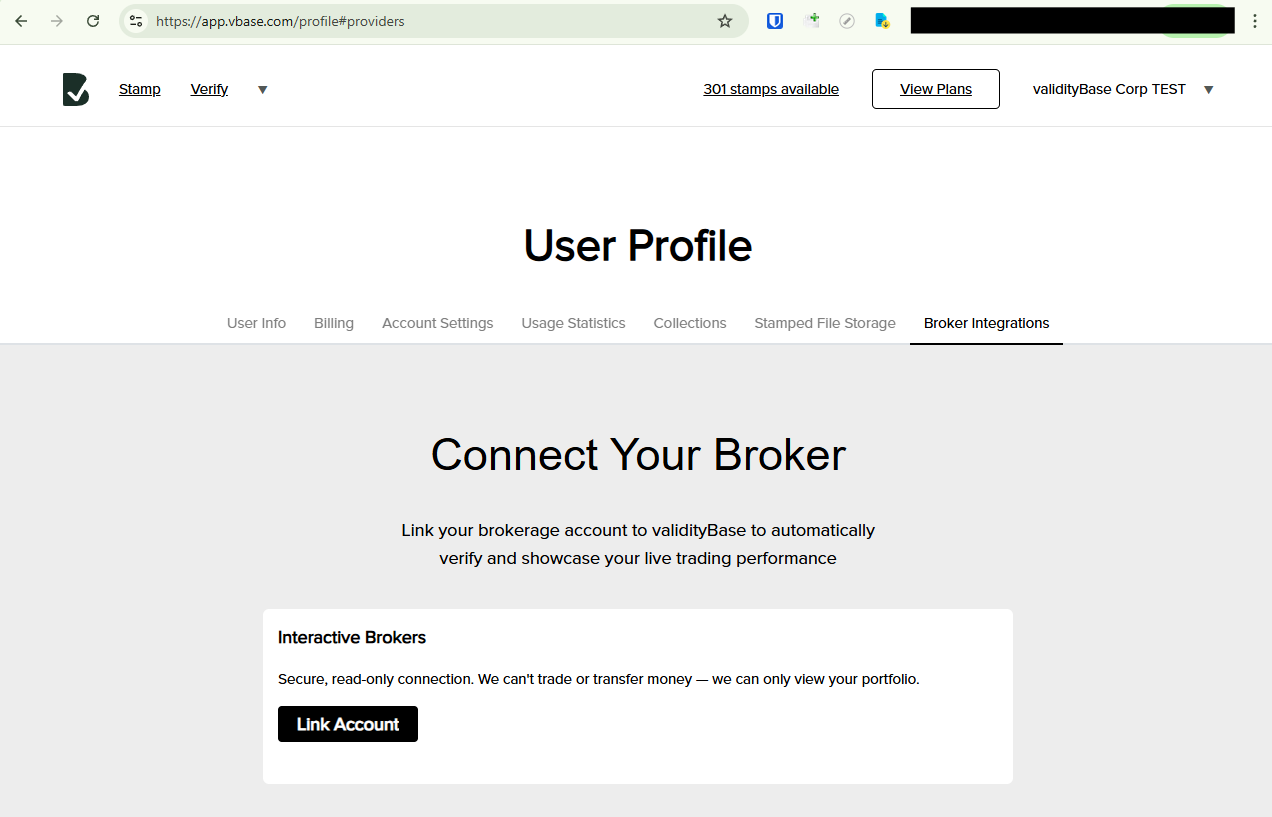
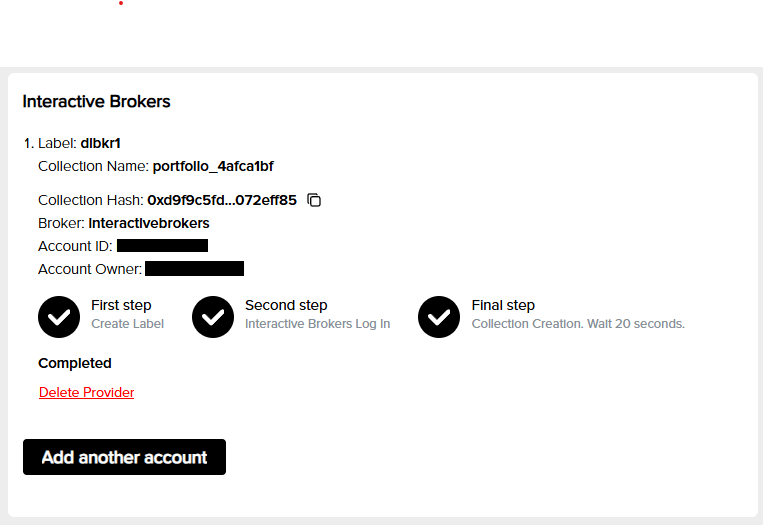
Connect your IBKR account to validityBase to securely **import positions and cash balances** to generate a **verifiable, point-in-time track record** directly from your account activity.

> **Note:** validityBase access is strictly **read-only**. We cannot place orders or move funds in your account.

## Step-by-step

### 1) Sign in to validityBase & navigate to Broker Integrations

* Visit [**app.vbase.com**](https://app.vbase.com/) and sign in (or create an account).
* Click your display name in the upper right corner and select [**User Profile**](https://app.vbase.com/profile).
* In your Profile, select [**Broker Integrations**](https://app.vbase.com/profile/#providers) from the top menu.

<img src="https://4101148087-files.gitbook.io/~/files/v0/b/gitbook-x-prod.appspot.com/o/spaces%2Fq4MLOHYMJWnZwBvFYFky%2Fuploads%2Fgit-blob-340fa9e5920d343b4930f576e89cb584335ad8ae%2Fbroker-integrations-screenshot.png?alt=media" alt="Profile menu showing “Broker Integrations" width="400">

### 2) Setup account link

* Click **Link Account**.
* Enter a label (to help you identify the account later).
* Click **Next**.

### 3) Link your IBKR account

* You’ll be redirected to the IBKR authentication portal.
* Choose whether to connect a **Paper** or **Live** account.
* Enter your IBKR **username** and **password** and complete 2FA as necessary
* Review and approve the requested **read-only** permissions (account, positions, trades, balances).
* You’ll then be redirected back to validityBase.

### 4) Confirm the connection

* Back in validityBase, you’ll see a **Connection successful** message and your account details.

  <img src="https://4101148087-files.gitbook.io/~/files/v0/b/gitbook-x-prod.appspot.com/o/spaces%2Fq4MLOHYMJWnZwBvFYFky%2Fuploads%2Fgit-blob-654536273d1167a77396949103100519cf443473%2FIBKR-success-screenshot.png?alt=media" alt="IBKR success screenshot" width="400">
* Occasionally the IBKR authorization can fail. If so, delete the provider and repeat steps 2–3.
* If you manage multiple IBKR sub-accounts under one login, email **<portfolios@vbase.com>** so we can configure the correct account(s).

### 5) Set up your dashboards

Email **<portfolios@vbase.com>** with the following:

* Your strategy name
* A short description of your strategy (100–200 characters)
* A short description of yourself as the dashboard creator (100–200 characters)
* An optional contact email

We will reply back with your live dashboard link.

See this [example dashboard](https://portfolios.vbase.com/?sym=ASGSP5DR) to understand how the information appears.

## Common issues & fixes

**No data after linking**

* Within 2 minutes you should see your first portfolio Stamp in [Stamped File Storage](https://app.vbase.com/profile/#user_data_storage). If nothing appears, retry the link.

**Multiple sub-accounts**

* For corporate IBKR accounts with multiple sub-accounts, link as usual, then email **<portfolios@vbase.com>** specifying which sub-account(s) you’d like connected.

## FAQs

**Is this trading access?**\
No. Access is **read-only**—we cannot trade or move funds.

**How often do you sync?**\
We sync automatically each day around **3:15 pm EST**.

**What gets stamped for verification?**\
Your portfolio weights are cryptographically stamped. Copies are stored in your [Stamped File Storage](https://app.vbase.com/profile/#user_data_storage). Note the vBase track record is built on portfolio weights, not trade history.

**Can I disconnect later?**\
Yes. Go to **Profile → Broker Integrations → IBKR → Disconnect**. You can also ask us to delete your dashboard link.

**Does this replace an audit?**\
validityBase provides an **independently verifiable, cryptographic validation** of your IBKR track record. Many managers use this to share performance transparently and reduce reliance on costly audits for marketing.

## Need help?

If you encounter issues, contact **<portfolios@vbase.com>** with:

* Your validityBase email
* IBKR account type (individual, advisor, master/sub)
* A brief description and the time you attempted the link
* Any relevant screenshots (no sensitive information)


# Linking with QuantConnect

Export trading signals from QuantConnect to vBase to build a verifiable strategy track record

Link your QuantConnect algorithm to validityBase (vBase) to create a verifiable, point‑in‑time audit trail of your strategy’s live portfolio targets. This guide mirrors our other How‑Tos and walks you through setup, usage, and troubleshooting for the QuantConnect **Signal Exports → vBase** integration.

***

## Who this is for

* QuantConnect users running live or paper algorithms who want to export portfolio targets to vBase.
* Anyone using QuantConnect who wants a **verifiable, point‑in‑time** record of signals for marketing, research reproducibility, or compliance.

> vBase creates a blockchain‑anchored audit trail of your signals and models. Data fingerprints (hashes) from your signals and models are made verifiably complete, point-in-time, and free from selective presentation. This allows you to build trust and showcase your work with confidence that it will be taken seriously.

***

## Prerequisites

1. **vBase account & API Key**
   * Sign in to vBase and copy your API key from [**Account Settings**](https://app.vbase.com/profile/#account_settings).
2. **A vBase Collection**
   * Think of a *Collection* as the dataset/strategy name where your stamped targets will live. Create one in [**Collections**](https://app.vbase.com/profile/#collections) if you haven't previously set one up.
   * You can also set up Collections via our [REST API](/python-blockchain-sdk-vbase-advanced/api)
3. **QuantConnect project** running in live or paper trading.
4. **LEAN SDK** support for Signal Exports (built‑in on QuantConnect Cloud).

***

## What gets exported and stamped?

When you send **portfolio targets** from your algorithm, the vBase Signal Export builds a simple CSV in the form `sym,wt` (symbol, target weight). Under the hood, the provider derives weights from your `PortfolioTarget` inputs. This stamped CSV is the immutable record of your target portfolio at that moment.

> **Why weights?** Weights unambiguously capture your intended sizing regardless of current cash/holdings and are convenient for downstream performance dashboards and live tickers.

***

## Add the vBase Signal Export provider

Add the provider during algorithm **initialization**.

### Python

```python
from AlgorithmImports import *

class MyAlgo(QCAlgorithm):
    def initialize(self):
        api_key = self.get_parameter("VBASE_API_KEY")  # or hardcode for quick tests
        collection_name = "MyStrategy"

        # store_stamped_file=True -> vBase stores the stamped CSV for you
        # idempotent=False -> repeated identical exports will create distinct stamps (set True to de‑dupe)
        self.signal_export.add_signal_export_provider(
            VBaseSignalExport(api_key, collection_name, store_stamped_file=True, idempotent=False)
        )

    def on_data(self, data):
        # example: equal‑weight two assets
        targets = [
            PortfolioTarget("SPY", 0.5),
            PortfolioTarget("QQQ", 0.5)
        ]
        self.signal_export.set_target_portfolio(targets)
```

### C\#

```csharp
using QuantConnect;
using QuantConnect.Algorithm;
using QuantConnect.Algorithm.Framework.Portfolio;
using QuantConnect.Algorithm.Framework.Portfolio.SignalExports;

public class MyAlgo : QCAlgorithm
{
    public override void Initialize()
    {
        var apiKey = GetParameter("VBASE_API_KEY");
        var collectionName = "MyStrategy";

        // storeStampedFile: true  | idempotent: false
        SignalExport.AddSignalExportProvider(
            new VBaseSignalExport(apiKey, collectionName, storeStampedFile: true, idempotent: false)
        );
    }

    public override void OnData(Slice data)
    {
        var targets = new List<PortfolioTarget>
        {
            new PortfolioTarget(Symbol.Create("SPY", SecurityType.Equity, Market.USA), 0.5m),
            new PortfolioTarget(Symbol.Create("QQQ", SecurityType.Equity, Market.USA), 0.5m)
        };
        SignalExport.SetTargetPortfolio(targets);
    }
}
```

***

## Provider arguments (quick reference)

| Argument                                  | Type   | Default | Description                                                                                                                                                 |
| ----------------------------------------- | ------ | ------- | ----------------------------------------------------------------------------------------------------------------------------------------------------------- |
| `api_key` / `apiKey`                      | string | —       | Your vBase API key (Account Settings).                                                                                                                      |
| `collection_name` / `collectionName`      | string | —       | The vBase Collection to receive these Stamps. Use one Collection per strategy, unless you need separate feeds.                                              |
| `store_stamped_file` / `storeStampedFile` | bool   | `True`  | If `True`, vBase stores the stamped CSV for you (recommended). If `False`, you **must** store the exact stamped file yourself or you’ll lose verifiability. |
| `idempotent`                              | bool   | `False` | If `True`, resending identical targets won’t create duplicate Stamps.                                                                                       |

> You can register **multiple** signal export providers per algorithm if you need to broadcast to several destinations.

***

## Supported asset classes

All asset classes supported by your algorithm are supported by the vBase signal export provider. The export records the **target weights** you submit for each symbol.

***

## Usage patterns

* **Periodic rebalances**: schedule target exports (e.g., daily at 15:55) using QC’s scheduling helpers.
* **Event‑driven**: export right after signals are computed.
* **On fills**: after executions, export the *new* desired target portfolio.

> Tip: keep exports **idempotent** if your on‑bar logic may emit identical targets repeatedly.

***

## Verifying your Stamps in vBase

1. Open the vBase app, go to **Stamped File Storage** in User Settings, and download a zip of your strategy history.
2. Anyone can now load that archive into <https://app.vbase.com/verify/?method=collection> to verify that the strategy history is completely, point-in-time, and free from selective presentation.
3. Use the Collection as a source for [live performance dashboards and a shareable live index](https://docs.vbase.com/use-case-how-tos/verified-track-record).

***

## Examples & demos

* Reference demonstration algorithms (Python and C#) that show adding the provider and sending targets.
* For CI/CD, pass your `VBASE_API_KEY` via project parameters or environment variables.

***

## Troubleshooting

**I don’t see Stamps arriving in vBase**

* Confirm the provider was added in `initialize()` and that `set_target_portfolio()` is being called.
* Check that the `collection_name` matches an existing Collection you own.
* Verify the API key and project parameter name.

**I set `store_stamped_file=False` and now I can’t verify**

* You must retain the **exact** stamped CSV emitted at export time. If it was lost or modified, the proof won’t match. Prefer `True` unless you have strict storage policies.

**Duplicate Stamps**

* Set `idempotent=True` to de‑duplicate identical exports. In some cases idempotency will be undesirable if you wish to stamp portfolio weights identical to those you've stamped previously.

**Symbols or weights look wrong**

* Ensure you’re constructing `PortfolioTarget` objects with *weights* (not quantities). If you need custom formatting, implement/override the provider’s CSV builder in your fork.

***

## Security & best practices

* Prefer **project parameters** or secret management to avoid hard‑coding API keys.
* Use **separate Collections** for different strategies.
* Stamp **before** you trade if you want your intent on record; or **after** fills if you only want executed target states—both patterns are fine, just be consistent.

***

## Next steps

* Build a **vBase dashboard** or **live ticker** from your stamped targets. E-mail <portfolios@vbase.com> with your Collection name to enable this.
* Share a read‑only link with teammates or allocators.
* Explore automated backtest → stamp → live handoff pipelines using our SDKs.

***

*Questions?* Reach us at <support@vbase.com>.


# Stamps and Collections

How Content IDs, Stamps, and Collections form vBase audit trails

vBase audit trails are built up from individual audit trail records (**Stamps**). Each Stamp is a public, timestamped record that identifies underlying data using cryptographic fingerprints called **Content IDs**.

Related Stamps can be organized into **Collections**, allowing a producer to build a single audit trail for a dataset, trading strategy, portfolio, model, research process, or other body of work.

This page explains the building blocks of a vBase audit trail. For a higher-level overview, see [How vBase Works](/overview/how-vbase-works).

## Content IDs

A **Content ID** is a cryptographic fingerprint, or hash, of a file or other digital object.

By default, vBase uses the NIST-standard **SHA3-256** hashing algorithm. A Content ID is a 256-bit hexadecimal value, for example:

`0xf99f54f22ae53ed63d4afe199a1de5fe8981d38c50da0302b8104f3d279531c2`

The same data always produces the same Content ID. Changing even a single byte of the underlying data produces a different Content ID.

This means a Content ID identifies the exact data it represents without revealing the underlying data itself.

Content IDs can be calculated using standard, widely available hashing libraries. Depending on the workflow, vBase can calculate the Content ID from the underlying data or receive a Content ID calculated locally by the producer. Because Content IDs can be calculated locally, the underlying data never needs to be sent to vBase.

A future consumer holding the same data can independently recalculate its Content ID and compare it with the Content ID recorded in the public audit trail.

For more detail on how Content IDs support verification, see [Verification and Trust Model](/concepts-and-architecture/verification-and-trust-model).

## Stamps

A **Stamp** is an individual public, timestamped audit trail record for a file or other digital object.

A Stamp contains:

* **Content ID** — the cryptographic fingerprint of the stamped data
* **Stamper blockchain address** — the blockchain address associated with the account creating the Stamp
* **Collection ID**, where applicable — identifies the Collection to which the Stamp belongs

Publishing the Stamp to a public blockchain creates a blockchain transaction with an independently verifiable publication timestamp.

A Stamp therefore provides evidence that the exact data represented by its Content ID existed **no later than the blockchain publication timestamp**.

The underlying data itself is not included in the Stamp.

### Stamps are permanent records

Once a Stamp is published, the existing blockchain record cannot be edited or replaced, and is stored redundantly across a distributed network.

For revisions in the data itself, a new Stamp is created with the Content ID of the revised data. The earlier Stamp remains part of the historical record.

For example:

```
January 10
Jan10_ModelOutput.csv → Content ID A → Stamp A

January 15
Jan10_ModelOutput_revised.csv → Content ID B → Stamp B
```

The two Stamps preserve separate point-in-time records for the two versions of the data and are linked via the Collection ID, which is explained below.

### Stamps identify the Stamper address

Each Stamp is associated with the blockchain address of the **Stamper** that created it.

In some workflows, vBase also associates blockchain addresses with vBase identity information, helping consumers understand which producer created the records they are reviewing.

The blockchain address and its activity are independently visible on the public blockchain. The linkage between blockchain addresses and vBase or real-world identities is provided separately by vBase.

For more detail, see [Verification and Trust Model](/concepts-and-architecture/verification-and-trust-model).

## Collections

A **Collection** is the set of Stamps created by a particular Stamper address that were each assigned the same **Collection ID** *at the time they were stamped.*

The Collection ID is recorded as part of each Stamp, so membership in a Collection is established when the Stamp is created and becomes part of the public audit trail.

A Collection typically represents an identifiable dataset, trading strategy, portfolio, model, research process, or other body of work whose history the producer wants to maintain as a single audit trail.

For example:

```
Product: US Inflation Forecasts

January Forecast  → Stamp A │ Stamper address: 0xAlice │ Collection ID: XYZ
February Forecast → Stamp B │ Stamper address: 0xAlice │ Collection ID: XYZ
March Forecast    → Stamp C │ Stamper address: 0xAlice │ Collection ID: XYZ
April Forecast    → Stamp D │ Stamper address: 0xAlice │ Collection ID: XYZ
```

Together these Stamps form the Collection of audit trail records for the dataset: US Inflation Forecasts

### Collection IDs

A **Collection ID** is the identifier recorded in each Stamp that establishes its Collection membership.

By default, vBase calculates the Collection ID as a SHA3-256 hash of the Collection name specified by the stamping account.

The Collection is defined by both the **Stamper address** and the **Collection ID**. Two different Stamper addresses using the same Collection ID do not form a single Collection.

Because the Collection ID is part of the public Stamp, an existing Stamp cannot later be reassigned to a different Collection.

### Collections build a historical record for a dataset or product

As a producer creates new data, updates, or revisions, each can be stamped using the same Collection ID.

Over time, the resulting set of Stamps forms a point-in-time audit trail for that dataset or product.

Examples include:

* Successive releases of a dataset
* A trading strategy or signal history
* Portfolio rebalances over time
* A model's historical forecasts or predictions
* Successive outputs from a research process

Each Stamp remains independently verifiable, while the Collection allows the records to be evaluated together as one history.

### Collections support completeness verification

Collections make it possible to verify more than individual records.

A consumer can compare a presented dataset or archive with the Stamps recorded in the Collection and determine whether:

* Each presented object matches a Stamp
* Each relevant Stamp in the Collection is represented in the presented data
* Any records are missing or extra relative to the recorded Collection history

For example, if a Collection contains 100 Stamps, a consumer presented with the corresponding historical dataset can verify whether there is a one-to-one correspondence between the dataset and the Collection record.

This allows Collection verification to establish both the point-in-time integrity and the completeness of the presented history **relative to the full set of Stamps recorded in that Collection**.

For best practices on deciding what should belong to a Collection and maintaining a useful point-in-time history, see [Building a Verifiable History](/concepts-and-architecture/building-a-verifiable-history).

### Collections are optional

A Stamp does not need to belong to a Collection.

Standalone Stamps remain independently verifiable and may be appropriate when there is no larger sequence or body of work to organize.

Collections are most useful when a producer expects to create multiple related Stamps over time and wants those records to form a single identifiable audit trail.

## How the pieces fit together

At a high level:

```
Underlying Data       Stamping Account       Collection Name
       │                     │                     │
       ▼                     ▼                     ▼
  Content ID         Blockchain Address      Collection ID
       │                     │               (if assigned)
       └─────────────────────┼─────────────────────┘
                             ▼
                           Stamp
           (public, timestamped audit trail record)
```

The **Content ID** identifies the underlying data.

The **Stamper address** identifies the blockchain address that created the Stamp.

The **Collection ID**, when assigned, identifies the audit trail to which the Stamp belongs.

The **Stamp** is the public, timestamped audit trail record containing these identifiers.

A **Collection** is the set of Stamps created by the same Stamper address that share the same Collection ID.

Together, these building blocks allow producers to create point-in-time audit trails as data is produced and allow future consumers to independently verify historical data against those records.

## Learn more

* [How vBase works](/overview/how-vbase-works) — an overview of building and verifying vBase audit trails
* [Building a Verifiable History](/concepts-and-architecture/building-a-verifiable-history) — best practices for creating a useful audit trail over time
* [Verification and Trust Model](/concepts-and-architecture/verification-and-trust-model) — what Stamps and Collection verification establish and why
* [Privacy and Data Handling](/concepts-and-architecture/privacy-and-data-handling) — what information is public and when underlying data is shared with vBase


# Verification and Trust Model

What vBase verification establishes, where its evidence comes from, and which claims are independently verifiable

vBase creates **independently verifiable public evidence** for establishing the provenance of data and digital objects. The core audit trail does not require a verifier to rely on either vBase or the data producer as the source of truth.

vBase may also provide additional metadata and services—such as identity verification, hosted storage, and validation reports—that supplement the public evidence and make it easier to use in verification workflows.

This page explains where the different parts of a vBase verification come from and what each establishes.

For a broader overview of Stamps, Content IDs, Collections, and verification, see [How vBase Works](/overview/how-vbase-works).

## How data is matched to Stamps

Each vBase Stamp contains a cryptographic hash of the stamped data, which vBase calls a **Content ID**. The Content ID acts as a digital fingerprint: even a small change to the underlying content produces a different hash.

Example Content ID: `0xf99f54f22ae53ed63d4afe199a1de5fe8981d38c50da0302b8104f3d279531c2`

By default, vBase uses **SHA3-256**, a publicly documented cryptographic hashing algorithm [standardized by the U.S. National Institute of Standards and Technology (NIST)](https://csrc.nist.gov/pubs/fips/202/final). SHA3-256 produces a 256-bit hash and is designed as a one-way cryptographic function resistant to collisions and second preimages. As a result, a Content ID does not encode the underlying content, and finding different content that matches an existing Content ID is computationally infeasible.

To verify data, a verifier calculates its Content ID and compares it with the Content ID in the Stamp. A match provides strong cryptographic evidence that the data being evaluated is the same data represented by the publicly timestamped audit trail record.

Because SHA3-256 is a public standard, this calculation does not require vBase software. The Web App can hash files directly in the user's browser, and developer integrations can calculate Content IDs locally and submit only the hash, enabling workflows in which the underlying data is never sent to vBase.

For more detail, see [Privacy and Data Handling](/concepts-and-architecture/privacy-and-data-handling).

## Collection and dataset completeness

A **Collection** groups the Stamps associated with a particular dataset, strategy, model, portfolio, or other product. It does this by publishing a **Collection ID** as part of each Stamp. Stamps associated with the same Collection ID therefore form a single identifiable audit trail, typically representing a discrete dataset or product.

By default, vBase uses the SHA3-256 hash of the Collection Name as the Collection ID.

When a verifier is presented with a dataset or data product, they can compare the data with the Collection's audit trail. If each presented object corresponds to a Stamp and the relevant Stamps in the Collection are all accounted for, the verifier can establish that the presented dataset is complete relative to that Collection.

The blockchain timestamps additionally provide independently verifiable evidence of **when each object in the dataset existed**, allowing the verifier to validate the dataset's point-in-time history.

## Identity and attribution

Collection verification can establish the completeness and point-in-time integrity of a particular dataset or product. A separate challenge for consumers evaluating predictive data is determining whether the history being presented is the producer's only history or one selected from among several. For example, is the trading track record being evaluated the only one the provider maintained, or simply the best-performing one?

vBase addresses this critical question through three layers of identity attribution.

### Layer 1 - Blockchain address: Complete public activity

Each vBase Stamp is **digitally signed** by the Stamper's blockchain address. Because a blockchain is a public ledger, a verifier can independently inspect the complete set of vBase Stamps and Collections made by that address.

### Layer 2 - vBase identity: Links one or more blockchain addresses

A vBase identity can use one or more blockchain addresses. vBase links all addresses used by that identity so their activity can be evaluated together rather than appearing as unrelated histories.

### Layer 3 - Identity verification: Links vBase identity to a real-world identity

vBase can verify the real-world person or organization associated with a vBase identity. For a verified producer, a consumer can see the vBase audit trails associated with that identity across all of its linked blockchain addresses.

This helps address **selective presentation or cherry-picking**. A consumer evaluating one Collection can see the other Collections associated with the same verified identity and judge the presented history in the context of the producer's broader vBase record.

### Evidentiary basis and limits

Activity associated with a blockchain address is independently verifiable from the public blockchain records. The linkage of one or more blockchain addresses to a vBase identity, and the verification of that identity as a particular person or organization, are currently provided by vBase and are not independently verifiable from the blockchain alone.

vBase will only verify one vBase identity for a given person or organization. Thus, all identity-verified vBase activity for a producer is associated with a single verified identity. This does not establish that no audit trails by this producer exist outside vBase or at blockchain addresses not linked to a verified vBase identity.

Where independent corroboration of the real-world identity matters, the association between a stamping address and a person or organization can also be supported through external evidence, such as the producer publishing the address on its own website or in a press release.

## Independent verification

vBase provides tools that automate Content ID calculation, Stamp lookup, Collection validation, and display of available identity and Collection metadata:

* [vBase Verify via Web App](/web-app/how-to-use-vbase-verify)
* [Python API Client](/get-started/api-py-quickstart)
* [REST API](/rest-api/rest-api-user-guide)

These tools are conveniences, not the source of the underlying public evidence. Technically capable users can inspect the blockchain records independently or build their own software against the public blockchain interfaces.

For instructions on validating blockchain records directly, see [Independent Blockchain Verification](https://github.com/validityBase/docs/tree/main/docs/concepts/independent-verification.md).

## Trust model at a glance

The most important verification claims and their sources of evidence can be summarized as follows:

| Verification claim                                                             | What establishes it                                                                                                               | Independently verifiable?                            |
| ------------------------------------------------------------------------------ | --------------------------------------------------------------------------------------------------------------------------------- | ---------------------------------------------------- |
| **The presented data is the same data that was stamped**                       | Recalculating the content's SHA3-256 Content ID and matching it to the Content ID in the Stamp                                    | **Yes**                                              |
| **The data existed by a particular time**                                      | The Stamp's publicly recorded blockchain timestamp                                                                                | **Yes**                                              |
| **A dataset is complete relative to its point-in-time audit trail**            | Matching the presented objects to the Stamps associated with the Collection ID and accounting for the relevant Collection records | **Yes**                                              |
| **The complete vBase activity of a blockchain address**                        | The complete public blockchain history associated with that address                                                               | **Yes**                                              |
| **One or more blockchain addresses belong to a single vBase identity**         | vBase account and identity records linking those addresses                                                                        | **No** — this linkage is currently provided by vBase |
| **A vBase identity represents a particular real-world person or organization** | vBase's identity-verification process                                                                                             | **No** — currently provided by vBase                 |

## Learn more

* [How vBase Works](/overview/how-vbase-works)
* [Building a Verifiable History](/concepts-and-architecture/building-a-verifiable-history)
* [Why Public Blockchains?](/concepts-and-architecture/why-blockchains)
* [Privacy and Data Handling](/concepts-and-architecture/privacy-and-data-handling)
* [Technical Architecture](/concepts-and-architecture/technical-architecture)


# Building a Verifiable History

Best practices for stamping production data so the resulting audit trail is complete, point-in-time, and useful to verifiers

This page describes **best practices for setting up a stamping process** so that the resulting audit trail is as useful as possible to future consumers and verifiers.

The core principle is that the audit trail should faithfully reflect the data product's production history. The goal is to answer a user's question: **Had I been receiving this data live all along, what would I have seen at each point in time?**

That means stamping production releases and revisions as they occur and preserving the exact stamped content.

For an overview of Stamps, Content IDs, Collections, and verification, see [How vBase Works](/overview/how-vbase-works).

## Stamp the production record

Stamp the content that you would have delivered to a live customer, user, or client at that point in time.

For example:

* A data provider might stamp each day's client data delivery
* A trading strategy might stamp each new trade or portfolio rebalance
* A forecasting model might stamp each published forecast
* A research process might stamp each recommendation or report
* A model developer might stamp successive model outputs, model versions, or parameter updates

### Choose the right unit to stamp

A production release may consist of one file or many. Choose a stamping unit that corresponds to what a customer would recognize as the release.

For example:

* If each file is independently meaningful and delivered separately, stamp the individual files.
* If customers receive a single archive, the archive itself may be the natural object to stamp.

Also consider stamping important inputs that could later become useful products or diligence artifacts themselves. For example, a national inflation forecast may be built from state-level estimates that customers later want to evaluate or purchase separately. This does not mean stamping every intermediate artifact. Focus on inputs with a reasonable chance of being independently valuable.

## Use Collections for each dataset or product

A **Collection** groups the Stamps for a particular dataset, strategy, model, portfolio, or other product into a single audit trail, allowing its recorded history to be evaluated as a whole.

Assign each production release or revision for that product to the same Collection.

If you have—or expect to have—multiple distinct products, use separate Collections for each one. For example, a data provider offering three different datasets would generally maintain three separate Collections rather than combining them into one.

Avoid mixing unrelated datasets, strategies, models, or experimental activity in the same Collection.

Broader questions about other products or histories maintained by the same producer are addressed through the vBase identity and verification model. See [Verification and Trust Model](/concepts-and-architecture/verification-and-trust-model).

## Preserve the exact stamped content

Future verification requires access to the exact content represented by each Stamp. Make sure the exact content you stamp remains available for later verification, either in your own storage or using optional vBase storage.

Avoid relying on recreating data later. Even if a reconstructed file contains the same logical data, differences in formatting, row ordering, or metadata can produce a different hash (Content ID).

Stamps remain part of a Collection's audit trail even if the underlying content is lost, and the remaining objects can still be verified individually. However, if a stamped object is missing, a verifier will be unable to validate the Collection's full audit trail because one or more audit trail records will be unaccounted for. How significant this is depends on the use case and the role of the missing data in the history.

vBase can optionally store copies of stamped objects through the Web App and API, which can be useful as a backup or when you prefer to maintain the audit trail and corresponding content together.

For details on when vBase receives or stores content, see [Privacy and Data Handling](/concepts-and-architecture/privacy-and-data-handling).

## Stamp promptly

Create a Stamp as close as practical to the point when the relevant output is finalized or made available.

A Stamp establishes that the exact content represented by its Content ID existed **no later than its blockchain timestamp**. It does not establish the exact moment the content was originally created.

For predictive data, forecasts, trading signals, and similar products, earlier timestamps are often more valuable because they establish that the prediction or signal existed before more of the outcome was known. A forecast stamped two months before an event generally provides more useful evidence of predictive value than the same forecast first stamped the day before the event.

### If you miss a Stamp

Occasional gaps are to be expected in any production data pipeline. If no data release was produced, there is nothing to stamp; simply resume stamping when production resumes.

If a release was produced but not stamped, stamp it when the omission is discovered and continue the normal process. The resulting timestamp will establish that the content existed by the later stamping time.

A missed Stamp does not invalidate the rest of the audit trail. An audit trail with verified provenance for 99% of production releases is still far more informative than one with no independently verifiable history.

## Record revisions and corrections

Historical data, estimates, and model outputs are often revised or corrected after publication.

Stamp revisions and corrections when they occur. Each revised version receives a different Content ID and a new Stamp, while the earlier Stamps remain permanently visible in the audit trail. This preserves the point-in-time revision history.

For example:

```
Jan 5    Original release stamped
Jan 12   New release stamped
Jan 15   Correction to Jan 5 release stamped
```

This distinction matters because a future consumer may want to answer two different questions:

* What does the dataset say today?
* What would I actually have known on January 10?

A well-maintained audit trail can answer both.

Revisions and corrections should generally remain in the same Collection as the original history so their relationship to that history is preserved.

In many datasets, it is clear from the data itself which earlier values or records a revision replaces. Where that relationship is not obvious, make it explicit in the data or if necessary in the accompanying metadata.

## Backfilled data

A backfill is historical data from before the live audit trail period.

Backfilled data may be stamped when useful—for example, to establish a verifiable baseline for the dataset as it exists when the vBase audit trail begins. It is not necessary to stamp a backfill if the objective is simply to build a verifiable history going forward.

A Stamp on backfilled data establishes only that the content existed **by the time it was stamped**. It cannot establish that the same content existed during the earlier period the data describes.

For example:

```
Data describes:        June 2024
First vBase Stamp:     August 2026

Established by Stamp:  Content existed by August 2026
Not established:       Content existed in June 2024
```

From the point live stamping begins, subsequent data releases can build a verifiable point-in-time audit trail.

## Full snapshots vs. incremental updates

A recurring dataset can be stamped as either **full snapshots** or **incremental updates**.

* **Full snapshots** contain the complete dataset state at each release.
* **Incremental updates** contain only new or changed information.

Either approach can work. The important requirement is that the stamped sequence contains enough information to reconstruct the dataset as it would have appeared at any point in the recorded history.

Use a consistent approach and make the meaning of each stamped object clear.

## Automate recurring workflows

For recurring production data, automation is usually the best way to stamp promptly and consistently.

The vBase Python API Client, REST API, and other integrations can make stamping part of the same production workflow that generates or publishes the data. This reduces timestamp delays and the risk of missed releases caused by manual processes.

[Choose an integration for automated workflows](/get-started/choose-how-to-use-vbase).

## Keep testing separate from production

Test Stamps can be useful while setting up a workflow. Consider using a separate testing account or a clearly designated test Collection before beginning the live audit trail.

## A recommended workflow

For many recurring workflows, the basic pattern is:

1. **Generate the production output as usual**
2. **Stamp it at or as close as practical to delivery, assigning it to the appropriate Collection**
3. **Preserve the exact stamped content**
4. **Stamp revisions and corrections as they occur**
5. **Continue the process consistently**

The result is a dataset or product with an independently verifiable record of its timing, integrity, revision history, and completeness.

## Learn more

* [Learn How vBase Works](/overview/how-vbase-works)
* [Use the vBase Stamper](/web-app/how-to-use-vbase-stamper)
* [Verification and Trust Model](/concepts-and-architecture/verification-and-trust-model)
* [Privacy and Data Handling](/concepts-and-architecture/privacy-and-data-handling)


# Privacy and Data Handling

What information vBase makes public, how local-only workflows keep data private, and when optional services access underlying data

**Creating a vBase audit trail does not make the underlying data public.** vBase publishes cryptographic fingerprints (known as Content IDs or hashes) of the data to a public blockchain, not the underlying data itself.

Depending on the workflow, vBase supports two data-handling models:

1. **Local-only** — the Content ID is calculated locally and only the resulting cryptographic fingerprint is sent to vBase. The underlying data remains within the producer's environment and is never shared with vBase.
2. **Privately shared with vBase** — the producer chooses to send vBase data for optional services such as backup storage, performance dashboards, or managed data delivery.

In both models, the underlying data remains private and is never published to the public blockchain.

This page explains what information is public, how local-only workflows operate, and when optional vBase services require access to underlying data.

For the broader system architecture, see [Technical Architecture](/concepts-and-architecture/technical-architecture).

## What is public?

The public audit trail records vBase creates contain only cryptographic identifiers:

* **Content ID** — the cryptographic fingerprint of the stamped content
* **Stamper blockchain address**
* **Collection ID**, where applicable

The publication of the audit trail record to a blockchain also creates a transaction record with a publicly verifiable timestamp.

**The underlying data is never published to the blockchain.**

A Content ID is a SHA3-256 cryptographic hash of the content, not the content itself. For more detail on how Content IDs work, see [Verification and Trust Model](/concepts-and-architecture/verification-and-trust-model).

## Local-only workflows

Underlying data does not need to be shared with vBase in order to create an audit trail. Content IDs are calculated locally using widely available hashing libraries. Only the Content ID enters the vBase audit trail flow; the underlying data remains within the producer's environment.

Because SHA3-256 is a public standard with widely available implementations, any future data consumer with the same underlying data can independently calculate the same Content ID and compare it with the public audit trail. This does not require proprietary vBase software, methodology, or infrastructure.

For example, the vBase Web App calculates a file's Content ID directly in the user's browser, while API users can calculate it within their own environment.

## Sharing data with vBase

vBase offers optional services that require access to the underlying data:

* **Backup storage** — vBase can retain copies of stamped data for future validation. See [Building a Verifiable History](/concepts-and-architecture/building-a-verifiable-history) for guidance.
* **Performance dashboards for trading signals and portfolios** — vBase can receive portfolio or strategy outputs to build and maintain performance dashboards.
* **Managed data delivery** — for some data providers, vBase helps deliver underlying data to end users as part of a managed delivery workflow.

These are optional convenience and managed-service features layered on top of the core audit trail system. **If you do not need vBase to provide one of these services, the underlying data does not need to be shared with vBase.**

Content that is privately shared with or stored by vBase remains separate from the public audit trail and is not published to the blockchain.

**Your data remains yours.** When you share data with vBase, its use is governed by our [Terms of Service](https://www.vbase.com/terms-of-service/) and [Privacy Policy](https://www.vbase.com/privacy-policy/). vBase does not acquire ownership of user data or its derivatives, and may use it only as necessary to provide and support the services you have chosen. vBase does not sell user data or use it for unrelated purposes.

## Data handling by workflow

Common workflows can be summarized as follows:

| Workflow                                  | Underlying content shared with vBase? | Underlying content made public by vBase? |
| ----------------------------------------- | ------------------------------------- | ---------------------------------------- |
| **Stamp a precomputed Content ID**        | **No**                                | **No**                                   |
| **Web App: stamp file, storage disabled** | **No**                                | **No**                                   |
| **Web App: stamp file, storage enabled**  | **Yes**                               | **No**                                   |
| **Web App: stamp text**                   | **Yes**                               | **No**                                   |
| **API: submit a precomputed Content ID**  | **No**                                | **No**                                   |
| **API: submit file or data**              | **Yes**                               | **No**                                   |
| **Web App: verify file**                  | **No**                                | **No**                                   |
| **Verify by Content ID**                  | **No**                                | **No**                                   |
| **Performance dashboard service**         | **Yes**                               | **No**                                   |
| **Managed data delivery**                 | **Yes**                               | **No**                                   |

## Learn more

* [Technical Architecture](/concepts-and-architecture/technical-architecture)
* [Verification and Trust Model](/concepts-and-architecture/verification-and-trust-model)
* [Building a Verifiable History](/concepts-and-architecture/building-a-verifiable-history)
* [How to Use the vBase Stamper](/web-app/how-to-use-vbase-stamper)
* [How to Use vBase Verify](/web-app/how-to-use-vbase-verify)


# Why Public Blockchains?

Why vBase publishes audit trail records to a public blockchain instead of relying on a trusted third party

vBase's goal is to create data audit trails that remain credible and accessible, allowing data consumers to independently verify the provenance of historical data.

A public blockchain is a database whose history is maintained by a distributed network rather than by any single person or institution. Records are ordered and timestamped through the network's consensus process, creating a shared public ledger.

The primary advantage of using a public blockchain is that it allows records to be **publicly timestamped and independently verified without requiring the verifier to rely on either vBase or the data producer**.

vBase uses [Polygon](https://polygon.technology/) as its default public blockchain and handles the blockchain mechanics for users, so most never need to interact with blockchains directly.

For an overview of how Stamps, Content IDs, and Collections work, see [How vBase Works](/overview/how-vbase-works).

## Publicly timestamped, independently verifiable records

For many datasets, strategies, forecasts, and models, the critical question is not simply what the data says, but **what it said at a particular point in time**.

A timestamp recorded only in a producer's own system requires a future consumer to trust that producer's historical records. A timestamp maintained only by vBase would simply shift that trust to vBase.

A public blockchain provides an external, publicly accessible record that neither party can change. When a vBase Stamp is published to a blockchain, the record establishes that its Content ID existed **no later than the blockchain timestamp**.

One way to think about a blockchain is as a public-notice service that allows automated publication and verification. Information can be published at a particular point in time, and anyone can later independently confirm what was published and when.

This is particularly valuable for predictive products. A forecast, signal, or model output is more meaningful when a consumer can independently confirm that it existed before the outcome it predicts.

## No walled garden

**You do not need vBase to verify a vBase Stamp.**

vBase makes creating, finding, and validating Stamps convenient, but the underlying audit trail records are public rather than locked inside a vBase database or proprietary verification service. Anyone can inspect the blockchain records independently without a vBase account or permission from vBase.

Because both the records and the underlying blockchain interfaces are public, the audit trail does not depend on vBase continuing to operate. If vBase ceased to exist, existing Stamps could still be independently validated, while technically capable users and third parties could create, retrieve, and validate compatible records—or build their own tools to do so—without relying on vBase software or coordination.

vBase is the application layer that makes the system easy to use, not the custodian or gatekeeper of the underlying evidence.

For more detail, see [Verification and Trust Model](/concepts-and-architecture/verification-and-trust-model).

## Persistent provenance

A vBase Stamp does not become stale as time passes. This is useful for data that may need to be verified years later.

With trusted third-party or certificate-based approaches, older records can become difficult to verify over time. With blockchains, as long as the underlying content (stamped data) and the relevant blockchain records remain available, the content's hash (Content ID) can be calculated and matched against its audit trail records.

Public blockchain records are highly durable because their history is replicated across many independent participants and archival services, and any surviving copy can be independently checked for integrity.

## Portable provenance

Because the audit trail is recorded separately on a public blockchain, it does not need to travel with the underlying data.

A file or dataset does not need to carry a special certificate, embedded provenance metadata, or sidecar file in order to remain verifiable. It can move through ordinary storage and delivery systems while the audit trail remains separately available.

For example, a file might pass from:

```
Producer → Customer → Downstream User → Archive
```

As long as the data itself doesn't change as it moves, any later holder can calculate its Content ID and locate the corresponding public audit trail records.
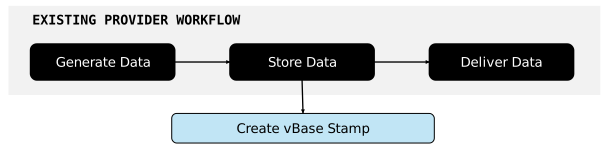
## Why not use a trusted third party?

A trusted third party can provide credible timestamping and integrity verification, but doing so creates an ongoing dependency on that intermediary to preserve the records, operate the verification infrastructure, provide access to the evidence, and remain trusted by market participants.

vBase uses a public blockchain to provide the convenience of a trusted third party without becoming the source of truth. The producer and verifier can instead refer to the same publicly available evidence.

## vBase hides the blockchain complexity

The properties of public blockchains are useful for audit trails, but interacting with blockchains directly can require wallets, transaction fees, smart contracts, and specialized infrastructure.

vBase abstracts that complexity behind familiar Web and API interfaces. In hosted workflows, users do not need to acquire cryptocurrency, submit blockchain transactions manually, or operate blockchain infrastructure.

The blockchain is therefore part of the **trust infrastructure**, not something most users need to interact with directly.

The underlying content itself does not need to be published to the blockchain. For details on what vBase receives, stores, and publishes in different workflows, see [Privacy and Data Handling](/concepts-and-architecture/privacy-and-data-handling).

## Learn more

* [How vBase Works](/overview/how-vbase-works)
* [Verification and Trust Model](/concepts-and-architecture/verification-and-trust-model)
* [Privacy and Data Handling](/concepts-and-architecture/privacy-and-data-handling)
* [Technical Architecture](/concepts-and-architecture/technical-architecture)


# Technical Architecture

How the vBase audit trail layer fits alongside existing data production, storage, and delivery systems

vBase builds an external audit trail layer that sits alongside a data producer's existing production, storage, and delivery processes. Audit trail records are published to an external public ledger, while producers continue generating, storing, and distributing their underlying data through their existing tools and workflows.

For a less technical introduction, see [How vBase Works](/overview/how-vbase-works).

## Architecture at a glance

The diagram shows five steps in two parallel flows: the producer's existing data flow and the vBase audit trail flow:

<figure><img src="https://4101148087-files.gitbook.io/~/files/v0/b/gitbook-x-prod.appspot.com/o/spaces%2Fq4MLOHYMJWnZwBvFYFky%2Fuploads%2Fgit-blob-597e019e22d19958d17e3983dae1adfd14848913%2Fvbase_tech_architecture.svg?alt=media" alt="The vBase Technical Architecture"><figcaption></figcaption></figure>

The architecture separates the producer's normal **data flow** from the **audit trail flow**. A Content ID connects the two.

The Content ID is a cryptographic fingerprint calculated deterministically from the underlying data and published as part of each audit trail record. A consumer holding the exact same data can later independently recalculate its Content ID using standard, widely available hashing libraries and match it to the corresponding public audit trail record.

## End-to-end data flow

A typical workflow looks like this:

1. **Generate data** — The producer generates and stores data using its existing systems. Storage can be local, cloud-based, or external to the Producer's primary environment.
2. **Send the Content ID to vBase** — The Producer cryptographically hashes the data to calculate a **Content ID** and sends that Content ID to vBase. The underlying data does not need to leave the producer's systems.
3. **Publish the Stamp** — vBase creates a **Stamp** (audit trail record) by publishing the Content ID to a blockchain, linking it to the Stamper's blockchain address and, where applicable, a Collection ID. The Stamp establishes that the Content ID existed **no later than the blockchain publication timestamp**.
4. **Share the data** — The producer distributes the underlying data to consumers through its normal delivery channels. vBase does not need to sit between the producer and consumer or change the producer's existing delivery infrastructure.
5. **Verify data provenance** — A consumer can calculate the Content ID of the data received and compare it with the public audit trail record. Verification can be performed using vBase tools or by independently inspecting the blockchain records, and can happen at any time after Stamp creation.

### Key implications of this architecture

Separating the data flow from the audit trail flow has several important consequences:

* **No change required to normal data production, storage, or delivery** — Producers can continue using their existing files, databases, APIs, S3 buckets, SFTP, or other systems. vBase creates audit trail records alongside the existing workflow, without requiring changes to how the underlying data is produced, stored, or delivered.
* **Underlying data need not be sent to vBase** — The Content ID can be calculated within the producer's environment, so only the cryptographic fingerprint needs to enter the audit trail flow.
* **Provenance remains verifiable as data moves** — No special certificate, receipt, or embedded metadata needs to accompany the data. Data can move between consumers, systems, or archives and still be independently verified against its audit trail.
* **Verification does not depend on vBase** — vBase provides convenient verification tools and outputs, but consumers can also validate by independently inspecting the underlying public blockchain records.

## System components

The architecture can be thought of as three primary layers:

* **Producer and consumer systems** — The files, databases, cloud storage, APIs, models, applications, and delivery infrastructure through which the underlying data is created, stored, and shared.
* **vBase APIs and services** — The Web App, APIs, user accounts, Collection and identity metadata, blockchain transaction submission, record indexing and verification, and optional storage, dashboard, and managed delivery services.
* **Public blockchain** — The external public ledger containing the stamped records. vBase currently uses [Polygon](https://polygon.technology/) as its default public blockchain, while the architecture is designed so that other compatible ledgers can also be used.

vBase's application layer makes the audit trail easy to create and use, while the public blockchain contains the independently verifiable record.

## Record storage

The Producer stores the underlying data, while the public blockchain contains the independently verifiable audit trail records. vBase's application layer optionally provides identity verification, use-case specific metadata, and other services around those records.

| Information                                  | Location          |
| -------------------------------------------- | ----------------- |
| **Underlying data**                          | Producer\*        |
| **Audit trail record (Stamp)**               | Public blockchain |
| **Application-specific metadata** (optional) | vBase application |

\**Users may choose to share underlying data with vBase when using optional services such as backup storage, performance dashboards, or managed data delivery.*

For technical information about how vBase audit trail records verify data provenance, see [Verification and Trust Model](/concepts-and-architecture/verification-and-trust-model). For details on how data is shared and processed in specific workflows, see [Privacy and Data Handling](/concepts-and-architecture/privacy-and-data-handling).

## Learn more

* [How vBase Works](/overview/how-vbase-works)
* [Why Public Blockchains?](/concepts-and-architecture/why-blockchains)
* [Independent Blockchain Verification](https://github.com/validityBase/docs/tree/main/docs/concepts/independent-verification.md)
* [Python API Client](/get-started/api-py-quickstart)
* [REST API](/rest-api/rest-api-user-guide)
* [Interactive API Reference](https://app.vbase.com/swagger/)


# Guide

## About the REST API

The REST API provides a programmatic interface to interact with our services, allowing you to stamp files, inline data, or existing CIDs. This API is designed to be flexible and secure, supporting various data formats and authentication methods.

## Getting Started with the REST API

To begin using the REST API, you need to have a valid API token for authentication. The API is accessible via standard HTTP methods and returns JSON responses.

### How to Obtain an API Key

1. **Log in** to your vBase account at <https://app.vbase.com>
2. In your User Profile, navigate to ["Account Settings"](https://app.vbase.com/profile#account_settings)
3. Copy the API key from this screen and store it securely

### Base URL

```
https://app.vbase.com/api/v1/
```

## About the OpenAPI Description for the REST API

Our REST API is documented using OpenAPI, providing a comprehensive description of available endpoints, parameters, and response formats. You can explore the API using the Swagger UI, which offers an interactive interface for testing API calls.

Access the Swagger UI at:

```
https://app.vbase.com/swagger/
```

For programmatic clients (agents, SDKs), fetch the OpenAPI/Swagger JSON at:

```
https://app.vbase.com/swagger.json
```

The Swagger UI route also supports:

```
https://app.vbase.com/swagger/?format=openapi
```

## Authenticating to the REST API

Authentication is required for all API requests. Use the Bearer token method by including an `Authorization` header in your requests. The format should be:

```
Authorization: Bearer <your-api-token>
```

## curl Command Conventions

These examples use Bash quoting. When quoting a static value, put single quotes around the complete argument, such as `--form-string 'data_cid=0x...'`. Simple tokens such as `POST` and URLs without shell-special characters can remain unquoted. Use double quotes when an argument needs shell variable expansion, such as `-H "Authorization: Bearer $API_TOKEN"`. Do not add quotes around the value after `=`: those quotes would become part of the value sent to the API.

For multipart requests, use `--form-string 'name=value'` for text fields (including CIDs, data, names, booleans, and numbers) and `-F 'file=@path'` for file uploads. In `--form-string 'data={"status":"approved"}'`, the double quotes belong to the JSON value. Bash `$'...'` quoting is used only when escape sequences, such as newlines in a CSV body, are needed. See the [curl form options](https://curl.se/docs/manpage.html#--form-string) and [Bash quoting rules](https://www.gnu.org/software/bash/manual/html_node/Quoting.html).

## Request Validation Rules

For endpoints that use strict request schemas, unknown or unrecognized request keys are rejected with `400 Bad Request`. Only documented request fields are accepted.

## Keeping your API credentials secure

* Never share your API token publicly
* Store your API token securely
* Use environment variables to store your API token
* Never commit API tokens to version control

## API Endpoints

### Verify User Collection

**POST** `/v1/collections/verify`

This endpoint verifies a stamped collection against blockchain records for the authenticated user.

#### Request Formats

Choose the request body format with `Content-Type`:

* `application/json`: send the verify request JSON body
* `text/csv`: send the raw CSV string in the body

For JSON requests, top-level `collection_name` and `user_address` are optional. If they are omitted or set to `null`, the backend will try to infer collection metadata from the submitted records.

The `context` object is also optional and may be omitted or set to `null`. Each entry in `objects` may omit `file_name` or set it to `null`.

For CSV requests, the leading metadata section `collection_name,user_address,collection_timezone` is optional.

Legacy `multipart/form-data` uploads are also supported with a `.csv` or `.json` file in the `file` field.

Use `Accept: application/json` for the response.

#### Example Requests

**JSON body:**

```bash
curl -X POST https://app.vbase.com/api/v1/collections/verify \
-H 'Authorization: Bearer YOUR_API_TOKEN' \
-H 'Content-Type: application/json' \
-H 'Accept: application/json' \
-d '{
  "collection_name": "my-collection",
  "user_address": "0x123",
  "objects": [
    {
      "timestamp": "2024-01-01T00:00:00+00:00",
      "cid": "cid1",
      "file_name": "example.csv"
    }
  ]
}'
```

**CSV body:**

```bash
curl -X POST https://app.vbase.com/api/v1/collections/verify \
-H 'Authorization: Bearer YOUR_API_TOKEN' \
-H 'Content-Type: text/csv' \
-H 'Accept: application/json' \
--data-binary $'collection_name,user_address,collection_timezone\nvb-test,0x4A281DdC750359d5C0D2D51A890cefA43485EF2d,\nt,c,f\n2025-07-23 11:42:15+00:00,0x6f3328cba0ffde8429e66008708419751921bf41737e32a0fcd173849e325561,application-logs2025-07-15T19_46_13.098Z-2025-07-16T19_46_13.098Z_2025-07-23_11-42-15+0000.json\n2025-07-23 20:34:58+00:00,0xaeda4cf7d65f9d67b128bf795b5f237183550a814c9d4aa83c7e84f027d4aeec,attribcache140_2025-07-23_20-34-58+0000.bin\n'
```

**Legacy multipart upload:**

```bash
curl -X POST https://app.vbase.com/api/v1/collections/verify \
-H 'Authorization: Bearer YOUR_API_TOKEN' \
-H 'Accept: application/json' \
-F 'file=@collection.json;type=application/json'
```

#### Example Response

**Response (200):**

```json
{
  "display_timezone": "UTC",
  "collections": [
    {
      "name": "my-collection",
      "cid": "0x329c036f2bcedbb9c44521c22a84d82ae328fef03e942c42b447d4ae67bbd800",
      "user_address": "0x4A281DdC750359d5C0D2D51A890cefA43485EF2d",
      "matched_receipts": [
        {
          "transaction_hash": "0xbe3f57e7ad7b00e79f88b3f9ffc9fdee84d3251cfc2d121386d8fe793b0d782a",
          "user_address": "0x4A281DdC750359d5C0D2D51A890cefA43485EF2d",
          "set_cid": "0x329c036f2bcedbb9c44521c22a84d82ae328fef03e942c42b447d4ae67bbd800",
          "object_cid": "0x6f3328cba0ffde8429e66008708419751921bf41737e32a0fcd173849e325561",
          "timestamp": "2025-07-23T11:42:15+00:00",
          "chain_id": 8453
        }
      ],
      "unmatched_objects": [
        {
          "cid": "0xaeda4cf7d65f9d67b128bf795b5f237183550a814c9d4aa83c7e84f027d4aeec",
          "timestamp": "2025-07-23T20:34:58+00:00"
        }
      ],
      "unmatched_receipts": []
    }
  ]
}
```

Each entry in `collections` identifies the verified collection by:

* `name`: collection name
* `cid`: collection/set CID
* `user_address`: resolved owner address used for verification
* `matched_receipts`: blockchain receipts matched to submitted objects for this collection
* `unmatched_objects`: submitted objects with no matching blockchain receipt for this collection
* `unmatched_receipts`: blockchain receipts with no matching submitted object for this collection

### Upload Stamped File

**POST** `/v1/stamps/upload-stamped-file`

This endpoint allows you to upload a file or inline data that has been previously stamped and verified against blockchain records.

#### Overview

The upload stamped file endpoint calculates the object CID from the submitted file or inline data, verifies that matching blockchain commitments exist for the authenticated user and collection, uploads the content, and associates each uploaded file with its matching commitment.

Content must be provided as either `file` or `data`, but not both. `file_name` is required whenever `data` is provided.

If the same stamped content is uploaded again with a different file name, the endpoint is idempotent: it returns the existing file object with HTTP 200 and does not create another uploaded copy for the same commitment.

If multiple commitments in the collection match the same object CID, the first successful upload stores one timestamped file copy for each matching commitment. The API response contains one matching `commitment_receipt` and `file_object`.

#### Request Parameters

| Parameter        | Type   | Required    | Description                                                                              |
| ---------------- | ------ | ----------- | ---------------------------------------------------------------------------------------- |
| collection\_name | String | No          | Collection name (case-insensitive, must not be empty). Provide this or `collection_cid`. |
| collection\_cid  | String | No          | Collection CID (hex hash). Provide this or `collection_name`.                            |
| file             | File   | No          | Previously stamped file to upload. Provide this or `data`, but not both.                 |
| data             | String | No          | Inline text / JSON data to upload. Provide this or `file`, but not both.                 |
| file\_name       | String | Conditional | Required when `data` is provided.                                                        |

**Note**: User address is automatically determined from the authenticated user's profile, so no `user_address` parameter is needed. At least one of `collection_name` or `collection_cid` must be present, and exactly one of `file` or `data` must be present.

#### Validation Process

The endpoint performs the following validations in sequence:

1. **Input Validation**: Validates collection name is not empty, validates collection identifiers (`collection_name`/`collection_cid`), enforces exactly one content source (`file` xor `data`), and requires `file_name` whenever `data` is provided.
2. **User Address Resolution**: Automatically determines user address from authenticated user's profile
3. **Collection Lookup**: Finds the collection by name or CID for the authenticated user
4. **CID Calculation**: Calculates object CID from the uploaded file, or from inline data when no file is provided
5. **Blockchain Verification**: Verifies that matching commitments exist in blockchain records for the user's address and collection
6. **File Association**: Uploads the file and associates it with each matching commitment that does not already have a file
7. **Idempotent Duplicate Handling**: Returns the existing file object with HTTP 200 when a matching commitment is already associated with a file

Unknown or unrecognized form fields are rejected with `400 Bad Request`.

#### Response Codes

| Status Code | Description                                         | When It Occurs                                                                            |
| ----------- | --------------------------------------------------- | ----------------------------------------------------------------------------------------- |
| 200         | File already uploaded                               | Matching commitment already has an associated file; no duplicate copy is created          |
| 201         | File uploaded successfully                          | File passes all validations and uploads successfully for one or more matching commitments |
| 400         | Invalid input or validation failed                  | Empty collection name or missing required parameters                                      |
| 404         | Collection not found or no blockchain records found | Collection doesn't exist or no matching blockchain records                                |
| 500         | File processing, blockchain, or upload errors       | CID calculation fails, blockchain errors, or upload failures                              |

#### Example Requests

**Successful Upload:**

```bash
curl -X POST https://app.vbase.com/api/v1/stamps/upload-stamped-file \
-H 'Authorization: Bearer YOUR_API_TOKEN' \
--form-string 'collection_name=My Collection' \
-F 'file=@stamped_file.pdf'
```

**Successful Upload Using Collection CID and Inline Data:**

```bash
curl -X POST https://app.vbase.com/api/v1/stamps/upload-stamped-file \
-H 'Authorization: Bearer YOUR_API_TOKEN' \
--form-string 'collection_cid=0x329c036f2bcedbb9c44521c22a84d82ae328fef03e942c42b447d4ae67bbd800' \
--form-string 'data={"status":"approved"}' \
--form-string 'file_name=stamped_data.json'
```

**Response (201):**

```json
{
  "commitment_receipt": {
    "transaction_hash": "0xbe3f57e7ad7b00e79f88b3f9ffc9fdee84d3251cfc2d121386d8fe793b0d782a",
    "user_address": "0x4A281DdC750359d5C0D2D51A890cefA43485EF2d",
    "set_cid": "0x329c036f2bcedbb9c44521c22a84d82ae328fef03e942c42b447d4ae67bbd800",
    "object_cid": "0xf2ad58a03e4d1e4cf11f046e32b0e12fb9d835f63fa79fd5a4769d24ea5b3949",
    "timestamp": "2025-01-01 12:00:00+00:00",
    "chain_id": 1
  },
  "file_object": {
    "file_name": "stamped_file_2025-01-01_12-00-00+0000.pdf",
    "file_path": "0x4A281DdC750359d5C0D2D51A890cefA43485EF2d/collections/My Collection/stamped/stamped_file_2025-01-01_12-00-00+0000.pdf"
  }
}
```

**Duplicate Upload Response (200):**

```json
{
  "commitment_receipt": {
    "transaction_hash": "0xbe3f57e7ad7b00e79f88b3f9ffc9fdee84d3251cfc2d121386d8fe793b0d782a",
    "user_address": "0x4A281DdC750359d5C0D2D51A890cefA43485EF2d",
    "set_cid": "0x329c036f2bcedbb9c44521c22a84d82ae328fef03e942c42b447d4ae67bbd800",
    "object_cid": "0xf2ad58a03e4d1e4cf11f046e32b0e12fb9d835f63fa79fd5a4769d24ea5b3949",
    "timestamp": "2025-01-01 12:00:00+00:00",
    "chain_id": 1
  },
  "file_object": {
    "file_name": "stamped_file_2025-01-01_12-00-00+0000.pdf",
    "file_path": "0x4A281DdC750359d5C0D2D51A890cefA43485EF2d/collections/My Collection/stamped/stamped_file_2025-01-01_12-00-00+0000.pdf"
  }
}
```

**Error Responses:**

**Collection Not Found (404):**

```json
{
  "error": "Collection not found"
}
```

**No Blockchain Records (404):**

```json
{
  "error": "No records found for this object_cid: 0x329c036f2bcedbb9c44521c22a84d82ae328fef03e942c42b447d4ae67bbd800"
}
```

If a matching blockchain receipt is verified but its local `UserStampedFiles` row is missing, the endpoint recreates that row with `success` stamp status and the authenticated user, object CID, collection CID, receipt timestamp, and full receipt. It then continues the upload and returns the normal `201` response. Repeating the request reuses the recovered row and stored file rather than creating a duplicate.

**File Processing Error (500):**

```json
{
  "error": "Failed to process file for object CID generation"
}
```

#### Error Handling

The API uses structured error responses with appropriate HTTP status codes to help you handle different error scenarios:

* **4xx Client Errors**: Issues with your request (missing parameters, invalid data, not found)
* **5xx Server Errors**: Internal processing issues (file processing, blockchain connectivity, upload failures)

Always check the HTTP status code first, then parse the error message for specific details about what went wrong.

#### Best Practices

1. **Validate Input**: Ensure collection names are not empty before sending requests
2. **Handle Errors**: Implement proper error handling for all status codes
3. **File Validation**: Only upload files that have been previously stamped
4. **Collection Management**: Ensure collections exist before attempting uploads
5. **Retry Logic**: Implement retry logic for 5xx errors (server issues)
6. **Rate Limiting**: Respect API rate limits to avoid throttling


# Examples

## Stamp Endpoint

### Curl Examples

See [curl command conventions](/rest-api/rest-api-user-guide#curl-command-conventions) for quoting and multipart fields.

#### Stamping Without a Collection

1. Stamping a file:

```bash
curl -X POST https://app.vbase.com/api/v1/stamps \
-H 'Authorization: Bearer YOUR_API_TOKEN' \
-F 'file=@testfile.txt' \
--form-string 'store_stamped_file=true' \
--form-string 'idempotent=true' \
--form-string 'idempotency_window=3600'
```

2. Stamping inline data:

```bash
curl -X POST https://app.vbase.com/api/v1/stamps \
-H 'Authorization: Bearer YOUR_API_TOKEN' \
--form-string 'data=1212121212' \
--form-string 'store_stamped_file=true' \
--form-string 'idempotent=true' \
--form-string 'idempotency_window=3600'
```

3. Stamping a Content Identifier (CID) without revealing data:

```bash
curl -X POST https://app.vbase.com/api/v1/stamps \
-H 'Authorization: Bearer YOUR_API_TOKEN' \
--form-string 'data_cid=0x229c036f2bcedbb9c44521c22a84d82ae328fef03e942c42b447d4ae67bbd800' \
--form-string 'idempotent=true' \
--form-string 'idempotency_window=3600'
```

#### Stamping to a Collection Identified by a Name

1. Stamping a file:

```bash
curl -X POST https://app.vbase.com/api/v1/stamps \
-H 'Authorization: Bearer YOUR_API_TOKEN' \
--form-string 'collection_name=Test Collection' \
-F 'file=@testfile.txt' \
--form-string 'store_stamped_file=true' \
--form-string 'idempotent=true' \
--form-string 'idempotency_window=3600'
```

2. Stamping inline data:

```bash
curl -X POST https://app.vbase.com/api/v1/stamps \
-H 'Authorization: Bearer YOUR_API_TOKEN' \
--form-string 'collection_name=Test Collection' \
--form-string 'data=1212121212' \
--form-string 'store_stamped_file=true' \
--form-string 'idempotent=true' \
--form-string 'idempotency_window=3600'
```

3. Stamping a Content Identifier (CID) without revealing data:

```bash
curl -X POST https://app.vbase.com/api/v1/stamps \
-H 'Authorization: Bearer YOUR_API_TOKEN' \
--form-string 'collection_name=Test Collection' \
--form-string 'data_cid=0x229c036f2bcedbb9c44521c22a84d82ae328fef03e942c42b447d4ae67bbd800' \
--form-string 'idempotent=true' \
--form-string 'idempotency_window=3600'
```

#### Stamping to a Collection Identified by a Content Identifier (Collection CID)

1. Stamping a file:

```bash
curl -X POST https://app.vbase.com/api/v1/stamps \
-H 'Authorization: Bearer YOUR_API_TOKEN' \
--form-string 'collection_cid=0x36f028580bb02cc8272a9a020f4200e346e276ae664e45ee80745574e2f5ab80' \
-F 'file=@testfile.txt' \
--form-string 'store_stamped_file=true' \
--form-string 'idempotent=true' \
--form-string 'idempotency_window=3600'
```

2. Stamping a Content Identifier (CID) without revealing data:

```bash
curl -X POST https://app.vbase.com/api/v1/stamps \
-H 'Authorization: Bearer YOUR_API_TOKEN' \
--form-string 'collection_cid=0x36f028580bb02cc8272a9a020f4200e346e276ae664e45ee80745574e2f5ab80' \
--form-string 'data_cid=0x229c036f2bcedbb9c44521c22a84d82ae328fef03e942c42b447d4ae67bbd800' \
--form-string 'idempotent=true' \
--form-string 'idempotency_window=3600'
```

#### Collection CID validation behavior

When you pass `collection_cid` directly, stamp-and-save only supports collections that are already known in your vBase app account (`UserCollection`) so the backend can resolve a storage folder name. After local lookup succeeds, the backend also validates that the collection has been created by the authenticated user.

| Scenario                                                                      | HTTP Status | Error/Result                                                                                                                                                                                               | Notes                                                                                                                  |
| ----------------------------------------------------------------------------- | ----------: | ---------------------------------------------------------------------------------------------------------------------------------------------------------------------------------------------------------- | ---------------------------------------------------------------------------------------------------------------------- |
| `collection_cid` is **not found** in the app DB (`UserCollection`)            |         400 | `Collection CID is not registered in your vBase app account: {collection_cid}. Stamping with collection_cid requires a known collection name for storage, so on-chain-only collections are not supported.` | Request stops before blockchain stamping. This includes on-chain CIDs that were never registered as app collections.   |
| `collection_cid` exists in app DB but **was not created by the current user** |         400 | `Collection CID has not been created by the current user: {collection_cid}. Please create a collection first.`                                                                                             | File may still be uploaded to `non_confirmed/` and a failed `UserStampedFiles` record is saved when upload is enabled. |
| `collection_cid` exists in app DB and has been created by the current user    |         201 | `commitment_receipt` (+ `file_object` when upload is enabled)                                                                                                                                              | File is stored under `stamped/`.                                                                                       |

This means **on-chain-only, unknown-name collections are intentionally unsupported** in `POST /api/v1/stamps` when file storage is requested, because current storage paths require a known collection name.

## Verify Endpoint

### Curl Examples

See [curl command conventions](/rest-api/rest-api-user-guide#curl-command-conventions) for quoting and multipart fields.

1. Verifying CIDs:

```bash
curl -X POST 'https://dev.app.vbase.com/api/v1/stamps/verify' \
  -H 'Authorization: Bearer YOUR_API_TOKEN' \
  -H 'Content-Type: application/json' \
  -H 'Accept: application/json' \
  -d '{
    "cids": ["0xdb...5"],
    "filter_by_user": false
  }'
```

## Python Examples

```python
"""
A Python client for the VBase API to stamp files and data.
"""
from typing import TypedDict, Optional, Dict, Any, List
import json
import os
import logging
import requests
from dotenv import load_dotenv

load_dotenv()

# Configure logger
logging.basicConfig(level=logging.INFO)
logger = logging.getLogger("VBaseClient")
REQUEST_TIMEOUT = 1000


class StampData(TypedDict, total=False):
    """
    TypedDict for the data to be sent in the stamp request.
    """

    data: Optional[str]
    data_cid: Optional[str]
    collection_cid: Optional[str]
    store_stamped_file: bool
    idempotent: bool
    idempotency_window: int


class VBaseClientAPI:
    """
    A client for interacting with the VBase API.
    """

    def __init__(self, base_url: str, api_token: str):
        self.base_url = base_url.rstrip("/")
        self.api_token = api_token
        self.stamp_url = f"{self.base_url}/api/v1/stamps"
        self.verify_url = f"{self.base_url}/api/v1/stamps/verify"

    def stamp(
        self,
        input_data: Optional[StampData] = None,
        input_files: Optional[Dict[str, Any]] = None,
    ) -> Dict[str, Any]:
        """
        Send a stamp request to the VBase API.
        """
        headers = {"Authorization": f"Bearer {self.api_token}"}
        if input_files is None:
            input_files = {}

        try:
            resp = requests.post(
                self.stamp_url,
                data=input_data,
                files=input_files,
                headers=headers,
                timeout=REQUEST_TIMEOUT,
            )
            resp.raise_for_status()
        except requests.HTTPError as e:
            body = getattr(e.response, "text", "")
            logger.error(
                "stamp: HTTP %s at %s. Body: %s",
                getattr(e.response, "status_code", "?"),
                self.stamp_url,
                body,
            )
            raise
        except requests.RequestException as e:
            logger.error("stamp: Request failed to %s: %s", self.stamp_url, e)
            raise

        try:
            return resp.json()
        except json.JSONDecodeError:
            logger.error(
                "stamp: Failed to parse JSON. Status=%s Body=%s",
                resp.status_code,
                resp.text,
            )
            raise

    def verify(
        self,
        object_hashes: List[str],
        filter_by_user: Optional[bool] = False,
    ) -> Dict[str, Any]:
        """Send a verification request to the VBase API."""
        headers = {
            "Authorization": f"Bearer {self.api_token}",
            "Content-Type": "application/json",
            "Accept": "application/json",
        }
        payload = {
            "cids": object_hashes,
            "filter_by_user": bool(filter_by_user),
        }

        try:
            resp = requests.post(
                self.verify_url, json=payload, headers=headers, timeout=REQUEST_TIMEOUT
            )
            resp.raise_for_status()
        except requests.HTTPError as e:
            body = getattr(e.response, "text", "")
            logger.error(
                "verify: HTTP %s at %s. Body: %s",
                getattr(e.response, "status_code", "?"),
                self.verify_url,
                body,
            )
            raise
        except requests.RequestException as e:
            logger.error("verify: Request failed to %s: %s", self.verify_url, e)
            raise

        try:
            return resp.json()
        except json.JSONDecodeError:
            logger.error(
                "verify: Failed to parse JSON. Status=%s Body=%s",
                resp.status_code,
                resp.text,
            )
            raise


API_TOKEN = "YOUR-API-KEY"
BASE_URL = "https://app.vbase.com"

def test_stamp_file():
    """
    Test function to stamp a file.
    """
    client = VBaseClientAPI(base_url=BASE_URL, api_token=API_TOKEN)
    data: StampData = {
        "store_stamped_file": "true",
        "idempotent": "true",
        "idempotency_window": "3600",
    }

    with open("test_api.py", "rb") as f:
        files = {
            "file": f,
        }
        result = client.stamp(data, files)

    logger.info("Stamping file result:")
    logger.info(result)


def test_stamp_data():
    """
    Test function to stamp a file.
    """
    client = VBaseClientAPI(base_url=BASE_URL, api_token=API_TOKEN)
    data: StampData = {
        "data": "1212121212",
        "store_stamped_file": "true",
        "idempotent": "true",
        "idempotency_window": "3600",
    }
    result = client.stamp(data)
    logger.info("Stamping file result:")
    logger.info(result)


def test_stamp_data_cid():
    """
    Test function to stamp a file.
    """
    client = VBaseClientAPI(base_url=BASE_URL, api_token=API_TOKEN)
    data: StampData = {
        "data_cid": "0x229c036f2bcedbb9c44521c22a84d82ae328fef03e942c42b447d4ae67bbd800",
        "idempotent": "true",
        "idempotency_window": "3600",
    }
    result = client.stamp(data)
    logger.info("Stamping file result:")
    logger.info(result)


def test_verify():
    """
    Test function to verify CIDs.
    """
    client = VBaseClientAPI(base_url=BASE_URL, api_token=API_TOKEN)
    object_cids = ["0xdba7e3f5ccf6e119894d5396221b75c149f77fc158a45333eb284382a8112a55"]
    result = client.verify(object_cids, filter_by_user=False)
    logger.info("Verify file result:")
    logger.info(result)


# EXAMPLE USAGE
if __name__ == "__main__":
    test_stamp_file()
    test_stamp_data()
    test_stamp_data_cid()
```


# Quickstart

Quickstart options for the lower-level vbase Python SDK, in the cloud or installed locally

> **Looking for the recommended Python integration?**
>
> Most Python users should start with the [Python API Client](/get-started/api-py-quickstart). It provides a simpler interface for stamping files and data, working with Collections, and verifying stamps through the hosted vBase API.

The `vbase-py` SDK provides lower-level access to vBase commitment, indexing, and blockchain functionality.

Use this SDK when you need:

* Direct blockchain interaction
* Custom commitment-service configuration
* Lower-level indexing functionality
* Specialized infrastructure or deployment control
* Existing workflows already built on `vbase-py`

## Choose an SDK quickstart

* [Cloud Notebooks](/python-blockchain-sdk-vbase-advanced/python-quickstart-readme/quickstart)
* [Local Installation](/python-blockchain-sdk-vbase-advanced/python-quickstart-readme/quickstart-1)


# Cloud Notebooks

The samples run in [Google Colab](https://colab.research.google.com/) and use the `vbase-api` Python package. Basic samples require only a vBase API key.

## 1. Get a vBase API key

1. Sign in to [vBase](https://app.vbase.com).
2. Open [Account Settings](https://app.vbase.com/profile#account_settings).
3. Copy your API key and keep it private.

## 2. Add the API key to Google Colab

Open the [setup notebook](https://colab.research.google.com/github/validityBase/vbase-py-samples-collab/blob/main/samples/setup.ipynb), then select the key icon in the left sidebar to open the Secrets panel.

![Google Colab secrets](https://4101148087-files.gitbook.io/~/files/v0/b/gitbook-x-prod.appspot.com/o/spaces%2Fq4MLOHYMJWnZwBvFYFky%2Fuploads%2Fgit-blob-946dca02df93f1573092fca28449a23340fe7193%2Fgoogle_collab_secrets.png?alt=media)

Create a secret named `VBASE_API_KEY`, paste the API key as its value, and enable notebook access. Do not paste the API key into a code cell or save it in notebook output. Run the setup notebook's validation cell to confirm that vBase accepts the key before opening another sample.

The vBase API client uses `https://app.vbase.com` by default. The samples do not require a Forwarder URL or a blockchain private key.

## 3. Configure Amazon S3 when needed

Only the four producer and verifier samples with `_s3` in their file names need AWS configuration. Add these Google Colab secrets:

* `AWS_ACCESS_KEY_ID`
* `AWS_SECRET_ACCESS_KEY`
* `AWS_DEFAULT_REGION`
* `AWS_S3_BUCKET`
* `AWS_SESSION_TOKEN` when using temporary credentials

Use a dedicated AWS identity with access limited to the bucket and prefix used by the samples. The bucket must already exist.

The producer samples write below these prefixes:

* `vbase-samples/portfolio-history/`
* `vbase-samples/sentiment-history/`

## 4. Run a sample

Start with [Create a collection](https://colab.research.google.com/github/validityBase/vbase-py-samples-collab/blob/main/samples/create_set.ipynb) or [Stamp a text record](https://colab.research.google.com/github/validityBase/vbase-py-samples-collab/blob/main/samples/add_string_dataset_record.ipynb). Run cells from top to bottom.

For an S3 workflow, run a producer before its matching verification sample. The producer prints the collection name, collection CID, owner address, and S3 location. Copy the printed CID to `COLLECTION_CID` in the matching verifier. Verification defaults to the current vBase account; to verify data from another producer, also set `OWNER_ADDRESS` to the address supplied by that producer.

See the [repository README](/#samples) for the complete sample list.


# Local Installation

This guide configures the recommended `vbase-api` Python client and runs the first samples.

## 1. Get a vBase API key <a href="#get-a-vbase-api-key" id="get-a-vbase-api-key"></a>

Sign in to the [vBase app](https://app.vbase.com/) and copy your API key from [Account Settings](https://app.vbase.com/profile/#account_settings). The key belongs to your vBase account. Do not create it in GitHub and do not commit it to this repository.

## 2. Install the samples <a href="#install-the-samples" id="install-the-samples"></a>

```bash
git clone https://github.com/validityBase/vbase-py-samples.git
cd vbase-py-samples
python -m venv venv
source venv/bin/activate
python -m pip install -r requirements.txt
```

On Windows PowerShell, activate the environment with:

```powershell
.\venv\Scripts\Activate.ps1
python -m pip install -r requirements-win.txt
```

## 3. Configure the environment <a href="#configure-the-environment" id="configure-the-environment"></a>

Copy the safe template and add your API key:

```bash
cp .env.example .env
```

```ini
VBASE_API_KEY="YOUR_VBASE_API_KEY"
```

The samples load `.env` without replacing values already present in the process environment.

## 4. Verify the setup <a href="#verify-the-setup" id="verify-the-setup"></a>

Create or retrieve the sample collection, then stamp and verify a text record:

```bash
python samples/create_set.py
python samples/add_string_dataset_record.py
```

A successful run prints the collection CID, object CID, owner address, stamp timestamp, and transaction hash.

## 5. Configure Amazon S3 <a href="#configure-amazon-s3" id="configure-amazon-s3"></a>

Only the storage-backed samples need AWS configuration. Set the bucket name in `.env`:

```ini
AWS_S3_BUCKET="YOUR_BUCKET_NAME"
```

The samples use boto3’s standard credential and region resolution. A shared profile, AWS IAM Identity Center (SSO), or an IAM role needs no static access keys in `.env`. When using environment credentials, add:

```ini
AWS_ACCESS_KEY_ID="YOUR_AWS_ACCESS_KEY_ID"
AWS_SECRET_ACCESS_KEY="YOUR_AWS_SECRET_ACCESS_KEY"
AWS_DEFAULT_REGION="us-east-1"
# AWS_SESSION_TOKEN="YOUR_TEMPORARY_SESSION_TOKEN"
```

Use `AWS_SESSION_TOKEN` only with temporary AWS credentials. The bucket name must not include `s3://`.

Run a producer first. It prints values for the matching verifier:

```bash
python samples/produce_portfolio_history_json_s3.py
```

Add the printed collection information to `.env`, then run the verifier:

```ini
VBASE_COLLECTION_CID="0x..."
VBASE_OWNER_ADDRESS="0x..."
```

```bash
python samples/verify_portfolio_history_json_s3.py
```

The verifier requires exactly the expected sample files and matches every file CID to the configured collection and owner. For canonical complete-archive verification, use [vBase Verify](https://app.vbase.com/verify/?method=collection).


# Samples

## Contents

* [vBase Python Samples Quickstart](/python-blockchain-sdk-vbase-advanced/python-quickstart-readme/quickstart-1)
  * [1. Get a vBase API key](/python-blockchain-sdk-vbase-advanced/python-quickstart-readme/quickstart-1#get-a-vbase-api-key)
  * [2. Install the samples](/python-blockchain-sdk-vbase-advanced/python-quickstart-readme/quickstart-1#install-the-samples)
  * [3. Configure the environment](/python-blockchain-sdk-vbase-advanced/python-quickstart-readme/quickstart-1#configure-the-environment)
  * [4. Verify the setup](/python-blockchain-sdk-vbase-advanced/python-quickstart-readme/quickstart-1#verify-the-setup)
  * [5. Configure Amazon S3](/python-blockchain-sdk-vbase-advanced/python-quickstart-readme/quickstart-1#configure-amazon-s3)
* [Create a Collection](/python-blockchain-sdk-vbase-advanced/index/create_set)
  * [Before you run it](/python-blockchain-sdk-vbase-advanced/index/create_set#before-you-run-it)
  * [How it works](/python-blockchain-sdk-vbase-advanced/index/create_set#how-it-works)
* [Add and Verify a String Record](/python-blockchain-sdk-vbase-advanced/index/add_string_dataset_record)
  * [Before you run it](/python-blockchain-sdk-vbase-advanced/index/add_string_dataset_record#before-you-run-it)
  * [Stamp the record](/python-blockchain-sdk-vbase-advanced/index/add_string_dataset_record#stamp-the-record)
  * [Verify the record](/python-blockchain-sdk-vbase-advanced/index/add_string_dataset_record#verify-the-record)
* [Use the vBase API Client from Async Code](/python-blockchain-sdk-vbase-advanced/index/add_string_dataset_record_async)
  * [Why a worker thread is used](/python-blockchain-sdk-vbase-advanced/index/add_string_dataset_record_async#why-a-worker-thread-is-used)
  * [Run the sample](/python-blockchain-sdk-vbase-advanced/index/add_string_dataset_record_async#run-the-sample)
* [Restore Dataset Provenance after an S3 Copy](/python-blockchain-sdk-vbase-advanced/index/restore_dataset_provenance)
  * [Before you run it](/python-blockchain-sdk-vbase-advanced/index/restore_dataset_provenance#before-you-run-it)
  * [Workflow](/python-blockchain-sdk-vbase-advanced/index/restore_dataset_provenance#workflow)
* [Stamp an Interactive Brokers Portfolio](/python-blockchain-sdk-vbase-advanced/index/stamp_interactive_brokers_portfolio)
  * [Prerequisites](/python-blockchain-sdk-vbase-advanced/index/stamp_interactive_brokers_portfolio#prerequisites)
  * [Run the sample](/python-blockchain-sdk-vbase-advanced/index/stamp_interactive_brokers_portfolio#run-the-sample)
* [Stamp an Alpaca Portfolio](/python-blockchain-sdk-vbase-advanced/index/stamp_alpaca_portfolio)
  * [Prerequisites](/python-blockchain-sdk-vbase-advanced/index/stamp_alpaca_portfolio#prerequisites)
  * [Run the sample](/python-blockchain-sdk-vbase-advanced/index/stamp_alpaca_portfolio#run-the-sample)
* [GitHub Codespaces Guide](https://github.com/validityBase/docs/tree/main/vbase-py-samples/github_codespaces_guide.md)
  * [Configure the API key](https://github.com/validityBase/docs/tree/main/vbase-py-samples/github_codespaces_guide.md#configure-the-api-key)
  * [Open and prepare the codespace](https://github.com/validityBase/docs/tree/main/vbase-py-samples/github_codespaces_guide.md#open-and-prepare-the-codespace)
* [Windows vBase Setup Guide](/python-blockchain-sdk-vbase-advanced/windows_guide)
  * [1. Install Python and Git](/python-blockchain-sdk-vbase-advanced/windows_guide#1-install-python-and-git)
  * [2. Get the samples](/python-blockchain-sdk-vbase-advanced/windows_guide#2-get-the-samples)
  * [3. Create the environment](/python-blockchain-sdk-vbase-advanced/windows_guide#3-create-the-environment)
  * [4. Configure vBase](/python-blockchain-sdk-vbase-advanced/windows_guide#4-configure-vbase)
  * [5. Run a sample](/python-blockchain-sdk-vbase-advanced/windows_guide#5-run-a-sample)
* [Windows Subsystem for Linux (WSL) vBase Setup Guide](/technical-reference/windows_subsystem_for_linux_guide)
  * [1. Install Windows Subsystem for Linux (WSL)](/technical-reference/windows_subsystem_for_linux_guide#install-windows-subsystem-for-linux-wsl)
  * [2. Install Python](/technical-reference/windows_subsystem_for_linux_guide#install-python)
  * [3. Install Git](/technical-reference/windows_subsystem_for_linux_guide#install-git)
  * [4. Clone the vbase-py-samples Git Repository](/technical-reference/windows_subsystem_for_linux_guide#clone-the-vbase-py-samples-git-repository)
  * [5. Install the Samples](/technical-reference/windows_subsystem_for_linux_guide#install-the-samples)
  * [6. Run Jupyter Lab and Open a Notebook](/technical-reference/windows_subsystem_for_linux_guide#run-jupyter-lab-and-open-a-notebook)


# Creating a Dataset

This sample creates or retrieves a vBase collection for the authenticated account and confirms that the collection is available through the API.

Implementation: [`samples/create_set.py`](https://github.com/validityBase/vbase-py-samples/blob/main/samples/create_set.py)

## Before you run it <a href="#before-you-run-it" id="before-you-run-it"></a>

Complete the [Quickstart](/python-blockchain-sdk-vbase-advanced/python-quickstart-readme/quickstart-1) and set `VBASE_API_KEY`.

## How it works <a href="#how-it-works" id="how-it-works"></a>

The shared helper constructs `VBaseAPIClient` from the API key. The sample checks the current user’s collections by name and calls `create_collection()` only when needed:

```python
collection = get_or_create_collection(
    client,
    COLLECTION_NAME,
    COLLECTION_DESCRIPTION,
)
```

It then retrieves collections for the account owner and requires an exact CID match. A successful run prints the collection name, CID, and owner address.

```bash
python samples/create_set.py
```

Collections group related stamps into one independently identifiable history. Creating or retrieving a collection does not require a blockchain private key in the local environment; authentication uses the vBase account API key.


# Adding a Dataset Record

This sample stamps a text record in a collection and verifies the resulting Content ID (CID), collection, and authenticated owner.

Implementation: [`samples/add_string_dataset_record.py`](https://github.com/validityBase/vbase-py-samples/blob/main/samples/add_string_dataset_record.py)

## Before you run it <a href="#before-you-run-it" id="before-you-run-it"></a>

Complete the [Quickstart](/python-blockchain-sdk-vbase-advanced/python-quickstart-readme/quickstart-1) and set `VBASE_API_KEY`.

## Stamp the record <a href="#stamp-the-record" id="stamp-the-record"></a>

The sample creates or retrieves its collection and calls the recommended API client directly:

```python
stamp = client.create_stamp(
    data=RECORD,
    file_name="text-record.txt",
    collection_cid=collection.cid,
)
```

Because `store_stamped_file` is not overridden, vBase stores the sample text with the stamp. Storage-backed examples instead calculate the CID locally and keep the exact data in Amazon S3.

## Verify the record <a href="#verify-the-record" id="verify-the-record"></a>

New stamps may take a short time to appear through verification. The sample polls `verify_stamps()` and accepts only a receipt with the expected object CID and collection. `filter_by_user=True` limits the result to the authenticated owner.

```bash
python samples/add_string_dataset_record.py
```

A successful run prints the object CID, timestamp, and transaction hash.


# Adding a Dataset Record Asynchronously

This sample runs the complete synchronous stamping and verification workflow without blocking an application’s `asyncio` event loop.

Implementation: [`samples/add_string_dataset_record_async.py`](https://github.com/validityBase/vbase-py-samples/blob/main/samples/add_string_dataset_record_async.py)

## Why a worker thread is used <a href="#why-a-worker-thread-is-used" id="why-a-worker-thread-is-used"></a>

`VBaseAPIClient` provides a synchronous interface. Async applications can move the blocking network workflow to an executor:

```python
loop = asyncio.get_running_loop()
result = await loop.run_in_executor(None, operation)
```

The worker creates and closes its own API client. Client sessions are not shared across threads.

## Run the sample <a href="#run-the-sample" id="run-the-sample"></a>

Complete the [Quickstart](/python-blockchain-sdk-vbase-advanced/python-quickstart-readme/quickstart-1), then run:

```bash
python samples/add_string_dataset_record_async.py
```

The matching notebook uses top-level `await` but is generated from the same Python source. A successful run prints the collection CID, object CID, and verified timestamp.


# Restoring Dataset Provenance

This sample demonstrates how vBase stamp receipts recover trusted record timestamps after Amazon S3 copy metadata has changed.

Implementation: [`samples/restore_dataset_provenance.py`](https://github.com/validityBase/vbase-py-samples/blob/main/samples/restore_dataset_provenance.py)

## Before you run it <a href="#before-you-run-it" id="before-you-run-it"></a>

Configure `VBASE_API_KEY` and the AWS variables from the [Quickstart](/python-blockchain-sdk-vbase-advanced/python-quickstart-readme/quickstart-1). The AWS identity needs list, read, write, and copy access for the configured bucket.

## Workflow <a href="#workflow" id="workflow"></a>

1. Create a unique vBase collection.
2. Encode each record to exact UTF-8 bytes and calculate its SHA3-256 CID locally.
3. Write the exact bytes to an S3 source prefix.
4. Stamp each CID with `store_stamped_file=False`, so record contents are not uploaded to vBase.
5. Copy the objects to a new prefix. S3 storage timestamps may change, but the bytes and CIDs must remain identical.
6. Recalculate every copied object’s CID and match it to a receipt with the expected collection and owner.
7. Build a provenance table containing both the copied object’s S3 timestamp and its trusted vBase stamp timestamp.

Copying an object does not invalidate its contents. The sample therefore does not claim that the copied record fails cryptographic verification; it shows that storage metadata and provenance timestamps are different concepts.

```bash
python samples/restore_dataset_provenance.py
```

A successful run prints the restored provenance table, collection CID, and owner address.


# Stamp Interactive Brokers Portfolio

This sample retrieves current positions from the Interactive Brokers Client Portal API, converts them to portfolio weights, and creates a private vBase stamp for the exact CSV bytes stored in Amazon S3.

Implementation: [`samples/stamp_interactive_brokers_portfolio.py`](https://github.com/validityBase/vbase-py-samples/blob/main/samples/stamp_interactive_brokers_portfolio.py)

## Prerequisites

Complete the [quickstart](/python-blockchain-sdk-vbase-advanced/python-quickstart-readme/quickstart-1), configure an S3 bucket where your AWS identity can write objects, and start an authenticated Client Portal Gateway session on `https://localhost:5000`.

This focused example supports a non-tiered IBKR account whose equity positions all use one currency. Advisor, broker, and other tiered account structures require the documented subaccount endpoints. Mixed-currency portfolios require currency conversion before their market values can be normalized into meaningful weights.

Add these values to `.env`:

```ini
VBASE_API_KEY=your-vbase-api-key
VBASE_COLLECTION_NAME=Interactive Brokers Portfolio History

AWS_S3_BUCKET=your-s3-bucket
# AWS_DEFAULT_REGION=us-east-1
# AWS_ACCESS_KEY_ID=your-aws-access-key-id
# AWS_SECRET_ACCESS_KEY=your-aws-secret-access-key
# AWS_SESSION_TOKEN=your-session-token

IB_ACCOUNT_ID=your-interactive-brokers-account-id
# IB_CA_CERT_PATH=/path/to/a/trusted/ca-certificate.pem
```

Set `IB_CA_CERT_PATH` to a trusted certificate bundle when your gateway uses a locally trusted certificate. If it is omitted, the sample prints a warning and disables certificate verification only for its loopback gateway request.

## Run the sample

```bash
python samples/stamp_interactive_brokers_portfolio.py
```

The script:

1. Initializes access to the configured portfolio account and retrieves all position pages from the local Client Portal Gateway.
2. Normalizes position market values into portfolio weights.
3. Shows the portfolio and asks for confirmation.
4. Serializes the portfolio to deterministic CSV bytes and calculates their CID locally.
5. Writes the exact bytes to S3, creates a private stamp for their CID, and verifies the resulting receipt.

The S3 object key contains the collection CID and stamped data CID, so repeated snapshots do not overwrite one another. Never commit broker, AWS, or vBase credentials.

See the Interactive Brokers documentation for the [Client Portal Gateway](https://www.interactivebrokers.com/docs/web-api/v1/endpoints/introduction) and [portfolio positions endpoint](https://www.interactivebrokers.com/docs/web-api/v1/endpoints/portfolio/positions).


# Stamp Alpaca Portfolio

This sample retrieves current US equity positions from Alpaca, converts them to portfolio weights, and creates a private vBase stamp for the exact CSV bytes stored in Amazon S3.

Implementation: [`samples/stamp_alpaca_portfolio.py`](https://github.com/validityBase/vbase-py-samples/blob/main/samples/stamp_alpaca_portfolio.py)

## Prerequisites

Complete the [quickstart](/python-blockchain-sdk-vbase-advanced/python-quickstart-readme/quickstart-1), configure an S3 bucket where your AWS identity can write objects, and create Alpaca API credentials. The official `alpaca-py` SDK requires Python 3.10 or newer.

Install the optional broker dependency:

```bash
python -m pip install alpaca-py
```

Add these values to `.env`:

```ini
VBASE_API_KEY=your-vbase-api-key
VBASE_COLLECTION_NAME=Alpaca Portfolio History

AWS_S3_BUCKET=your-s3-bucket
# AWS_DEFAULT_REGION=us-east-1
# AWS_ACCESS_KEY_ID=your-aws-access-key-id
# AWS_SECRET_ACCESS_KEY=your-aws-secret-access-key
# AWS_SESSION_TOKEN=your-session-token

ALPACA_API_KEY=your-alpaca-api-key
ALPACA_API_SECRET=your-alpaca-api-secret
ALPACA_PAPER=true
```

Use `ALPACA_PAPER=false` only when the credentials belong to a live account. Never commit real credentials.

## Run the sample

```bash
python samples/stamp_alpaca_portfolio.py
```

The script:

1. Retrieves all current positions with Alpaca’s `TradingClient`.
2. Keeps US equity positions and normalizes their market values into weights.
3. Shows the portfolio and asks for confirmation.
4. Serializes the portfolio to deterministic CSV bytes and calculates their CID locally.
5. Writes the exact bytes to S3, creates a private stamp for their CID, and verifies the resulting receipt.

The S3 object key contains the collection CID and stamped data CID, so repeated snapshots do not overwrite one another.

See Alpaca’s official guides for [working with positions](https://docs.alpaca.markets/docs/working-with-positions) and [Python SDKs](https://docs.alpaca.markets/docs/sdks-and-tools).


# Windows Setup Guide

Use these steps to run the vBase samples from PowerShell on Windows 10 or 11.

## 1. Install Python and Git

Install [Python for Windows](https://www.python.org/downloads/windows/) and select **Add Python to PATH** in the installer. The core samples support Python 3.8 or newer; the optional Alpaca sample requires Python 3.10 or newer.

Install [Git for Windows](https://git-scm.com/download/win) when you want to clone the repository. Git is not required when you use the ZIP download option below.

Open PowerShell and confirm the tools are available:

```powershell
python --version
git --version
```

## 2. Get the samples

### Option 1: Clone with Git

Create only the parent directory, then clone the repository into it:

```powershell
New-Item -ItemType Directory -Force "$env:USERPROFILE\Projects\validityBase"
Set-Location "$env:USERPROFILE\Projects\validityBase"
git clone https://github.com/validityBase/vbase-py-samples.git
Set-Location vbase-py-samples
```

### Option 2: Download a ZIP

Open the [vbase-py-samples repository](https://github.com/validityBase/vbase-py-samples), select **Code**, then **Download ZIP**. Extract it under a directory such as `%USERPROFILE%\Projects\validityBase`, rename the extracted folder to `vbase-py-samples`, and open PowerShell in that folder.

## 3. Create the environment

From the repository root, create and activate a virtual environment, then install the samples:

```powershell
python -m venv venv
.\venv\Scripts\Activate.ps1
python -m pip install --upgrade pip
python -m pip install -r requirements-win.txt
```

If PowerShell prevents the activation script from running, see Microsoft’s [execution policy documentation](https://learn.microsoft.com/powershell/module/microsoft.powershell.core/about/about_execution_policies). In Command Prompt, activate the same environment with `venv\Scripts\activate.bat`.

## 4. Configure vBase

Copy the safe environment template:

```powershell
Copy-Item .env.example .env
```

Open `.env`, set `VBASE_API_KEY` to the key from [vBase Account Settings](https://app.vbase.com/profile/#account_settings), and save the file. Never commit `.env`.

## 5. Run a sample

```powershell
python samples\create_set.py
python samples\add_string_dataset_record.py
```

See the [Quickstart](/python-blockchain-sdk-vbase-advanced/python-quickstart-readme/quickstart-1) for Amazon S3 and verifier configuration.


# SDK API Reference

vbase

A Python library for interacting with the validityBase (vBase) platform

## class vbase.AggregateIndexingService(services: list\[[IndexingService](#vbase.IndexingService)])

Bases: [`IndexingService`](#vbase.IndexingService)

This indexing service aggregates the responses from a set of indexing services

Each operation executes a corresponding method on all services and aggregates the results.

### find\_last\_object(object\_cid: str, return\_set\_cid=False) → dict | None

Aggregate the last object from all services, returning the one with the latest timestamp.

### find\_last\_user\_set\_object(user: str, set\_cid: str) → dict | None

Aggregate the last user set object from all services, returning the one with the latest timestamp.

### find\_object(object\_cid: str, return\_set\_cids=False) → list\[dict]

Return the first non-empty list of objects found by the underlying services.

### find\_objects(object\_cids: list\[str], return\_set\_cids=False) → list\[dict]

Aggregate objects from all services, removing duplicates by transactionHash.

### find\_user\_objects(user: str, return\_set\_cids=False) → list\[dict]

Aggregate user objects from all services, removing duplicates by transactionHash.

### find\_user\_set\_objects(user: str, set\_cid: str) → list\[dict]

Aggregate user set objects from all services, removing duplicates by transactionHash.

### find\_user\_sets(user: str) → list\[dict]

Aggregate user sets from all services, removing duplicates by transactionHash.

## class vbase.BaseSetMatchingService

Bases: `ABC`

Abstract base class for set matching strategies.

Subclass this to implement alternative matching logic (e.g. stricter timestamp tolerances, weighted scoring, or a non-SQL data source)

### abstractmethod find\_matching\_sets(criteria: [SetMatchingCriteria](#vbase.SetMatchingCriteria)) → list\[[SetMatch](#vbase.SetMatch)]

Find committed sets that best match the provided criteria.

Args: : criteria: describes what set we are trying to find a match for

Returns: : Matching sets.

## class vbase.ChainSetMatchingService(matching\_services: list\[[BaseSetMatchingService](#vbase.BaseSetMatchingService)])

Bases: [`BaseSetMatchingService`](#vbase.BaseSetMatchingService)

Aggregate multiple set matching strategies to return first non-empty result.

This service executes matching strategies in order and returns the first non-empty result. If all strategies return empty results, it returns an empty list.

### find\_matching\_sets(criteria: [SetMatchingCriteria](#vbase.SetMatchingCriteria)) → list\[[SetMatch](#vbase.SetMatch)]

Find committed sets that best match the provided criteria.

Args: : criteria: describes what set we are trying to find a match for

Returns: : Matching sets.

## class vbase.FailoverIndexingService(services: list\[[IndexingService](#vbase.IndexingService)])

Bases: [`IndexingService`](#vbase.IndexingService)

This indexing service calls a set of indexing services one after another and provides a failover mechanism to ensure that if one service fails, another service can be used to retrieve the data.

Each operation will try to use the first service in the list. If it fails, it will try the next service in the list until it finds one that works.

### find\_last\_object(object\_cid: str, return\_set\_cid=False) → dict

Returns the last/latest receipt, if any, for object commitments. Finds and returns individual object commitment irrespective of the set it may have been committed to.

* **Parameters:**
  * **object\_cid** – The CID for the object for search.
  * **return\_set\_cid** – If True, return the set CIDs, if any, for the object.
* **Returns:** The commitment receipt for the last/latest object commitment.

### find\_last\_user\_set\_object(user: str, set\_cid: str) → dict

Returns the last/latest receipt, if any, for user set object commitments for a given user and set CID.

* **Parameters:**
  * **user** – The address for the user who made the commitment.
  * **set\_cid** – The CID for the set containing the object.
* **Returns:** The commitment receipt for the last/latest user set commitment.

### find\_object(object\_cid: str, return\_set\_cids=False) → dict

Returns the list of receipts for object commitments for a single object CID. Finds and returns individual object commitments irrespective of the set they may have been committed to.

* **Parameters:**
  * **object\_cid** – The CID for the objects to search.
  * **return\_set\_cids** – If True, return the set CIDs, if any, for the objects.
* **Returns:** The list of commitment receipts for all object commitments.

### find\_objects(object\_cids: list\[str], return\_set\_cids=False) → list\[dict]

Returns the list of receipts for object commitments for a list of object CIDs. Finds and returns individual object commitments irrespective of the set they may have been committed to.

* **Parameters:**
  * **object\_cids** – The CIDs for the objects to search.
  * **return\_set\_cids** – If True, return the set CIDs, if any, for the objects.
* **Returns:** The list of commitment receipts for all object commitments.

### find\_user\_objects(user: str, return\_set\_cids=False) → list\[dict]

Returns the list of receipts for user object commitments for a given user. Finds and returns individual object commitments irrespective of the set they may have been committed to.

* **Parameters:**
  * **user** – The address for the user who made the commitments.
  * **object\_cids** – The CIDs for the objects to search.
* **Returns:** The list of commitment receipts for all user object commitments.

### find\_user\_set\_objects(user: str, set\_cid: str) → dict

Returns the list of receipts for user set object commitments for a given user and set CID.

* **Parameters:**
  * **user** – The address for the user who made the commitments.
  * **set\_cid** – The CID for the set containing the objects.
* **Returns:** The list of commitment receipts for all user set object commitments.

### find\_user\_sets(user: str) → list\[dict]

Returns the list of receipts for user set commitments for a given user.

* **Parameters:** **user** – The address for the user who made the commitments.
* **Returns:** The list of commitment receipts for all user set commitments.

## class vbase.ForwarderCommitmentService(forwarder\_url: str, api\_key: str, private\_key: str | None = None, commitment\_service\_json\_file\_name: str | None = 'CommitmentService.json')

Bases: `Web3CommitmentService`

Commitment service accessible using a forwarder API endpoint.

### add\_object(object\_cid: str) → dict

Record an object commitment. This is a low-level function that operates on object hashes. It does not specify how a hash is built and does not provide a schema for hashing complex information.

* **Parameters:** **object\_cid** – The CID identifying the object.
* **Returns:** The commitment log containing commitment receipt info.

### add\_set(set\_cid: str) → dict

Records a set commitment. This is a low-level function that operates on set CIDs. It does not specify how a hash is built and does not provide a schema for hashing complex information.

The operation is idempotent. A successful transaction receipt containing a matching `AddSet` event is authoritative for the submitted write and avoids a potentially stale state read. If an idempotent transaction emits no event, the service confirms the existing commitment using bounded, exponential-backoff retries.

Transaction confirmation does not guarantee immediate visibility through an indexing service. Consumers that query indexing immediately after a write may need read-your-write handling based on the returned transaction hash.

* **Parameters:** **set\_cid** – The CID identifying the set.
* **Returns:** The commitment log containing commitment receipt info.
* **Raises:** **RuntimeError** – If a matching event is absent and the commitment cannot be confirmed after retrying.

### add\_set\_object(set\_cid: str, object\_cid: str) → dict

Records a commitment for an object belonging to a set of objects. This is a low-level function that operates on set and object hashes. It does not specify how a hash is built and does not provide a schema for hashing complex information.

* **Parameters:**
  * **set\_cid** – The CID for the set containing the object.
  * **object\_cid** – The object hash to record.
* **Returns:** The commitment log containing commitment receipt info.

### add\_set\_objects\_batch(set\_cid: str, object\_cids: List\[str]) → List\[dict]

Records a batch of commitments for objects belonging to a set. This is a low-level function that operates on set and object hashes. It does not specify how a hash is built and does not provide a schema for hashing complex information.

* **Parameters:**
  * **set\_cid** – The hashes of the sets containing the objects.
  * **object\_cids** – The hashes to record.
* **Returns:** The commitment logs containing commitment receipts.

### add\_sets\_objects\_batch(set\_cids: List\[str], object\_cids: List\[str]) → List\[dict]

Records a batch of commitments for objects belonging to sets. This is a low-level function that operates on set and object hashes. It does not specify how a hash is built and does not provide a schema for hashing complex information.

* **Parameters:**
  * **set\_cids** – The hashes of the sets containing the objects.
  * **object\_cids** – The hashes to record.
* **Returns:** The commitment logs containing commitment receipts.

### static create\_instance\_from\_env(dotenv\_path: str | None = None) → [ForwarderCommitmentService](#vbase.ForwarderCommitmentService)

Creates an instance initialized from environment variables. Syntactic sugar for initializing new commitment objects using settings stored in a .env file or in environment variables.

* **Parameters:** **dotenv\_path** –

  Path to the .env file. Below is the default treatment that should be appropriate in most scenarios:

  * If called with no arguments, or if the default None dotenv\_path is specified,

  > default to the existing environment variables.

  * If dotenv\_path is specified, attempt to load environment variables from the file.
* **Returns:** The dictionary of arguments.

### get\_commitment\_service\_data() → dict

Get commitment service data from the API server. This returns the node\_rpc\_url and the commitment\_service\_address for the web3 commitment service abstracted by the forwarder.

* **Returns:** The commitment service data for the API server.

### static get\_init\_args\_from\_env(dotenv\_path: str | None = None) → dict

Worker function to load the environment variables.

* **Parameters:** **dotenv\_path** – The .env file path, if any.
* **Returns:** The dictionary of construction arguments.

### user\_set\_exists(user: str, set\_cid: str) → bool

Checks whether a given set exists for a user.

* **Parameters:**
  * **user** – The address for the user who recorded the commitment.
  * **set\_cid** – The CID identifying the set.
* **Returns:** True if the set exists for the user; False otherwise.

### verify\_user\_object(user: str, object\_cid: str, timestamp: str) → bool

Verifies an object commitment previously recorded. This is a low-level function that operates on object hashes.

* **Parameters:**
  * **user** – The address for the user who recorded the commitment.
  * **object\_cid** – The CID identifying the object.
  * **timestamp** – The timestamp of the commitment.
* **Returns:** True if the commitment has been verified successfully; False otherwise.

### verify\_user\_set\_objects(user: str, set\_cid: str, user\_set\_object\_cid\_sum: str) → bool

Verifies an object commitment previously recorded. This is a low-level function that operates on object hashes.

* **Parameters:**
  * **user** – The address for the user who recorded the commitment.
  * **set\_cid** – The CID for the set containing the object.
  * **user\_set\_object\_cid\_sum** – The sum of all object hashes for the user set
* **Returns:** True if the commitment has been verified successfully; False otherwise.

### verify\_user\_sets(user: str, user\_set\_cid\_sum: str) → bool

Verifies all set commitments previously recorded by the user. This verifies all set commitments for completeness. The sum of all set CIDs for the user encodes the collection of all sets. This is a low-level function that operates on object hashes.

* **Parameters:**
  * **user** – The address for the user who recorded the commitment.
  * **user\_set\_cid\_sum** – The sum of all set CIDs for the user.
* **Returns:** True if the commitment has been verified successfully; False otherwise.

## class vbase.ForwarderCommitmentServiceTest(forwarder\_url: str, api\_key: str, private\_key: str | None = None, commitment\_service\_json\_file\_name: str | None = 'CommitmentServiceTest.json')

Bases: [`ForwarderCommitmentService`](#vbase.ForwarderCommitmentService), `CommitmentServiceTest`

Test commitment service accessible using a forwarder API endpoint.

### add\_object\_with\_timestamp(object\_cid: str, timestamp: str) → dict

Test shim to record an object commitment with a given timestamp. Only supported by test contracts.

* **Parameters:**
  * **object\_cid** – The CID identifying the object.
  * **timestamp** – The timestamp to force for the record.
* **Returns:** The commitment log containing commitment receipt info.

### add\_set\_object\_with\_timestamp(set\_cid: str, object\_cid: str, timestamp: str) → dict

Test shim to record an object commitment with a given timestamp. Only supported by test contracts.

* **Parameters:**
  * **set\_cid** – The CID of the set containing the object.
  * **object\_cid** – The CID to record.
  * **timestamp** – The timestamp to force for the record.
* **Returns:** The commitment log containing commitment receipt info.

### add\_set\_objects\_with\_timestamps\_batch(set\_cid: str, object\_cids: List\[str], timestamps: List\[str]) → List\[dict]

Test shim to record a batch of object commitment with a timestamps. Only supported by test contracts.

* **Parameters:**
  * **set\_cid** – The CID of the set containing the objects.
  * **object\_cids** – The hashes to record.
  * **timestamps** – The timestamps to force for the records.
* **Returns:** The commitment logs containing commitment receipts.

### add\_sets\_objects\_with\_timestamps\_batch(set\_cids: List\[str], object\_cids: List\[str], timestamps: List\[str]) → List\[dict]

Test shim to record a batch of object commitment with a timestamps. Only supported by test contracts.

* **Parameters:**
  * **set\_cids** – The hashes of the sets containing the objects.
  * **object\_cids** – The hashes to record.
  * **timestamps** – The timestamps to force for the records.
* **Returns:** The commitment logs containing commitment receipts.

### clear\_set\_objects(set\_cid: str)

Clear all records (objects) for a user’s set. Used to clear state when testing. Only supported by test contracts.

* **Parameters:** **set\_cid** – Hash identifying the set.

### clear\_sets()

Clear all sets for the user. Used to clear state when testing. Only supported by test contracts.

### static create\_instance\_from\_env(dotenv\_path: str | None = None) → [ForwarderCommitmentServiceTest](#vbase.ForwarderCommitmentServiceTest)

Creates an instance initialized from environment variables. Syntactic sugar for initializing new commitment objects using settings stored in a .env file or in environment variables.

* **Parameters:** **dotenv\_path** –

  Path to the .env file. Below is the default treatment that should be appropriate in most scenarios:

  * If called with no arguments, or if the default None dotenv\_path is specified,

  > default to the existing environment variables.

  * If dotenv\_path is specified, attempt to load environment variables from the file.
* **Returns:** The dictionary of arguments.

## class vbase.FuzzySetMatchingService(db\_url: str, tolerance: float = 0.2)

Bases: [`BaseSetMatchingService`](#vbase.BaseSetMatchingService)

Service for performing fuzzy set matching with tolerance. Finds sets whose elements match the criteria within a configurable tolerance. Searches the blockchain index SQL table of EventAddSetObject events with the following columns:

* set\_cid
* user
* object\_cid
* timestamp

Each set is identified by its set\_cid and user, and consists of all objects with the same set\_cid ordered by timestamp. Elements may come from multiple chains (distributed sets).

Unlike HeadBasedSetMatchingService which requires exact head matching, this service allows a configurable percentage of CIDs to differ.

### MIN\_CRITERIA\_SIZE\_FOR\_TOLERANCE = 5

### find\_matching\_sets(criteria: [SetMatchingCriteria](#vbase.SetMatchingCriteria)) → list\[[SetMatch](#vbase.SetMatch)]

Scans the blockchain index SQL table of EventAddSetObject events to find sets whose elements match the criteria within the configured tolerance. Access to the database is sqlmodel based.

Algorithm: : - If criteria has fewer than MIN\_CRITERIA\_SIZE\_FOR\_TOLERANCE elements, use exact matching (tolerance = 0).

* Find all sets that contain at least (1 - tolerance) \* 100% of the criteria elements.
* Order criteria and candidate set elements by timestamp to build comparable CID sequences.
* Rank candidate sets by CID sequence similarity (Levenshtein distance).

Corner Cases: : - Empty search criteria: return an empty list.

* Multiple matches: return up to five matches, ranked by match quality.

## class vbase.HeadBasedSetMatchingService(db\_url: str)

Bases: [`BaseSetMatchingService`](#vbase.BaseSetMatchingService)

Service for performing head-based set matching. Finds sets whose head (first elements) matches the elements specified in the criteria. Searches the blockchain index SQL table of EventAddSetObject events with the following columns:

* set\_cid
* user
* object\_cid
* timestamp

Each set is identified by its set\_cid and user, and consists of all objects with the same set\_cid ordered by timestamp. Elements may come from multiple chains (distributed sets).

### find\_matching\_sets(criteria: [SetMatchingCriteria](#vbase.SetMatchingCriteria)) → list\[[SetMatch](#vbase.SetMatch)]

Scans the blockchain index SQL table of EventAddSetObject events to find sets whose head (first elements) matches the elements specified in the criteria. Access to the database is sqlmodel based.

Algorithm: : - Find all sets that start with the first object in the criteria.

* For each candidate set, check whether the subsequent objects in the criteria match the subsequent objects in the set.
* Use timestamps only to determine element ordering, not to filter out matches.

Corner Cases: : - Empty search criteria: return an empty list.

* Multiple matches: return the first five matches, ranked by how well the element timestamps align.

## class vbase.IndexingService

Bases: `ABC`

Base indexing operations. Various indexing services may provide a subset of the below operations that they support.

### static create\_instance\_from\_commitment\_service(commitment\_service: CommitmentService) → [IndexingService](#vbase.IndexingService)

Creates an instance initialized from a commitment service. Handles the complexities of initializing an IndexingService using a forwarded commitment service. We need to query this service for the information needed to connect to a commitment service directly, and this method abstracts this initialization.

* **Parameters:** **commitment\_service** – The commitment service used.
* **Returns:** The IndexingService created.

### static create\_instance\_from\_env\_json\_descriptor(dotenv\_path: str | None = None) → [IndexingService](#vbase.IndexingService)

Creates an instance initialized from an environment variable containing a JSON descriptor. Syntactic sugar for initializing a new indexing service object using settings stored in a .env file or in environment variables. This method is especially useful for constructing complex indexers using multiple commitment service defined using complex JSON.

* **Parameters:** **dotenv\_path** – Path to the .env file. If path is not specified, does not load the .env file.
* **Returns:** The IndexingService created.

### static create\_instance\_from\_json\_descriptor(is\_json: str) → [IndexingService](#vbase.IndexingService)

Creates an instance initialized from a JSON descriptor. This method is especially useful for constructing complex indexers using multiple commitment service defined using complex JSON.

* **Parameters:** **is\_json** – The JSON string with the initialization data.
* **Returns:** The IndexingService created.

### find\_last\_object(object\_cid: str, return\_set\_cid=False) → dict | None

Returns the last/latest receipt, if any, for object commitments. Finds and returns individual object commitment irrespective of the set it may have been committed to.

* **Parameters:**
  * **object\_cid** – The CID for the object for search.
  * **return\_set\_cid** – If True, return the set CIDs, if any, for the object.
* **Returns:** The commitment receipt for the last/latest object commitment.

### find\_last\_user\_set\_object(user: str, set\_cid: str) → dict | None

Returns the last/latest receipt, if any, for user set object commitments for a given user and set CID.

* **Parameters:**
  * **user** – The address for the user who made the commitment.
  * **set\_cid** – The CID for the set containing the object.
* **Returns:** The commitment receipt for the last/latest user set commitment.

### find\_object(object\_cid: str, return\_set\_cids=False) → List\[dict]

Returns the list of receipts for object commitments for a single object CID. Finds and returns individual object commitments irrespective of the set they may have been committed to.

* **Parameters:**
  * **object\_cid** – The CID for the objects to search.
  * **return\_set\_cids** – If True, return the set CIDs, if any, for the objects.
* **Returns:** The list of commitment receipts for all object commitments.

### find\_objects(object\_cids: List\[str], return\_set\_cids=False) → List\[dict]

Returns the list of receipts for object commitments for a list of object CIDs. Finds and returns individual object commitments irrespective of the set they may have been committed to.

* **Parameters:**
  * **object\_cids** – The CIDs for the objects to search.
  * **return\_set\_cids** – If True, return the set CIDs, if any, for the objects.
* **Returns:** The list of commitment receipts for all object commitments.

### find\_user\_objects(user: str, return\_set\_cids=False) → List\[dict]

Returns the list of receipts for user object commitments for a given user. Finds and returns individual object commitments irrespective of the set they may have been committed to.

* **Parameters:**
  * **user** – The address for the user who made the commitments.
  * **object\_cids** – The CIDs for the objects to search.
* **Returns:** The list of commitment receipts for all user object commitments.

### find\_user\_set\_objects(user: str, set\_cid: str) → List\[dict]

Returns the list of receipts for user set object commitments for a given user and set CID.

* **Parameters:**
  * **user** – The address for the user who made the commitments.
  * **set\_cid** – The CID for the set containing the objects.
* **Returns:** The list of commitment receipts for all user set object commitments.

### find\_user\_sets(user: str) → List\[dict]

Returns the list of receipts for user set commitments for a given user.

* **Parameters:** **user** – The address for the user who made the commitments.
* **Returns:** The list of commitment receipts for all user set commitments.

## class vbase.SQLIndexingService(db\_url: str, indexing\_stale\_threshold\_seconds: int = 60)

Bases: [`IndexingService`](#vbase.IndexingService)

Indexing service based on chain indexing data from sql db.

### find\_last\_object(object\_cid: str, return\_set\_cid=False) → dict | None

Find the last object for a list of object cids.

### find\_last\_user\_set\_object(user: str, set\_cid: str) → dict | None

Find the last object for a user and set cid.

### find\_object(object\_cid: str, return\_set\_cids=False) → List\[dict]

Returns the list of receipts for object commitments for a single object CID. Finds and returns individual object commitments irrespective of the set they may have been committed to.

* **Parameters:**
  * **object\_cid** – The CID for the objects to search.
  * **return\_set\_cids** – If True, return the set CIDs, if any, for the objects.
* **Returns:** The list of commitment receipts for all object commitments.

### find\_objects(object\_cids: List\[str], return\_set\_cids=False) → List\[dict]

Find all objects for a list of object cids.

### find\_user\_objects(user: str, return\_set\_cids=False) → List\[dict]

Find all EventAddObject records for a user.

### find\_user\_set\_objects(user: str, set\_cid: str) → List\[dict]

Find all objects for a user and set cid.

### find\_user\_sets(user: str) → List\[dict]

Find all sets for a user.

## class vbase.SetMatch(rank: float, set\_cid: str, user: str, last\_matching\_element\_timestamp: int, is\_full\_match: bool, data\_freshness\_timestamp: int | None = None)

Bases: `object`

Represents a successful match of a set of objects to a set on the blockchain, along with metadata about the match.

### data\_freshness\_timestamp: int | None = None

### is\_full\_match: bool

Whether the match is a full match (all criteria objects are in the set and all set objects are in the criteria), or a partial match where extra objects are in the set.

### last\_matching\_element\_timestamp: int

### rank: float

### set\_cid: str

### user: str

## class vbase.SetMatchingCriteria(objects: list\[[TimestampedCid](#vbase.TimestampedCid)])

Bases: `object`

Describes the set of elements for which we are trying to find a matching set on a blockchain. Criteria consist of elements where each element pairs an object\_cid with its timestamp.

### objects: list\[[TimestampedCid](#vbase.TimestampedCid)]

## class vbase.TimestampedCid(object\_cid: str, timestamp: int)

Bases: `object`

Pair of object\_cid and its timestamp criteria.

### object\_cid: str

### timestamp: int

## class vbase.VBaseBytesObject(init\_data: bytes | None = None, init\_dict: Dict\[str, str] | None = None, init\_json: str | None = None)

Bases: [`VBaseObject`](#vbase.VBaseObject)

A binary (bytes) object for opaque binary data (e.g., PDFs, images).

### static get\_cid\_for\_data(record\_data: bytes) → str

Generate a content identifier (CID) for an object with given data. The method may be called to post commitments without instantiating an object. The encapsulation of different digital objects and their CID calculation is a primary job of an object.

* **Parameters:** **record\_data** – The object data. Allows calculating a CID without instantiating an object.
* **Returns:** The CID generated.

## class vbase.VBaseClient(commitment\_service: CommitmentService)

Bases: `object`

Provides Python validityBase (vBase) access.

### add\_named\_set(name: str) → dict

Creates a commitment for a set with a given name. This function abstracts the low-level commitment of set creation.

* **Parameters:** **name** – The name of the set.
* **Returns:** The commitment log containing commitment receipt info.

### add\_object(object\_cid: str) → dict

Record an object commitment. This is a low-level function that operates on object hashes. It does not specify how a hash is built and does not provide a schema for hashing complex information.

* **Parameters:** **object\_cid** – The CID identifying the object.
* **Returns:** The commitment log containing commitment receipt info.

### add\_set(set\_cid: str) → dict

Records a set commitment. This is a low-level function that operates on set CIDs. It does not specify how a hash is built and does not provide a schema for hashing complex information.

The operation is idempotent. A successful transaction receipt containing a matching `AddSet` event is authoritative for the submitted write and avoids a potentially stale state read. If an idempotent transaction emits no event, the service confirms the existing commitment using bounded, exponential-backoff retries.

Transaction confirmation does not guarantee immediate visibility through an indexing service. Consumers that query indexing immediately after a write may need read-your-write handling based on the returned transaction hash.

* **Parameters:** **set\_cid** – The CID (hash) identifying the set.
* **Returns:** The commitment log containing commitment receipt info.
* **Raises:** **RuntimeError** – If a matching event is absent and the commitment cannot be confirmed after retrying.

### add\_set\_object(set\_cid: str, object\_cid: str) → dict

Records a commitment for an object belonging to a set of objects. This is a low-level function that operates on set and object hashes. It does not specify how a hash is built and does not provide a schema for hashing complex information.

* **Parameters:**
  * **set\_cid** – The CID for the set containing the object.
  * **object\_cid** – The object hash to record.
* **Returns:** The commitment log containing commitment receipt info.

### add\_set\_objects\_batch(set\_cid: str, object\_cids: List\[str]) → List\[dict]

Records a batch of commitments for objects belonging to a set. This is a low-level function that operates on set and object hashes. It does not specify how a hash is built and does not provide a schema for hashing complex information.

* **Parameters:**
  * **set\_cid** – The CID of the set containing the objects.
  * **object\_cids** – The hashes to record.
* **Returns:** The commitment log list containing commitment receipts.

### add\_sets\_objects\_batch(set\_cids: List\[str], object\_cids: List\[str]) → List\[dict]

Records a batch of commitments for objects belonging to sets. This is a low-level function that operates on set and object hashes. It does not specify how a hash is built and does not provide a schema for hashing complex information.

* **Parameters:**
  * **set\_cids** – The hashes of the sets containing the objects.
  * **object\_cids** – The hashes to record.
* **Returns:** The commitment log list containing commitment receipts.

### static create\_instance\_from\_env(dotenv\_path: str | None = None) → [VBaseClient](#vbase.VBaseClient)

Creates an instance initialized from environment variables. Syntactic sugar for initializing new commitment objects using settings stored in a .env file or in environment variables.

* **Parameters:** **dotenv\_path** –

  Path to the .env file. Below is the default treatment that should be appropriate in most scenarios:

  * If called with no arguments, or if the default None dotenv\_path is specified,

  > default to the existing environment variables.

  * If dotenv\_path is specified, attempt to load environment variables from the file.
* **Returns:** The constructed vBase client object.

### get\_default\_user() → str

Return the default user address used in vBase transactions.

* **Returns:** The default user address used in vBase transactions.

### get\_named\_set\_cid(name: str) → str

Converts a set name to a hash. Abstracts the hashing implementation from the upper layers.

* **Parameters:** **name** – The name of the set.
* **Returns:** The CID for the name.

### get\_sim\_t() → Timestamp | None

Get the simulation timestamp.

* **Returns:** If in simulation, the sim timestamp; None otherwise.

### in\_sim() → bool

Get the simulation state.

* **Returns:** True if vBase is in a simulation; False otherwise.

### run\_pit\_sim(ts: DatetimeIndex, callback: Callable\[\[], int | float | dict | DataFrame]) → Series | DataFrame

Runs a point-in-time (PIT) simulation. PIT simulation executes callback for each t specified letting the callback see world state as it existed at that t.

* **Parameters:**
  * **ts** – Times/timestamps for which callback should be called and PIT world state simulated.
  * **callback** – The callback to call.
* **Returns:** The aggregated output of all callback invocations.

### user\_named\_set\_exists(user: str, name: str) → bool

Checks whether a set with a given name exists for the calling user. This function abstracts the low-level commitment of named set creation.

* **Parameters:**
  * **user** – The address for the user who recorded the commitment.
  * **name** – The name of the set.
* **Returns:** True if the set with the given name exists; False otherwise.

### user\_set\_exists(user: str, set\_cid: str) → bool

Checks whether a given set exists for the calling user. This function abstracts the low-level commitment of named set creation.

* **Parameters:**
  * **user** – The address for the user who recorded the commitment.
  * **set\_cid** – The CID (hash) identifying the set.
* **Returns:** True if the set with the given hash exists; False otherwise.

### verify\_user\_named\_sets(user: str, names: List\[str]) → bool

Verifies the completeness of a list of named sets.

* **Parameters:**
  * **user** – Address for the user who recorded the commitment.
  * **names** – Names of user sets.
* **Returns:** True if the names comprise all named sets committed by the user; False otherwise.

### verify\_user\_object(user: str, object\_cid: str, timestamp: Timestamp | str) → bool

Verifies an object commitment previously recorded. This is a low-level function that operates on object hashes.

* **Parameters:**
  * **user** – The address for the user who recorded the commitment.
  * **object\_cid** – The CID identifying the object.
  * **timestamp** – The timestamp of the commitment.
* **Returns:** True if the commitment has been verified successfully; False otherwise.

### verify\_user\_set\_objects(user: str, set\_cid: str, user\_set\_objects\_cid\_sum: str) → bool

Verifies an object commitment previously recorded. This is a low-level function that operates on object hashes.

* **Parameters:**
  * **user** – The address for the user who recorded the commitment.
  * **set\_cid** – The CID for the set containing the object.
  * **user\_set\_objects\_cid\_sum** – The sum of all object hashes for the user set
* **Returns:** True if the commitment has been verified successfully; False otherwise.

### verify\_user\_sets(user: str, user\_sets\_cid\_sum: str) → bool

Verifies set commitments previously recorded by the user. This is a low-level function that operates on object hashes.

* **Parameters:**
  * **user** – The address for the user who recorded the commitment.
  * **user\_sets\_cid\_sum** – The sum of all set CIDs for the user.
* **Returns:** True if the commitment has been verified successfully; False otherwise.

## class vbase.VBaseClientTest(commitment\_service: CommitmentServiceTest)

Bases: [`VBaseClient`](#vbase.VBaseClient)

Provides Python validityBase (vBase) access with test methods. Test methods allow clearing state and bootstrapping objects with pre-defined timestamps.

### add\_object\_with\_timestamp(object\_cid: str, timestamp: Timestamp | str) → dict

Test method to record an object commitment with a given timestamp. Only supported by test contracts.

* **Parameters:**
  * **object\_cid** – The CID identifying the object.
  * **timestamp** – The timestamp to force for the record.
* **Returns:** The commitment log containing commitment receipt info.

### add\_set\_object\_with\_timestamp(set\_cid: str, object\_cid: str, timestamp: Timestamp | str) → dict

Test method to record an object commitment with a given timestamp. Only supported by test contracts.

* **Parameters:**
  * **set\_cid** – The CID of the set containing the object.
  * **object\_cid** – The CID to record.
  * **timestamp** – The timestamp to force for the record.
* **Returns:** The commitment log containing commitment receipt info.

### add\_set\_objects\_with\_timestamps\_batch(set\_cid: str, object\_cids: List\[str], timestamps: List\[Timestamp]) → List\[dict]

Test method to record a batch of object commitment with a timestamps. Only supported by test contracts.

* **Parameters:**
  * **set\_cid** – The CID of the set containing the objects.
  * **object\_cids** – The hashes to record.
  * **timestamps** – The timestamps to force for the records.
* **Returns:** The commitment log list containing commitment receipts.

### add\_sets\_objects\_with\_timestamps\_batch(set\_cids: List\[str], object\_cids: List\[str], timestamps: List\[Timestamp]) → List\[dict]

Test method to record a batch of object commitment with a timestamps. Only supported by test contracts.

* **Parameters:**
  * **set\_cids** – The hashes of the sets containing the objects.
  * **object\_cids** – The hashes to record.
  * **timestamps** – The timestamps to force for the records.
* **Returns:** The commitment log list containing commitment receipts.

### clear\_named\_set\_objects(name: str)

Clear all records (objects) for a user’s named set.

* **Parameters:** **name** – Name of the set to clear.

### clear\_set\_objects(set\_cid: str)

Clear all records (objects) for a user’s set. Used to clear state when testing. Only supported by test contracts.

* **Parameters:** **set\_cid** – Hash identifying the set.

### clear\_sets()

Clear all sets for the user. Used to clear state when testing. Only supported by test contracts.

### static create\_instance\_from\_env(dotenv\_path: str | None = None) → [VBaseClientTest](#vbase.VBaseClientTest)

Creates an instance initialized from environment variables. Syntactic sugar for initializing new commitment objects using settings stored in a .env file or in environment variables.

* **Parameters:** **dotenv\_path** –

  Path to the .env file. Below is the default treatment that should be appropriate in most scenarios:

  * If called with no arguments, or if the default None dotenv\_path is specified,

  > default to the existing environment variables.

  * If dotenv\_path is specified, attempt to load environment variables from the file.
* **Returns:** The constructed vBase client object.

### static normalize\_pd\_timestamp(timestamp: Timestamp | str)

Normalize Pandas timestamp converting it to a string representation that is serializable.

* **Parameters:** **timestamp** – A representation of a pd.Timestamp object.
* **Returns:** The string representation of a pd.Timestamp.

## class vbase.VBaseDataset(vbc: [VBaseClient](#vbase.VBaseClient) | [VBaseClientTest](#vbase.VBaseClientTest), name: str | None = None, record\_type: Type\[[VBaseObject](#vbase.VBaseObject)] | None = None, init\_dict: dict | None = None, init\_json: str | None = None)

Bases: `ABC`

Provides Python vBase dataset access. Implements base functionality shared across datasets regardless of record type. Record-specific logic is implemented in the record class.

### add\_record(record\_data: any) → dict

Add a record to a VBaseDataset object.

* **Parameters:** **record\_data** – The record datum.
* **Returns:** The commitment log containing commitment receipt info.

### add\_record\_with\_timestamp(record\_data: any, timestamp: Timestamp | str) → dict

Test shim to add a record to a VBaseDataset object with a given timestamp. Only supported by test contracts.

* **Parameters:**
  * **record\_data** – The record datum.
  * **timestamp** – Timestamp to force for the record.
* **Returns:** The commitment log containing commitment receipt info.

### add\_records\_batch(record\_data\_list: List\[any]) → List\[dict]

Add a list of records to a VBaseDataset object. This function will typically be called to backfill a dataset history:

* Producer creates records for 1/1, 1/2, 1/3.
* On 1/4 methodology changes.
* Producer back-fills history for 1/1, 1/2, 1/3 and adds their commitments.
* **Parameters:** **record\_data\_list** – The list of records’ data.
* **Returns:** The commitment log list containing commitment receipts.

### add\_records\_with\_timestamps\_batch(record\_data\_list: List\[any], timestamps: List\[Timestamp | str]) → List\[dict]

Test shim to add a batch of records with timestamps to a VBaseDataset object. Only supported by test contracts.

* **Parameters:**
  * **record\_data\_list** – The list of records’ data.
  * **timestamps** – The list of timestamps to force for the records.
* **Returns:** The commitment log list containing commitment receipts.

### get\_commitment\_receipts() → List\[dict]

Get commitment receipts for dataset records.

* **Returns:** Commitment receipts for dataset records.

### get\_last\_record() → Any | None

Get the last/latest record for the dataset.

* **Returns:** The last/latest record prior to the current time:
  * If not in a simulation, this is the last known record.
  * If within a simulation, this is the last record with a timestamp less than or equal to the sim t.
  * If all records are after the current time, returns None.

### get\_last\_record\_data() → Any | None

Get the last/latest record’s data for the dataset.

* **Returns:** The last/latest record data prior to the current time using get\_last\_record() semantics.

### get\_pd\_data\_frame() → DataFrame | None

Get a Pandas DataFrame representation of the dataset’s records. This default method works for most datasets. Datasets that need special handling will override this method.

* **Returns:** The pd.DataFrame object representing the dataset’s records.

### get\_records() → List\[any] | None

Get all records for the dataset.

* **Returns:** All record up to the current time:
  * If not in a simulation, returns all records.
  * If within a simulation, returns records with a timestamp less than or equal to the sim t.
  * If all records are after the current time, returns None.

### static get\_set\_cid\_for\_dataset(dataset\_name: str) → str

Generate set CID for a named dataset. May be called to post commitments without instantiating a dataset object.

* **Parameters:** **dataset\_name** – The dataset name.
* **Returns:** The CID for the dataset.

### get\_timestamps() → DatetimeIndex

Get all record timestamps.

* **Returns:** The timestamps for all dataset records.

### to\_dict() → dict

Return dictionary representation of the dataset.

* **Returns:** The dictionary representation of the dataset.

### to\_json() → str

Return JSON representation of the dataset.

* **Returns:** The JSON representation of the dataset.

### try\_restore\_timestamps\_from\_index() -> (\<class 'bool'>, typing.List\[str])

Try to restore timestamps for dataset records using the index service.

The function should always attempt to do the right thing by default, but long-term options can get complex. The following work remains:

* How should records with identical CIDs be treated?
* When multiple commitments exist for a given CID, what is the order of pairing?
* **Returns:** A tuple containing success and log:

  * success: True if all record have been found in the index

  > and timestamps restored; False otherwise.

  * l\_log: A list log of verification explaining any failures.

### verify\_commitments() -> (\<class 'bool'>, typing.List\[str])

Verify commitments for all dataset records.

* **Returns:** A tuple containing success and log:
  * success: True if all record commitments have been verified; False otherwise.
  * l\_log: A list log of verification explaining any failures.

## class vbase.VBaseDatasetAsync(vbc: [VBaseClient](#vbase.VBaseClient) | [VBaseClientTest](#vbase.VBaseClientTest), name: str | None = None, record\_type: Type\[[VBaseObject](#vbase.VBaseObject)] | None = None, init\_dict: dict | None = None, init\_json: str | None = None)

Bases: [`VBaseDataset`](#vbase.VBaseDataset)

Provides Python vBase dataset async access. Asynchronous dataset wraps synchronous dataset object to support async operations using asyncio.

### async add\_record\_async(record\_data: any) → dict

Add a record to a VBase dataset object asynchronously. Offloads add\_record execution to the default event loop’s executor.

* **Parameters:** **record\_data** – The record datum.
* **Returns:** The commitment log containing commitment receipt info.

### async add\_record\_with\_timestamp\_async(record\_data: any, timestamp: Timestamp | str) → dict

Test shim to add a record to a VBaseDataset object with a given timestamp asynchronously. Only supported by test contracts. Offloads add\_record\_with\_timestamp execution to the default event loop’s executor.

* **Parameters:**
  * **record\_data** – The record datum.
  * **timestamp** – Timestamp to force for the record.
* **Returns:** The commitment log containing commitment receipt info.

### async add\_records\_batch\_async(record\_data\_list: List\[any]) → List\[dict]

Add a record to a VBase dataset object asynchronously. Offloads add\_record execution to the default event loop’s executor.

* **Parameters:** **record\_data\_list** – The list of records’ data.
* **Returns:** The commitment log list containing commitment receipts.

### async add\_records\_with\_timestamps\_batch\_async(record\_data\_list: List\[any], timestamps: List\[Timestamp | str]) → List\[dict]

Test shim to add a batch of records with timestamps to a VBaseDataset object asynchronously. Only supported by test contracts. Offloads add\_records\_with\_timestamps\_batch execution to the default event loop’s executor.

* **Parameters:**
  * **record\_data\_list** – The list of records’ data.
  * **timestamps** – The list of timestamps to force for the records.
* **Returns:** The commitment log list containing commitment receipts.

### async classmethod create(\*args, \*\*kwargs) → [VBaseDatasetAsync](#vbase.VBaseDatasetAsync)

Creates a vBase dataset object asynchronously. A static async factory method that delegates to the synchronous constructor. Offloads VBaseDataset constructor execution to the default event loop’s executor.

* **Parameters:**
  * **args** – Arguments passed to the VBaseDataset constructor.
  * **kwargs** – Arguments passed to the VBaseDataset constructor.
* **Returns:** The created dataset.

### async verify\_commitments\_async() -> (\<class 'bool'>, typing.List\[str])

Verify commitments for all dataset records asynchronously. Offloads verify\_commitments execution to the default event loop’s executor.

* **Returns:** A tuple containing success and log:
  * success: true if all record commitments have been verified; false otherwise
  * l\_log: a list log of verification explaining any failures

## class vbase.VBaseFloatObject(init\_data: float | None = None, init\_dict: Dict\[str, float] | None = None, init\_json: str | None = None)

Bases: [`VBaseObject`](#vbase.VBaseObject)

A float object Floats are committed as fixed-point integers to support ZKPs.

### static get\_cid\_for\_data(record\_data: float) → str

Generate a content identifier (CID) for an object with given data. The method may be called to post commitments without instantiating an object. The encapsulation of different digital objects and their CID calculation is a primary job of an object.

* **Parameters:** **record\_data** – The object data. Allows calculating a CID without instantiating an object.
* **Returns:** The CID generated.

## class vbase.VBaseIntObject(init\_data: int | None = None, init\_dict: Dict\[str, int] | None = None, init\_json: str | None = None)

Bases: [`VBaseObject`](#vbase.VBaseObject)

An integer object

### static get\_cid\_for\_data(record\_data: int) → str

Generate a content identifier (CID) for an object with given data. The method may be called to post commitments without instantiating an object. The encapsulation of different digital objects and their CID calculation is a primary job of an object.

* **Parameters:** **record\_data** – The object data. Allows calculating a CID without instantiating an object.
* **Returns:** The CID generated.

## class vbase.VBaseJsonObject(init\_data: str | None = None, init\_dict: Dict\[str, str] | None = None, init\_json: str | None = None)

Bases: [`VBaseObject`](#vbase.VBaseObject)

A JSON string object

### static get\_cid\_for\_data(record\_data: str) → str

Generate a content identifier (CID) for an object with given data. The method may be called to post commitments without instantiating an object. The encapsulation of different digital objects and their CID calculation is a primary job of an object.

* **Parameters:** **record\_data** – The object data. Allows calculating a CID without instantiating an object.
* **Returns:** The CID generated.

### get\_dict() → dict

Return the dictionary representation of the object’s data. This is a basic implementation that most objects should override with more intelligent object-specific implementations. Converting objects to dictionaries is useful as a step in converting sets to DataFrames.

* **Returns:** The dictionary representation of the object.

## class vbase.VBaseObject(init\_data: Any | None = None, init\_dict: Dict | None = None, init\_json: str | None = None)

Bases: `ABC`

Provides basic Python vBase object features. Implements base functionality shared across various objects and dataset records. Children implement object-specific logic.

### cid: str | None

### data: Any

### get\_cid() → str

Return the content identifier (CID) for the object. Calculates the CID if necessary and caches it for subsequent queries.

* **Returns:** The CID generated.

### abstractmethod static get\_cid\_for\_data(record\_data: Any) → str

Generate a content identifier (CID) for an object with given data. The method may be called to post commitments without instantiating an object. The encapsulation of different digital objects and their CID calculation is a primary job of an object.

* **Parameters:** **record\_data** – The object data. Allows calculating a CID without instantiating an object.
* **Returns:** The CID generated.

### get\_dict() → dict

Return the dictionary representation of the object’s data. This is a basic implementation that most objects should override with more intelligent object-specific implementations. Converting objects to dictionaries is useful as a step in converting sets to DataFrames.

* **Returns:** The dictionary representation of the object.

## class vbase.VBasePortfolioObject(init\_data: Dict\[str, int | float] | None = None, init\_dict: Dict\[str, Dict\[str, int | float]] | None = None, init\_json: str | None = None)

Bases: [`VBaseObject`](#vbase.VBaseObject)

A portfolio object Each portfolio is a dictionary with symbol/id keys and weight values.

### static get\_cid\_for\_data(record\_data: dict) → str

Generate a content identifier (CID) for an object with given data. The method may be called to post commitments without instantiating an object. The encapsulation of different digital objects and their CID calculation is a primary job of an object.

* **Parameters:** **record\_data** – The object data. Allows calculating a CID without instantiating an object.
* **Returns:** The CID generated.

## class vbase.VBasePrivateFloatObject(init\_data: float | str | None = None, init\_dict: Dict\[str, float | str] | None = None, init\_json: str | None = None)

Bases: [`VBaseObject`](#vbase.VBaseObject)

A float object that preserves object privacy Each object comprises a float value and a string salt.

### static get\_cid\_for\_data(record\_data: Tuple\[int, str]) → str

Generate a content identifier (CID) for an object with given data. The method may be called to post commitments without instantiating an object. The encapsulation of different digital objects and their CID calculation is a primary job of an object.

* **Parameters:** **record\_data** – The object data. Allows calculating a CID without instantiating an object.
* **Returns:** The CID generated.

## class vbase.VBasePrivateIntObject(init\_data: int | str | None = None, init\_dict: Dict\[str, int | str] | None = None, init\_json: str | None = None)

Bases: [`VBaseObject`](#vbase.VBaseObject)

An integer object that preserves object privacy Each object comprises an integer value and a string salt. The user-specified random salt preserves privacy of the data with low entropy. To verify the object, users must specify the preimage with salts. The source datasets to be validated will be commonly stored as a spreadsheet with two columns.

### static get\_cid\_for\_data(record\_data: Tuple\[int, str]) → str

Generate a content identifier (CID) for an object with given data. The method may be called to post commitments without instantiating an object. The encapsulation of different digital objects and their CID calculation is a primary job of an object.

* **Parameters:** **record\_data** – The object data. Allows calculating a CID without instantiating an object.
* **Returns:** The CID generated.

## class vbase.VBaseStringObject(init\_data: str | None = None, init\_dict: Dict\[str, str] | None = None, init\_json: str | None = None)

Bases: [`VBaseObject`](#vbase.VBaseObject)

A string object

### static get\_cid\_for\_data(record\_data: str) → str

Generate a content identifier (CID) for an object with given data. The method may be called to post commitments without instantiating an object. The encapsulation of different digital objects and their CID calculation is a primary job of an object.

* **Parameters:** **record\_data** – The object data. Allows calculating a CID without instantiating an object.
* **Returns:** The CID generated.

## class vbase.Web3HTTPCommitmentService(node\_rpc\_url: str, commitment\_service\_address: str, private\_key: str | None = None, commitment\_service\_json\_file\_name: str | None = 'CommitmentService.json', inject\_geth\_poa\_middleware: bool = False)

Bases: `Web3CommitmentService`

Commitment service accessible using Web3.HTTPProvider. Without private key support, this class will only support operations on a test node.

### add\_object(object\_cid: str) → dict

Record an object commitment. This is a low-level function that operates on object hashes. It does not specify how a hash is built and does not provide a schema for hashing complex information.

* **Parameters:** **object\_cid** – The CID identifying the object.
* **Returns:** The commitment log containing commitment receipt info.

### add\_set(set\_cid: str) → dict

Records a set commitment. This is a low-level function that operates on set CIDs. It does not specify how a hash is built and does not provide a schema for hashing complex information.

The operation is idempotent. A successful transaction receipt containing a matching `AddSet` event is authoritative for the submitted write and avoids a potentially stale state read. If an idempotent transaction emits no event, the service confirms the existing commitment using bounded, exponential-backoff retries.

Transaction confirmation does not guarantee immediate visibility through an indexing service. Consumers that query indexing immediately after a write may need read-your-write handling based on the returned transaction hash.

* **Parameters:** **set\_cid** – The CID identifying the set.
* **Returns:** The commitment log containing commitment receipt info.
* **Raises:** **RuntimeError** – If a matching event is absent and the commitment cannot be confirmed after retrying.

### add\_set\_object(set\_cid: str, object\_cid: str) → dict

Records a commitment for an object belonging to a set of objects. This is a low-level function that operates on set and object hashes. It does not specify how a hash is built and does not provide a schema for hashing complex information.

* **Parameters:**
  * **set\_cid** – The CID for the set containing the object.
  * **object\_cid** – The object hash to record.
* **Returns:** The commitment log containing commitment receipt info.

### add\_set\_objects\_batch(set\_cid: str, object\_cids: List\[str]) → List\[dict]

Records a batch of commitments for objects belonging to a set. This is a low-level function that operates on set and object hashes. It does not specify how a hash is built and does not provide a schema for hashing complex information.

* **Parameters:**
  * **set\_cid** – The hashes of the sets containing the objects.
  * **object\_cids** – The hashes to record.
* **Returns:** The commitment logs containing commitment receipts.

### add\_sets\_objects\_batch(set\_cids: List\[str], object\_cids: List\[str]) → List\[dict]

Records a batch of commitments for objects belonging to sets. This is a low-level function that operates on set and object hashes. It does not specify how a hash is built and does not provide a schema for hashing complex information.

* **Parameters:**
  * **set\_cids** – The hashes of the sets containing the objects.
  * **object\_cids** – The hashes to record.
* **Returns:** The commitment logs containing commitment receipts.

### static create\_instance\_from\_env(dotenv\_path: str | None = None) → [Web3HTTPCommitmentService](#vbase.Web3HTTPCommitmentService)

Creates an instance initialized from environment variables. Syntactic sugar for initializing new commitment objects using settings stored in a .env file or in environment variables.

* **Parameters:** **dotenv\_path** –

  Path to the .env file. Below is the default treatment that should be appropriate in most scenarios:

  * If called with no arguments, or if the default None dotenv\_path is specified,

  > default to the existing environment variables.

  * If dotenv\_path is specified, attempt to load environment variables from the file.
* **Returns:** The dictionary of arguments.

### static get\_init\_args\_from\_env(dotenv\_path: str | None = None) → dict

Worker function to load the environment variables.

* **Parameters:** **dotenv\_path** – The .env file path, if any.
* **Returns:** The dictionary of construction arguments.

### user\_set\_exists(user: str, set\_cid: str) → bool

Checks whether a given set exists for a user.

* **Parameters:**
  * **user** – The address for the user who recorded the commitment.
  * **set\_cid** – The CID identifying the set.
* **Returns:** True if the set exists for the user; False otherwise.

### verify\_user\_object(user: str, object\_cid: str, timestamp: str) → bool

Verifies an object commitment previously recorded. This is a low-level function that operates on object hashes.

* **Parameters:**
  * **user** – The address for the user who recorded the commitment.
  * **object\_cid** – The CID identifying the object.
  * **timestamp** – The timestamp of the commitment.
* **Returns:** True if the commitment has been verified successfully; False otherwise.

### verify\_user\_set\_objects(user: str, set\_cid: str, user\_set\_object\_cid\_sum: str) → bool

Verifies an object commitment previously recorded. This is a low-level function that operates on object hashes.

* **Parameters:**
  * **user** – The address for the user who recorded the commitment.
  * **set\_cid** – The CID for the set containing the object.
  * **user\_set\_object\_cid\_sum** – The sum of all object hashes for the user set
* **Returns:** True if the commitment has been verified successfully; False otherwise.

### verify\_user\_sets(user: str, user\_set\_cid\_sum: str) → bool

Verifies all set commitments previously recorded by the user. This verifies all set commitments for completeness. The sum of all set CIDs for the user encodes the collection of all sets. This is a low-level function that operates on object hashes.

* **Parameters:**
  * **user** – The address for the user who recorded the commitment.
  * **user\_set\_cid\_sum** – The sum of all set CIDs for the user.
* **Returns:** True if the commitment has been verified successfully; False otherwise.

## class vbase.Web3HTTPCommitmentServiceTest(node\_rpc\_url: str = None, commitment\_service\_address: str = None, private\_key: str | None = None, commitment\_service\_json\_file\_name: str | None = 'CommitmentServiceTest.json', inject\_geth\_poa\_middleware: bool = False)

Bases: [`Web3HTTPCommitmentService`](#vbase.Web3HTTPCommitmentService), `CommitmentServiceTest`

Test commitment service accessible using Web3.HTTPProvider.

### add\_object\_with\_timestamp(object\_cid: str, timestamp: str) → dict

Test shim to record an object commitment with a given timestamp. Only supported by test contracts.

* **Parameters:**
  * **object\_cid** – The CID identifying the object.
  * **timestamp** – The timestamp to force for the record.
* **Returns:** The commitment log containing commitment receipt info.

### add\_set\_object\_with\_timestamp(set\_cid: str, object\_cid: str, timestamp: str) → dict

Test shim to record an object commitment with a given timestamp. Only supported by test contracts.

* **Parameters:**
  * **set\_cid** – The CID of the set containing the object.
  * **object\_cid** – The CID to record.
  * **timestamp** – The timestamp to force for the record.
* **Returns:** The commitment log containing commitment receipt info.

### add\_set\_objects\_with\_timestamps\_batch(set\_cid: str, object\_cids: List\[str], timestamps: List\[str]) → List\[dict]

Test shim to record a batch of object commitment with a timestamps. Only supported by test contracts.

* **Parameters:**
  * **set\_cid** – The CID of the set containing the objects.
  * **object\_cids** – The hashes to record.
  * **timestamps** – The timestamps to force for the records.
* **Returns:** The commitment logs containing commitment receipts.

### add\_sets\_objects\_with\_timestamps\_batch(set\_cids: List\[str], object\_cids: List\[str], timestamps: List\[str]) → List\[dict]

Test shim to record a batch of object commitment with a timestamps. Only supported by test contracts.

* **Parameters:**
  * **set\_cids** – The hashes of the sets containing the objects.
  * **object\_cids** – The hashes to record.
  * **timestamps** – The timestamps to force for the records.
* **Returns:** The commitment logs containing commitment receipts.

### clear\_set\_objects(set\_cid: str)

Clear all records (objects) for a user’s set. Used to clear state when testing. Only supported by test contracts.

* **Parameters:** **set\_cid** – Hash identifying the set.

### clear\_sets()

Clear all sets for the user. Used to clear state when testing. Only supported by test contracts.

### static create\_instance\_from\_env(dotenv\_path: str | None = None) → [Web3HTTPCommitmentServiceTest](#vbase.Web3HTTPCommitmentServiceTest)

Creates an instance initialized from environment variables. Syntactic sugar for initializing new commitment objects using settings stored in a .env file or in environment variables.

* **Parameters:** **dotenv\_path** –

  Path to the .env file. Below is the default treatment that should be appropriate in most scenarios:

  * If called with no arguments, or if the default None dotenv\_path is specified,

  > default to the existing environment variables.

  * If dotenv\_path is specified, attempt to load environment variables from the file.
* **Returns:** The dictionary of arguments.

## class vbase.Web3HTTPIndexingService(commitment\_services: List\[[Web3HTTPCommitmentService](#vbase.Web3HTTPCommitmentService)])

Bases: [`IndexingService`](#vbase.IndexingService)

Indexing service accessible using Web3.HTTPProvider. Wraps RPC node event indexing to support commitment indexing operations.

### RETRY\_BACKOFF = 2

### RETRY\_DELAY = 2

### RETRY\_TRIES = 5

### static create\_instance\_from\_env\_json\_descriptor(dotenv\_path: str | None = None) → [Web3HTTPIndexingService](#vbase.Web3HTTPIndexingService)

Creates an instance initialized from an environment variable containing a JSON descriptor. Syntactic sugar for initializing a new indexing service object using settings stored in a .env file or in environment variables. This method is especially useful for constructing complex indexers using multiple commitment service defined using complex JSON.

* **Parameters:** **dotenv\_path** – Path to the .env file. If path is not specified, does not load the .env file.
* **Returns:** The IndexingService created.

### static create\_instance\_from\_json\_descriptor(is\_json: str) → [Web3HTTPIndexingService](#vbase.Web3HTTPIndexingService)

Creates an instance initialized from a JSON descriptor. This method is especially useful for constructing complex indexers using multiple commitment service defined using complex JSON.

* **Parameters:** **is\_json** – The JSON string with the initialization data.
* **Returns:** The IndexingService created.

### find\_last\_object(object\_cid: str, return\_set\_cid=False) → dict | None

Returns the last/latest receipt, if any, for object commitments. Finds and returns individual object commitment irrespective of the set it may have been committed to.

* **Parameters:**
  * **object\_cid** – The CID for the object for search.
  * **return\_set\_cid** – If True, return the set CIDs, if any, for the object.
* **Returns:** The commitment receipt for the last/latest object commitment.

### find\_last\_user\_set\_object(user: str, set\_cid: str) → dict | None

Returns the last/latest receipt, if any, for user set object commitments for a given user and set CID.

* **Parameters:**
  * **user** – The address for the user who made the commitment.
  * **set\_cid** – The CID for the set containing the object.
* **Returns:** The commitment receipt for the last/latest user set commitment.

### find\_object(object\_cid: str, return\_set\_cids=False) → List\[dict]

Returns the list of receipts for object commitments for a single object CID. Finds and returns individual object commitments irrespective of the set they may have been committed to.

* **Parameters:**
  * **object\_cid** – The CID for the objects to search.
  * **return\_set\_cids** – If True, return the set CIDs, if any, for the objects.
* **Returns:** The list of commitment receipts for all object commitments.

### find\_objects(object\_cids: List\[str], return\_set\_cids=False) → List\[dict]

Returns the list of receipts for object commitments for a list of object CIDs. Finds and returns individual object commitments irrespective of the set they may have been committed to.

* **Parameters:**
  * **object\_cids** – The CIDs for the objects to search.
  * **return\_set\_cids** – If True, return the set CIDs, if any, for the objects.
* **Returns:** The list of commitment receipts for all object commitments.

### find\_user\_objects(user: str, return\_set\_cids=False) → List\[dict]

Returns the list of receipts for user object commitments for a given user. Finds and returns individual object commitments irrespective of the set they may have been committed to.

* **Parameters:**
  * **user** – The address for the user who made the commitments.
  * **object\_cids** – The CIDs for the objects to search.
* **Returns:** The list of commitment receipts for all user object commitments.

### find\_user\_set\_objects(user: str, set\_cid: str) → List\[dict]

Returns the list of receipts for user set object commitments for a given user and set CID.

* **Parameters:**
  * **user** – The address for the user who made the commitments.
  * **set\_cid** – The CID for the set containing the objects.
* **Returns:** The list of commitment receipts for all user set object commitments.

### find\_user\_sets(user: str) → List\[dict]

Returns the list of receipts for user set commitments for a given user.

* **Parameters:** **user** – The address for the user who made the commitments.
* **Returns:** The list of commitment receipts for all user set commitments.

## vbase.get\_default\_logger(name: str) → Logger

Get default logger for a given name.

* **Parameters:** **name** – The logger name.
* **Returns:** The logger object.


# Package vbase-py-tools

* [Setup](/python-blockchain-sdk-vbase-advanced/index-1/setup)
* [commit\_s3\_objects](/python-blockchain-sdk-vbase-advanced/index-1/commit_s3_objects)
  * [commit\_s3\_objects options](/python-blockchain-sdk-vbase-advanced/index-1/commit_s3_objects#commit_s3_objects-options)
* [verify\_s3\_objects](/python-blockchain-sdk-vbase-advanced/index-1/verify_s3_objects)
  * [verify\_s3\_objects options](/python-blockchain-sdk-vbase-advanced/index-1/verify_s3_objects#verify_s3_objects-options)


# Setup

The following steps guide you through this process of setting up vBase Python Tools (`vbase-py-tools`) in your local environment.

`vbase-py-tools` is a set of common Python tools for high-level data science and infrastructure operations.

> **Note for Windows users:** If you’re on Windows, the following instructions will work on the Windows Subsystem for Linux (WSL). WSL provides a Linux environment on your Windows OS. Please follow the following guide to [set up your WSL environment for vBase](https://docs.vbase.com/technical-reference/windows_subsystem_for_linux_guide).

1. **Get a vBase API key:** Please [contact vBase](https://www.vbase.com/contact/) and request an API key if you wish to have the simplest experience. The API key is needed to access the forwarder API service, which simplifies commitment and validation operations but is not required for interacting with vBase.
2. **Create the vBase directory:** Create the directory where you want to clone vBase repositories and switch to this directory by running:

   ```bash
   mkdir ~/validityBase && cd ~/validityBase
   ```
3. **Use the vBase Python SDK from PyPI:** The `vbase` Python package is declared as a range dependency in `requirements/base.in` and installed with `vbase-py-tools` in step 6.
4. **Clone the vBase Python Tools:** Clone the `vbase-py-tools` GitHub repository:

   ```bash
   git clone https://github.com/validityBase/vbase-py-tools.git
   ```
5. **vBase Python Tools are installed!** Command-line tools can now be run from the `~/validityBase/vbase-py-tools` working directory. Enter the directory:

   ```bash
   cd vbase-py-tools
   ```
6. **Install vbase-py-tools:** Install the package and its runtime dependencies:

   ```bash
   python -m pip install -e .
   ```
7. **Configure vbase-py-tools:** vBase tools can be configured using an automatic configuration script or manually. We recommend an automatic configuration for the initial setup.

   1. **Option 1: Use the automatic configuration script:** Run the following script to configure the settings stored in the `.env` file automatically. The script will ask a few questions and initialize the appropriate environment variables.

      ```bash
      python3 -m tools.config_env
      ```

      You will be asked the following questions to configure the settings:

      ```
      Do you want to configure the vBase API key? (y/n) [yes]:
      ```

      Press `yes` to enter the API key provided to you by vBase. This should typically be done once upon the initial configuration. The vBase API key and access to the API server are not required to use vBase libraries, tools, and commitment services. They provide simple and convenient abstractions of the underlying complexities of accessing blockchains and managing cryptocurrencies.

      ```
      Do you want to generate a new private key? (y/n) [yes]:
      ```

      Press `yes` if you wish to generate a new private key and address. This should typically be done once upon the initial configuration. You should not share the private key. The script will print the address associated with the private key.

      ```
      Do you want to configure AWS access keys?
      ```

      This is the option to configure the environment variables used for AWS access. These are the same access keys as those used in AWS CLI tools (<https://docs.aws.amazon.com/cli/latest/userguide/cli-configure-envvars.html>) If you do not plan to use AWS integration tools, you can skip this option.
   2. **Option 2: Manually configure .env:** Configure the environment variables for `vbase-py-tools` by editing `~/validityBase/vbase-py-tools/.env`:

   ```bash
   # Forwarder Configuration
   # URL of the production vBase forwarder service.
   # Users should not change this value.
   VBASE_FORWARDER_URL = "https://api.vbase.com/forwarder/"
   # User API key for accessing the vBase forwarder service.
   # Users should set this value to the API key they received from vBase.
   VBASE_API_KEY = "YOUR_VBASE_API_KEY"
   ...
   # User Private Key
   # The private key for making stamps/commitments.
   # This key signs and controls all operations -- it must be kept secret.
   # vBase will never request this value.
   VBASE_COMMITMENT_SERVICE_PRIVATE_KEY = "YOUR_VBASE_COMMITMENT_SERVICE_PRIVATE_KEY"
   ...
   # AWS configuration:
   AWS_ACCESS_KEY_ID = "YOUR_AWS_ACCESS_KEY_ID"
   AWS_SECRET_ACCESS_KEY = "YOUR_AWS_SECRET_ACCESS_KEY"
   ```

   Below are additional details on the environment variables:

   * `VBASE_API_KEY` is the private API key for accessing the vBase API service.
   * `VBASE_COMMITMENT_SERVICE_PRIVATE_KEY` is the (private) cryptographic key suitable for signing Ethereum transactions. It can be generated using any of the mature key generation tools (<https://ethereum.org/en/developers/docs/accounts/#account-creation>, <https://support.metamask.io/hc/en-us/articles/360015289632-How-to-export-an-account-s-private-key>). Please keep the key private and do not disclose it to PitLabs or anyone else. Only the public address associated with the key is required for validation. The private key secures your access to vBase.
   * `AWS_ACCESS_KEY_ID`, `AWS_SECRET_ACCESS_KEY` must be defined for AWS operations such as S3 object commitment and validation.
8. **Test Configuration:** Test vBase connectivity and basic functionality:

   ```bash
   python3 -m tests.test_vbase_basics
   ```
9. **You are all set!** You can now run vBase Python Tools!
10. **Run vbase-py-tools:** vBase Python tools are now installed and configured. You can run them from the command line:

    ```bash
    python3 -m tools.commit_s3_objects --h
    ```


# commit\_s3\_objects

```none

Create validityBase (vBase) dataset commitments for S3 objects. 
Records timestamped signatures (commitments) for one or more S3 objects. 
A commitment proves that an object was known to a user at a given point-in-time
and belonged to a given dataset.
Such commitments establish provenance and PIT accuracy of datasets and its records.
```

```default
commit_s3_objects [-h] --dataset_name DATASET_NAME --bucket BUCKET [--key KEY]
                  [--key_prefix KEY_PREFIX] [--key_pattern KEY_PATTERN]
                  [--version {latest,version_id}] [--version_id VERSION_ID]
                  [--use_aws_access_key] [--verbose] [--test]
```

## commit\_s3\_objects options

* [**`-h`**](/python-blockchain-sdk-vbase-advanced/index-1/commit_s3_objects), [**`--help`**](/python-blockchain-sdk-vbase-advanced/index-1/commit_s3_objects) - show this help message and exit
* [**`--dataset_name`**](/python-blockchain-sdk-vbase-advanced/index-1/commit_s3_objects) `DATASET_NAME` - vBase dataset to receive commitments
* [**`--bucket`**](/python-blockchain-sdk-vbase-advanced/index-1/commit_s3_objects) `BUCKET` - S3 bucket name
* [**`--key`**](/python-blockchain-sdk-vbase-advanced/index-1/commit_s3_objects) `KEY` - S3 object key: If supplied, a single object will be committed. --key, --key\_prefix, or --key\_pattern argument must be provided.
* [**`--key_prefix`**](/python-blockchain-sdk-vbase-advanced/index-1/commit_s3_objects) `KEY_PREFIX` - S3 object key prefix: If supplied, objects matching the prefix will be committed. --key, --key\_prefix, or --key\_pattern argument must be provided.
* [**`--key_pattern`**](/python-blockchain-sdk-vbase-advanced/index-1/commit_s3_objects) `KEY_PATTERN` - S3 object key pattern: If supplied, objects matching the wildcard pattern will be committed.\
  \--key, --key\_prefix, or --key\_pattern argument must be provided.
* [**`--version`**](/python-blockchain-sdk-vbase-advanced/index-1/commit_s3_objects) `{latest,version_id}` - S3 object version: If latest is specified, the latest object will be committed. If version\_id is specified, --version\_id argument must be provided, and the version specified by version\_id will be committed. The version\_id option is only compatible with single object (--key argument) commitments. (default: `latest`)
* [**`--version_id`**](/python-blockchain-sdk-vbase-advanced/index-1/commit_s3_objects) `VERSION_ID` - S3 object version ID to commit
* [**`--use_aws_access_key`**](/python-blockchain-sdk-vbase-advanced/index-1/commit_s3_objects) - use AWS authentication: If specified, AWS Access Key defined in .env will be used. In this case, .env must define AWS\_ACCESS\_KEY\_ID and AWS\_SECRET\_ACCESS\_KEY variables.
* [**`--verbose`**](/python-blockchain-sdk-vbase-advanced/index-1/commit_s3_objects) - verbose output
* [**`--test`**](/python-blockchain-sdk-vbase-advanced/index-1/commit_s3_objects) - use a test vBase contract

```none

examples:
    python3 -m tools.commit_s3_objects --dataset_name=test --bucket=pitlabs-c2-test --key=commit_s3_objects/test_1.txt --use_aws_access_key
    python3 -m tools.commit_s3_objects --dataset_name=test --bucket=pitlabs-c2-test --key_prefix=commit_s3_objects/ --use_aws_access_key
    python3 -m tools.commit_s3_objects --dataset_name=test --bucket=pitlabs-c2-test --key_pattern=commit_s3_objects/*.txt --use_aws_access_key --verbose
```


# verify\_s3\_objects

```none

Verify validityBase (vBase) dataset commitments for S3 objects. 
Verifies timestamped signatures (commitments) for one or more S3 objects. 
A commitment proves that an object was known to a user at a given point-in-time
and belonged to a given dataset.
Such commitments establish provenance and PIT accuracy of datasets and its records.
```

```default
verify_s3_objects [-h] --dataset_name DATASET_NAME --bucket BUCKET [--key_prefix KEY_PREFIX]
                  [--key_pattern KEY_PATTERN] [--use_aws_access_key] [--verbose] [--test]
```

## verify\_s3\_objects options

* [**`-h`**](/python-blockchain-sdk-vbase-advanced/index-1/verify_s3_objects), [**`--help`**](/python-blockchain-sdk-vbase-advanced/index-1/verify_s3_objects) - show this help message and exit
* [**`--dataset_name`**](/python-blockchain-sdk-vbase-advanced/index-1/verify_s3_objects) `DATASET_NAME` - vBase dataset to verify
* [**`--bucket`**](/python-blockchain-sdk-vbase-advanced/index-1/verify_s3_objects) `BUCKET` - S3 bucket name containing dataset records
* [**`--key_prefix`**](/python-blockchain-sdk-vbase-advanced/index-1/verify_s3_objects) `KEY_PREFIX` - S3 object key prefix: If supplied, objects matching the prefix will be used to verify commitments.
* [**`--key_pattern`**](/python-blockchain-sdk-vbase-advanced/index-1/verify_s3_objects) `KEY_PATTERN` - S3 object key pattern: If supplied, objects matching the wildcard pattern will be used to verify commitments.
* [**`--use_aws_access_key`**](/python-blockchain-sdk-vbase-advanced/index-1/verify_s3_objects) - use AWS authentication: If specified, AWS Access Key defined in .env will be used. In this case, .env must define AWS\_ACCESS\_KEY\_ID and AWS\_SECRET\_ACCESS\_KEY variables.
* [**`--verbose`**](/python-blockchain-sdk-vbase-advanced/index-1/verify_s3_objects) - verbose output
* [**`--test`**](/python-blockchain-sdk-vbase-advanced/index-1/verify_s3_objects) - use a test vBase contract

```none

examples:
```


# Command Line Interface

## vbase-cli

vBase CLI for object commitment and verification

### Usage

```shell
vbase-cli [OPTIONS] COMMAND [ARGS]...
```

### Options

### -v, --verbose

Increase verbosity level

### commitment-service

Command group for interacting with a commitment service. Either a node commitment service or a forwarder commitment service must be used.

### Usage

```shell
vbase-cli commitment-service [OPTIONS] COMMAND [ARGS]...
```

### Options

### --vb-cs-node-rpc-url \<vb\_cs\_node\_rpc\_url>

vBase commitment service node RPC URL

### --vb-cs-address \<vb\_cs\_address>

vBase commitment service smart contract address

### --vb-forwarder-url \<vb\_forwarder\_url>

vBase forwarder URL

### --vb-api-key \<vb\_api\_key>

vBase API key

### --vb-cs-private-key \<vb\_cs\_private\_key>

vBase commitment service private key

#### add-object

Create an object commitment

### Usage

```shell
vbase-cli commitment-service add-object [OPTIONS]
```

### Options

### --object-cid \<object\_cid>

Specify object CID

### --object-cid-stdin

Read object CID from stdin

### --pad-object-cid

Pad the object CID with zeros if necessary

#### verify-object

Verify an object commitment

### Usage

```shell
vbase-cli commitment-service verify-object [OPTIONS]
```

### Options

### --object-cid \<object\_cid>

Specify object CID

### --object-cid-stdin

Read object CID from stdin

### --pad-object-cid

Pad the object CID with zeros if necessary

### --timestamp

Commitment timestamp

### --timestamp-stdin

Read timestamp from stdin

### --timestamp-tol \<timestamp\_tol>

Tolerance for commitment timestamp as a pd.Timedelta string


# C\#

## Contents

* [Cid](#tvbasecorecid)
  * [#ctor()](#mvbasecorecidctorsystembyte)
  * [#ctor(data)](#mvbasecorecidctorsystemstring)
  * [Data](#pvbasecoreciddata)
  * [Empty](#pvbasecorecidempty)
  * [ToHex()](#mvbasecorecidtohex)
* [Convert](#tvbasecoreutilitiesconvert)
* [CryptoUtils](#tvbasecoreutilitiescryptoutils)
  * [GetCid(value,size)](#mvbasecoreutilitiescryptoutilsgetcidsystemnumericsbigintegersystemuint32)
  * [GetCid(value)](#mvbasecoreutilitiescryptoutilsgetcidsystemstring)
* [ForwarderCommitmentService](#tvbasecoreweb3commitmentserviceforwardercommitmentservice)
* [ICommitmentService](#tvbasecoreicommitmentservice)
  * [DefaultUser](#pvbasecoreicommitmentservicedefaultuser)
  * [AddSet(setCid)](#mvbasecoreicommitmentserviceaddsetvbasecorecid)
  * [AddSetObject(setCid,objectCid)](#mvbasecoreicommitmentserviceaddsetobjectvbasecorecidvbasecorecid)
  * [UserSetExists(user,setCid)](#mvbasecoreicommitmentserviceusersetexistssystemstringvbasecorecid)
  * [VerifyUserObject(user,objectCid,timestamp)](#mvbasecoreicommitmentserviceverifyuserobjectsystemstringvbasecorecidsystemdatetimeoffset)
  * [VerifyUserSetObjects(user,setCid,userSetObjectCidSum)](#mvbasecoreicommitmentserviceverifyusersetobjectssystemstringvbasecorecidsystemnumericsbiginteger)
* [JsonSerializationDto](#tvbasecoredatasetjsonserializationdto)
* [Receipt](#tvbasecorereceipt)
  * [#ctor()](#mvbasecorereceiptctorsystemdatetimeoffset)
* [Utils](#tvbasecoreutilitiesutils)
* [VerificationResult](#tvbasecoredatasetverificationresult)
  * [VerificationFindings](#pvbasecoredatasetverificationresultverificationfindings)
  * [VerificationPassed](#pvbasecoredatasetverificationresultverificationpassed)
  * [AddFinding(finding)](#mvbasecoredatasetverificationresultaddfindingsystemstring)
* [Web3CommitmentService](#tvbasecoreweb3commitmentserviceweb3commitmentservice)
  * [CallContractFunction(function,functionData)](#mvbasecoreweb3commitmentserviceweb3commitmentservicecallcontractfunctionnethereumcontractsfunctionsystemstring)
  * [CallContractFunction(functionName,functionInput)](#mvbasecoreweb3commitmentserviceweb3commitmentservicecallcontractfunctionsystemstringsystemobject)
  * [CallStateVariable\`\`1(stateVariableName,functionInput)](#mvbasecoreweb3commitmentserviceweb3commitmentservicecallstatevariable1systemstringsystemobject)
  * [FetchStateVariable\`\`1(functionData)](#mvbasecoreweb3commitmentserviceweb3commitmentservicefetchstatevariable1systemstring)
* [Web3Receipt](#tvbasecoreweb3commitmentserviceweb3receipt)
  * [#ctor()](#mvbasecoreweb3commitmentserviceweb3receiptctorsystemstringsystemdatetimeoffset)
* [vBaseClient](#tvbasecorevbaseclient)
  * [DefaultUser](#pvbasecorevbaseclientdefaultuser)
  * [AddNamedSet(name)](#mvbasecorevbaseclientaddnamedsetsystemstring)
  * [AddSet(setCid)](#mvbasecorevbaseclientaddsetvbasecorecid)
  * [AddSetObject(setCid,objectCid)](#mvbasecorevbaseclientaddsetobjectvbasecorecidvbasecorecid)
  * [UserNamedSetExists(user,name)](#mvbasecorevbaseclientusernamedsetexistssystemstringsystemstring)
  * [VerifyUserObject(user,objectCid,timestamp)](#mvbasecorevbaseclientverifyuserobjectsystemstringvbasecorecidsystemdatetimeoffset)
  * [VerifyUserSetObjects(user,setCid,userSetObjectsCidSum)](#mvbasecorevbaseclientverifyusersetobjectssystemstringvbasecorecidsystemnumericsbiginteger)
* [vBaseDataset](#tvbasecoredatasetvbasedataset)
  * [#ctor(vBaseClient,name,recordTypeName)](#mvbasecoredatasetvbasedatasetctorvbasecorevbaseclientsystemstringsystemstring)
  * [#ctor(vBaseClient,json)](#mvbasecoredatasetvbasedatasetctorvbasecorevbaseclientsystemstring)
  * [AddRecord(recordData)](#mvbasecoredatasetvbasedatasetaddrecordsystemobject)
  * [Initialize()](#mvbasecoredatasetvbasedatasetinitialize)
  * [ToJson()](#mvbasecoredatasetvbasedatasettojson)
  * [VerifyCommitments()](#mvbasecoredatasetvbasedatasetverifycommitments)
* [vBaseException](#tvbasecoreexceptionsvbaseexception)
* [vBaseObject](#tvbasecoredatasetvbaseobjectsvbaseobject)
  * [Data](#pvbasecoredatasetvbaseobjectsvbaseobjectdata)
  * [StringData](#pvbasecoredatasetvbaseobjectsvbaseobjectstringdata)
  * [GetCid()](#mvbasecoredatasetvbaseobjectsvbaseobjectgetcid)
  * [GetJson()](#mvbasecoredatasetvbaseobjectsvbaseobjectgetjson)
  * [InitFromJson(jData)](#mvbasecoredatasetvbaseobjectsvbaseobjectinitfromjsonnewtonsoftjsonlinqjvalue)
* [vBaseStringObject](#tvbasecoredatasetvbaseobjectsvbasestringobject)
  * [vBaseObjectType](#fvbasecoredatasetvbaseobjectsvbasestringobjectvbaseobjecttype)

## Cid `type` <a href="#tvbasecorecid" id="tvbasecorecid"></a>

**Namespace**

vBase.Core

**Summary**

Content Identifier (CID) is used to uniquely identify objects.

### #ctor() `constructor` <a href="#mvbasecorecidctorsystembyte" id="mvbasecorecidctorsystembyte"></a>

**Summary**

Creates a new CID from the provided byte array.

**Parameters**

This constructor has no parameters.

### #ctor(data) `constructor` <a href="#mvbasecorecidctorsystemstring" id="mvbasecorecidctorsystemstring"></a>

**Summary**

Creates a new CID from the provided hex string.

**Parameters**

| Name | Type                                                                                                      | Description |
| ---- | --------------------------------------------------------------------------------------------------------- | ----------- |
| data | [System.String](http://msdn.microsoft.com/query/dev14.query?appId=Dev14IDEF1\&l=EN-US\&k=k:System.String) |             |

### Data `property` <a href="#pvbasecoreciddata" id="pvbasecoreciddata"></a>

**Summary**

The data of the CID.

### Empty `property` <a href="#pvbasecorecidempty" id="pvbasecorecidempty"></a>

**Summary**

Empty CID.

### ToHex() `method` <a href="#mvbasecorecidtohex" id="mvbasecorecidtohex"></a>

**Summary**

Returns the CID as a hex string.

**Returns**

Hex string.

**Parameters**

This method has no parameters.

## Convert `type` <a href="#tvbasecoreutilitiesconvert" id="tvbasecoreutilitiesconvert"></a>

**Namespace**

vBase.Core.Utilities

**Summary**

Provides conversion methods.

## CryptoUtils `type` <a href="#tvbasecoreutilitiescryptoutils" id="tvbasecoreutilitiescryptoutils"></a>

**Namespace**

vBase.Core.Utilities

**Summary**

Provides cryptographic utilities.

### GetCid(value,size) `method` <a href="#mvbasecoreutilitiescryptoutilsgetcidsystemnumericsbigintegersystemuint32" id="mvbasecoreutilitiescryptoutilsgetcidsystemnumericsbigintegersystemuint32"></a>

**Summary**

Get SHA3 256 hash of the input integer.

**Returns**

SHA3 256 hash object.

**Parameters**

| Name  | Type                                                                                                                                | Description    |
| ----- | ----------------------------------------------------------------------------------------------------------------------------------- | -------------- |
| value | [System.Numerics.BigInteger](http://msdn.microsoft.com/query/dev14.query?appId=Dev14IDEF1\&l=EN-US\&k=k:System.Numerics.BigInteger) | Integer value. |
| size  | [System.UInt32](http://msdn.microsoft.com/query/dev14.query?appId=Dev14IDEF1\&l=EN-US\&k=k:System.UInt32)                           | Size in bits.  |

### GetCid(value) `method` <a href="#mvbasecoreutilitiescryptoutilsgetcidsystemstring" id="mvbasecoreutilitiescryptoutilsgetcidsystemstring"></a>

**Summary**

Get SHA3 256 hash of the input string.

**Returns**

SHA3 256 hash object

**Parameters**

| Name  | Type                                                                                                      | Description  |
| ----- | --------------------------------------------------------------------------------------------------------- | ------------ |
| value | [System.String](http://msdn.microsoft.com/query/dev14.query?appId=Dev14IDEF1\&l=EN-US\&k=k:System.String) | input string |

## ForwarderCommitmentService `type` <a href="#tvbasecoreweb3commitmentserviceforwardercommitmentservice" id="tvbasecoreweb3commitmentserviceforwardercommitmentservice"></a>

**Namespace**

vBase.Core.Web3CommitmentService

**Summary**

Provides access to the CommitmentService smart contract over vBase forwarder.

## ICommitmentService `type` <a href="#tvbasecoreicommitmentservice" id="tvbasecoreicommitmentservice"></a>

**Namespace**

vBase.Core

**Summary**

Common interface for commitment services.

### DefaultUser `property` <a href="#pvbasecoreicommitmentservicedefaultuser" id="pvbasecoreicommitmentservicedefaultuser"></a>

**Summary**

Current user identifier.

### AddSet(setCid) `method` <a href="#mvbasecoreicommitmentserviceaddsetvbasecorecid" id="mvbasecoreicommitmentserviceaddsetvbasecorecid"></a>

**Summary**

Records a set commitment. If the set already exists, no action will be taken.

**Parameters**

| Name   | Type                             | Description                  |
| ------ | -------------------------------- | ---------------------------- |
| setCid | [vBase.Core.Cid](#tvbasecorecid) | The CID identifying the set. |

### AddSetObject(setCid,objectCid) `method` <a href="#mvbasecoreicommitmentserviceaddsetobjectvbasecorecidvbasecorecid" id="mvbasecoreicommitmentserviceaddsetobjectvbasecorecidvbasecorecid"></a>

**Summary**

Adds an object CID to the specified set.

**Returns**

Receipt of the operation.

**Parameters**

| Name      | Type                             | Description                                       |
| --------- | -------------------------------- | ------------------------------------------------- |
| setCid    | [vBase.Core.Cid](#tvbasecorecid) | CID of the set where the objectCid will be added. |
| objectCid | [vBase.Core.Cid](#tvbasecorecid) | Object CID to add.                                |

### UserSetExists(user,setCid) `method` <a href="#mvbasecoreicommitmentserviceusersetexistssystemstringvbasecorecid" id="mvbasecoreicommitmentserviceusersetexistssystemstringvbasecorecid"></a>

**Summary**

Checks if the specified object set exists.

**Parameters**

| Name   | Type                                                                                                      | Description     |
| ------ | --------------------------------------------------------------------------------------------------------- | --------------- |
| user   | [System.String](http://msdn.microsoft.com/query/dev14.query?appId=Dev14IDEF1\&l=EN-US\&k=k:System.String) | Set owner.      |
| setCid | [vBase.Core.Cid](#tvbasecorecid)                                                                          | CID of the set. |

### VerifyUserObject(user,objectCid,timestamp) `method` <a href="#mvbasecoreicommitmentserviceverifyuserobjectsystemstringvbasecorecidsystemdatetimeoffset" id="mvbasecoreicommitmentserviceverifyuserobjectsystemstringvbasecorecidsystemdatetimeoffset"></a>

**Summary**

Checks whether the object with the specified CID was stamped at the given time.

**Returns**

True if the commitment has been verified successfully; False otherwise.

**Parameters**

| Name      | Type                                                                                                                      | Description                                           |
| --------- | ------------------------------------------------------------------------------------------------------------------------- | ----------------------------------------------------- |
| user      | [System.String](http://msdn.microsoft.com/query/dev14.query?appId=Dev14IDEF1\&l=EN-US\&k=k:System.String)                 | The address for the user who recorded the commitment. |
| objectCid | [vBase.Core.Cid](#tvbasecorecid)                                                                                          | The CID identifying the object.                       |
| timestamp | [System.DateTimeOffset](http://msdn.microsoft.com/query/dev14.query?appId=Dev14IDEF1\&l=EN-US\&k=k:System.DateTimeOffset) | The timestamp of the transaction.                     |

### VerifyUserSetObjects(user,setCid,userSetObjectCidSum) `method` <a href="#mvbasecoreicommitmentserviceverifyusersetobjectssystemstringvbasecorecidsystemnumericsbiginteger" id="mvbasecoreicommitmentserviceverifyusersetobjectssystemstringvbasecorecidsystemnumericsbiginteger"></a>

**Summary**

Verifies an object commitment previously recorded.

**Returns**

True if the commitment has been verified successfully; False otherwise.

**Parameters**

| Name                | Type                                                                                                                                | Description                                           |
| ------------------- | ----------------------------------------------------------------------------------------------------------------------------------- | ----------------------------------------------------- |
| user                | [System.String](http://msdn.microsoft.com/query/dev14.query?appId=Dev14IDEF1\&l=EN-US\&k=k:System.String)                           | The address for the user who recorded the commitment. |
| setCid              | [vBase.Core.Cid](#tvbasecorecid)                                                                                                    | The CID for the set containing the object.            |
| userSetObjectCidSum | [System.Numerics.BigInteger](http://msdn.microsoft.com/query/dev14.query?appId=Dev14IDEF1\&l=EN-US\&k=k:System.Numerics.BigInteger) | The sum of all object hashes for the user set.        |

## JsonSerializationDto `type` <a href="#tvbasecoredatasetjsonserializationdto" id="tvbasecoredatasetjsonserializationdto"></a>

**Namespace**

vBase.Core.Dataset

**Summary**

DTO for dataset JSON serialization. It's important to keep this class in sync with the Python and other SDKs.

## Receipt `type` <a href="#tvbasecorereceipt" id="tvbasecorereceipt"></a>

**Namespace**

vBase.Core

**Summary**

Represents a transaction receipt.

### #ctor() `constructor` <a href="#mvbasecorereceiptctorsystemdatetimeoffset" id="mvbasecorereceiptctorsystemdatetimeoffset"></a>

**Summary**

Represents a transaction receipt.

**Parameters**

This constructor has no parameters.

## Utils `type` <a href="#tvbasecoreutilitiesutils" id="tvbasecoreutilitiesutils"></a>

**Namespace**

vBase.Core.Utilities

**Summary**

Provides utility methods.

## VerificationResult `type` <a href="#tvbasecoredatasetverificationresult" id="tvbasecoredatasetverificationresult"></a>

**Namespace**

vBase.Core.Dataset

**Summary**

Contains a list of verification findings. [VerifyCommitments](#mvbasecoredatasetvbasedatasetverifycommitments)

### VerificationFindings `property` <a href="#pvbasecoredatasetverificationresultverificationfindings" id="pvbasecoredatasetverificationresultverificationfindings"></a>

**Summary**

A collection of verification findings.

### VerificationPassed `property` <a href="#pvbasecoredatasetverificationresultverificationpassed" id="pvbasecoredatasetverificationresultverificationpassed"></a>

**Summary**

Indicates whether the verification passed.

### AddFinding(finding) `method` <a href="#mvbasecoredatasetverificationresultaddfindingsystemstring" id="mvbasecoredatasetverificationresultaddfindingsystemstring"></a>

**Summary**

Adds a finding to the verification result.

**Parameters**

| Name    | Type                                                                                                      | Description |
| ------- | --------------------------------------------------------------------------------------------------------- | ----------- |
| finding | [System.String](http://msdn.microsoft.com/query/dev14.query?appId=Dev14IDEF1\&l=EN-US\&k=k:System.String) |             |

## Web3CommitmentService `type` <a href="#tvbasecoreweb3commitmentserviceweb3commitmentservice" id="tvbasecoreweb3commitmentserviceweb3commitmentservice"></a>

**Namespace**

vBase.Core.Web3CommitmentService

**Summary**

Provides access to the CommitmentService smart contract.

### CallContractFunction(function,functionData) `method` <a href="#mvbasecoreweb3commitmentserviceweb3commitmentservicecallcontractfunctionnethereumcontractsfunctionsy" id="mvbasecoreweb3commitmentserviceweb3commitmentservicecallcontractfunctionnethereumcontractsfunctionsy"></a>

**Summary**

Executes Smart Contract function.

**Returns**

**Parameters**

| Name         | Type                                                                                                      | Description                                        |
| ------------ | --------------------------------------------------------------------------------------------------------- | -------------------------------------------------- |
| function     | [Nethereum.Contracts.Function](#tnethereumcontractsfunction)                                              | Function descriptor.                               |
| functionData | [System.String](http://msdn.microsoft.com/query/dev14.query?appId=Dev14IDEF1\&l=EN-US\&k=k:System.String) | Data which will be passed as a function arguments. |

### CallContractFunction(functionName,functionInput) `method` <a href="#mvbasecoreweb3commitmentserviceweb3commitmentservicecallcontractfunctionsystemstringsystemobject" id="mvbasecoreweb3commitmentserviceweb3commitmentservicecallcontractfunctionsystemstringsystemobject"></a>

**Summary**

Calls the specified contract function.

**Returns**

The result of the contract function execution.

**Parameters**

| Name          | Type                                                                                                             | Description                            |
| ------------- | ---------------------------------------------------------------------------------------------------------------- | -------------------------------------- |
| functionName  | [System.String](http://msdn.microsoft.com/query/dev14.query?appId=Dev14IDEF1\&l=EN-US\&k=k:System.String)        | The name of the function to call.      |
| functionInput | [System.Object\[\]](http://msdn.microsoft.com/query/dev14.query?appId=Dev14IDEF1\&l=EN-US\&k=k:System.Object\[]) | The input parameters for the function. |

### CallStateVariable\`\`1(stateVariableName,functionInput) `method` <a href="#mvbasecoreweb3commitmentserviceweb3commitmentservicecallstatevariable1systemstringsystemobject" id="mvbasecoreweb3commitmentserviceweb3commitmentservicecallstatevariable1systemstringsystemobject"></a>

**Summary**

Fetches the specified state variable from the contract.

**Returns**

Variable value

**Parameters**

| Name              | Type                                                                                                             | Description                   |
| ----------------- | ---------------------------------------------------------------------------------------------------------------- | ----------------------------- |
| stateVariableName | [System.String](http://msdn.microsoft.com/query/dev14.query?appId=Dev14IDEF1\&l=EN-US\&k=k:System.String)        | Name of the variable to fetch |
| functionInput     | [System.Object\[\]](http://msdn.microsoft.com/query/dev14.query?appId=Dev14IDEF1\&l=EN-US\&k=k:System.Object\[]) | Context identifying the set   |

**Generic Types**

| Name        | Description            |
| ----------- | ---------------------- |
| TResultType | Expected variable type |

### FetchStateVariable\`\`1(functionData) `method` <a href="#mvbasecoreweb3commitmentserviceweb3commitmentservicefetchstatevariable1systemstring" id="mvbasecoreweb3commitmentserviceweb3commitmentservicefetchstatevariable1systemstring"></a>

**Summary**

Fetches state variable from the Smart Contract.

**Returns**

Variable value

**Parameters**

| Name         | Type                                                                                                      | Description            |
| ------------ | --------------------------------------------------------------------------------------------------------- | ---------------------- |
| functionData | [System.String](http://msdn.microsoft.com/query/dev14.query?appId=Dev14IDEF1\&l=EN-US\&k=k:System.String) | Encoded state variable |

**Generic Types**

| Name        | Description          |
| ----------- | -------------------- |
| TResultType | Expected result type |

## Web3Receipt `type` <a href="#tvbasecoreweb3commitmentserviceweb3receipt" id="tvbasecoreweb3commitmentserviceweb3receipt"></a>

**Namespace**

vBase.Core.Web3CommitmentService

**Summary**

WEB3-specific receipt. Additionally to the base timestamp, it contains the transaction hash.

### #ctor() `constructor` <a href="#mvbasecoreweb3commitmentserviceweb3receiptctorsystemstringsystemdatetimeoffset" id="mvbasecoreweb3commitmentserviceweb3receiptctorsystemstringsystemdatetimeoffset"></a>

**Summary**

WEB3-specific receipt. Additionally to the base timestamp, it contains the transaction hash.

**Parameters**

This constructor has no parameters.

## vBaseClient `type` <a href="#tvbasecorevbaseclient" id="tvbasecorevbaseclient"></a>

**Namespace**

vBase.Core

**Summary**

Provides Python validityBase (vBase) access.

### DefaultUser `property` <a href="#pvbasecorevbaseclientdefaultuser" id="pvbasecorevbaseclientdefaultuser"></a>

**Summary**

Return the default user address used in vBase transactions.

### AddNamedSet(name) `method` <a href="#mvbasecorevbaseclientaddnamedsetsystemstring" id="mvbasecorevbaseclientaddnamedsetsystemstring"></a>

**Summary**

Adds a new named set.

**Returns**

A task representing the asynchronous operation.

**Parameters**

| Name | Type                                                                                                      | Description                 |
| ---- | --------------------------------------------------------------------------------------------------------- | --------------------------- |
| name | [System.String](http://msdn.microsoft.com/query/dev14.query?appId=Dev14IDEF1\&l=EN-US\&k=k:System.String) | The name of the set to add. |

### AddSet(setCid) `method` <a href="#mvbasecorevbaseclientaddsetvbasecorecid" id="mvbasecorevbaseclientaddsetvbasecorecid"></a>

**Summary**

Adds a new set.

**Returns**

A task representing the asynchronous operation.

**Parameters**

| Name   | Type                             | Description                |
| ------ | -------------------------------- | -------------------------- |
| setCid | [vBase.Core.Cid](#tvbasecorecid) | The identifier of the set. |

### AddSetObject(setCid,objectCid) `method` <a href="#mvbasecorevbaseclientaddsetobjectvbasecorecidvbasecorecid" id="mvbasecorevbaseclientaddsetobjectvbasecorecidvbasecorecid"></a>

**Summary**

Adds a new object to the set.

**Returns**

Receipt of the operation.

**Parameters**

| Name      | Type                             | Description        |
| --------- | -------------------------------- | ------------------ |
| setCid    | [vBase.Core.Cid](#tvbasecorecid) | Set CID.           |
| objectCid | [vBase.Core.Cid](#tvbasecorecid) | Object to add CID. |

### UserNamedSetExists(user,name) `method` <a href="#mvbasecorevbaseclientusernamedsetexistssystemstringsystemstring" id="mvbasecorevbaseclientusernamedsetexistssystemstringsystemstring"></a>

**Summary**

Checks if the user has a set with the specified CID.

**Returns**

**Parameters**

| Name | Type                                                                                                      | Description        |
| ---- | --------------------------------------------------------------------------------------------------------- | ------------------ |
| user | [System.String](http://msdn.microsoft.com/query/dev14.query?appId=Dev14IDEF1\&l=EN-US\&k=k:System.String) | User's identifier. |
| name | [System.String](http://msdn.microsoft.com/query/dev14.query?appId=Dev14IDEF1\&l=EN-US\&k=k:System.String) | Name of the set.   |

### VerifyUserObject(user,objectCid,timestamp) `method` <a href="#mvbasecorevbaseclientverifyuserobjectsystemstringvbasecorecidsystemdatetimeoffset" id="mvbasecorevbaseclientverifyuserobjectsystemstringvbasecorecidsystemdatetimeoffset"></a>

**Summary**

Verifies if the specified object was stamped at the given time by the given user.

**Returns**

True if the object was stamped; otherwise, false.

**Parameters**

| Name      | Type                                                                                                                      | Description                           |
| --------- | ------------------------------------------------------------------------------------------------------------------------- | ------------------------------------- |
| user      | [System.String](http://msdn.microsoft.com/query/dev14.query?appId=Dev14IDEF1\&l=EN-US\&k=k:System.String)                 | The object owner.                     |
| objectCid | [vBase.Core.Cid](#tvbasecorecid)                                                                                          | The object identifier.                |
| timestamp | [System.DateTimeOffset](http://msdn.microsoft.com/query/dev14.query?appId=Dev14IDEF1\&l=EN-US\&k=k:System.DateTimeOffset) | The time when the object was stamped. |

### VerifyUserSetObjects(user,setCid,userSetObjectsCidSum) `method` <a href="#mvbasecorevbaseclientverifyusersetobjectssystemstringvbasecorecidsystemnumericsbiginteger" id="mvbasecorevbaseclientverifyusersetobjectssystemstringvbasecorecidsystemnumericsbiginteger"></a>

**Summary**

Verifies if the sum of all CIDs in the current dataset matches the sum of the dataset stored in the commitment service.

**Returns**

A boolean indicating whether the sums match.

**Parameters**

| Name                 | Type                                                                                                                                | Description                                              |
| -------------------- | ----------------------------------------------------------------------------------------------------------------------------------- | -------------------------------------------------------- |
| user                 | [System.String](http://msdn.microsoft.com/query/dev14.query?appId=Dev14IDEF1\&l=EN-US\&k=k:System.String)                           | The set owner.                                           |
| setCid               | [vBase.Core.Cid](#tvbasecorecid)                                                                                                    | The CID of the set.                                      |
| userSetObjectsCidSum | [System.Numerics.BigInteger](http://msdn.microsoft.com/query/dev14.query?appId=Dev14IDEF1\&l=EN-US\&k=k:System.Numerics.BigInteger) | The sum of the CIDs of all objects belonging to the set. |

## vBaseDataset `type` <a href="#tvbasecoredatasetvbasedataset" id="tvbasecoredatasetvbasedataset"></a>

**Namespace**

vBase.Core.Dataset

**Summary**

vBase dataset.

### #ctor(vBaseClient,name,recordTypeName) `constructor` <a href="#mvbasecoredatasetvbasedatasetctorvbasecorevbaseclientsystemstringsystemstring" id="mvbasecoredatasetvbasedatasetctorvbasecorevbaseclientsystemstringsystemstring"></a>

**Summary**

Creates a new instance of the vBase dataset.

**Parameters**

| Name           | Type                                                                                                      | Description                                                           |
| -------------- | --------------------------------------------------------------------------------------------------------- | --------------------------------------------------------------------- |
| vBaseClient    | [vBase.Core.vBaseClient](#tvbasecorevbaseclient)                                                          | The vBaseClient used for communication with the vBase smart protocol. |
| name           | [System.String](http://msdn.microsoft.com/query/dev14.query?appId=Dev14IDEF1\&l=EN-US\&k=k:System.String) | The name of the dataset.                                              |
| recordTypeName | [System.String](http://msdn.microsoft.com/query/dev14.query?appId=Dev14IDEF1\&l=EN-US\&k=k:System.String) | The type of records to be stored in the dataset.                      |

**Exceptions**

| Name                                                                                                                                            | Description                                   |
| ----------------------------------------------------------------------------------------------------------------------------------------------- | --------------------------------------------- |
| [System.InvalidOperationException](http://msdn.microsoft.com/query/dev14.query?appId=Dev14IDEF1\&l=EN-US\&k=k:System.InvalidOperationException) | Thrown if an unknown record type is provided. |

### #ctor(vBaseClient,json) `constructor` <a href="#mvbasecoredatasetvbasedatasetctorvbasecorevbaseclientsystemstring" id="mvbasecoredatasetvbasedatasetctorvbasecorevbaseclientsystemstring"></a>

**Summary**

Creates a new instance of the vBase dataset from JSON.

**Parameters**

| Name        | Type                                                                                                      | Description                                                                                                                        |
| ----------- | --------------------------------------------------------------------------------------------------------- | ---------------------------------------------------------------------------------------------------------------------------------- |
| vBaseClient | [vBase.Core.vBaseClient](#tvbasecorevbaseclient)                                                          | The vBaseClient used for communication with the vBase smart protocol.                                                              |
| json        | [System.String](http://msdn.microsoft.com/query/dev14.query?appId=Dev14IDEF1\&l=EN-US\&k=k:System.String) | The JSON representation of the dataset. JSON created by vBase SDKs for other platforms, such as Python or Java, is also supported. |

**Exceptions**

| Name                                                                        | Description                                                                                                 |
| --------------------------------------------------------------------------- | ----------------------------------------------------------------------------------------------------------- |
| [vBase.Core.Exceptions.vBaseException](#tvbasecoreexceptionsvbaseexception) | Thrown when the current CID generation algorithm does not match the one used to generate the provided JSON. |

### AddRecord(recordData) `method` <a href="#mvbasecoredatasetvbasedatasetaddrecordsystemobject" id="mvbasecoredatasetvbasedatasetaddrecordsystemobject"></a>

**Summary**

Adds a record to the dataset.

**Returns**

A transaction receipt.

**Parameters**

| Name       | Type                                                                                                      | Description                                                     |
| ---------- | --------------------------------------------------------------------------------------------------------- | --------------------------------------------------------------- |
| recordData | [System.Object](http://msdn.microsoft.com/query/dev14.query?appId=Dev14IDEF1\&l=EN-US\&k=k:System.Object) | The record to add. The record type must match the dataset type. |

### Initialize() `method` <a href="#mvbasecoredatasetvbasedatasetinitialize" id="mvbasecoredatasetvbasedatasetinitialize"></a>

**Summary**

Creates a new dataset on the blockchain if it does not already exist.

**Returns**

A task representing the asynchronous operation.

**Parameters**

This method has no parameters.

### ToJson() `method` <a href="#mvbasecoredatasetvbasedatasettojson" id="mvbasecoredatasetvbasedatasettojson"></a>

**Summary**

Serializes the dataset into a vBase-compatible JSON representation.

**Returns**

A JSON string.

**Parameters**

This method has no parameters.

### VerifyCommitments() `method` <a href="#mvbasecoredatasetvbasedatasetverifycommitments" id="mvbasecoredatasetvbasedatasetverifycommitments"></a>

**Summary**

Verifies if all records in the dataset were actually created on the Validity Base platform at the specified timestamps.

**Returns**

Validation result: A collection of errors. For each record that was not found on the Validity Base platform, or was added with a different timestamp, there will be a separate error item in the collection. Additionally, an error item will be added if the dataset on the Validity Base platform contains more records than exist in this client-side dataset.

**Parameters**

This method has no parameters.

## vBaseException `type` <a href="#tvbasecoreexceptionsvbaseexception" id="tvbasecoreexceptionsvbaseexception"></a>

**Namespace**

vBase.Core.Exceptions

**Summary**

Base exception for all vBase exceptions.

## vBaseObject `type` <a href="#tvbasecoredatasetvbaseobjectsvbaseobject" id="tvbasecoredatasetvbaseobjectsvbaseobject"></a>

**Namespace**

vBase.Core.Dataset.vBaseObjects

**Summary**

Base class for all vBase objects. Each implementation should provide a constructor with one object parameter, and parameterless constructor.

### Data `property` <a href="#pvbasecoredatasetvbaseobjectsvbaseobjectdata" id="pvbasecoredatasetvbaseobjectsvbaseobjectdata"></a>

**Summary**

The data stored in the object.

### StringData `property` <a href="#pvbasecoredatasetvbaseobjectsvbaseobjectstringdata" id="pvbasecoredatasetvbaseobjectsvbaseobjectstringdata"></a>

**Summary**

String representation of the data.

### GetCid() `method` <a href="#mvbasecoredatasetvbaseobjectsvbaseobjectgetcid" id="mvbasecoredatasetvbaseobjectsvbaseobjectgetcid"></a>

**Summary**

Returns the [Cid](#tvbasecorecid) of the object.

**Returns**

CID (Content Identifiers) for the current object

**Parameters**

This method has no parameters.

### GetJson() `method` <a href="#mvbasecoredatasetvbaseobjectsvbaseobjectgetjson" id="mvbasecoredatasetvbaseobjectsvbaseobjectgetjson"></a>

**Summary**

Serializes the object to a JSON value.

**Returns**

**Parameters**

This method has no parameters.

### InitFromJson(jData) `method` <a href="#mvbasecoredatasetvbaseobjectsvbaseobjectinitfromjsonnewtonsoftjsonlinqjvalue" id="mvbasecoredatasetvbaseobjectsvbaseobjectinitfromjsonnewtonsoftjsonlinqjvalue"></a>

**Summary**

Initializes the object from a JSON object.

**Parameters**

| Name  | Type                                                      | Description |
| ----- | --------------------------------------------------------- | ----------- |
| jData | [Newtonsoft.Json.Linq.JValue](#tnewtonsoftjsonlinqjvalue) | Json value. |

## vBaseStringObject `type` <a href="#tvbasecoredatasetvbaseobjectsvbasestringobject" id="tvbasecoredatasetvbaseobjectsvbasestringobject"></a>

**Namespace**

vBase.Core.Dataset.vBaseObjects

**Summary**

vBase Object representing a string data.

### vBaseObjectType `constants` <a href="#fvbasecoredatasetvbaseobjectsvbasestringobjectvbaseobjecttype" id="fvbasecoredatasetvbaseobjectsvbasestringobjectvbaseobjecttype"></a>

**Summary**

vBase string object name for bidirectional compatibility with vBase Python SDK the V letter is capitalized


# TypeScript

**@validity-base/vbase-ts**

***

## vbase-ts

vBase TypeScript Software Development Kit (SDK)

***

### License

This project is licensed under the Apache 2.0 License - see the [LICENSE.txt](https://github.com/validityBase/docs/tree/main/vbase-ts/_media/LICENSE.txt) file for details.

### Introduction

vBase maintains a global auditable record of when data was created, by whom, and how it has changed (collectively, “data provenance”). Data producers can prove the provenance of their data to any external party, increasing its value and marketability. Data consumers can ensure the integrity of historical data and any derivative calculations. The result is trustworthy information that can be put into production quickly without expensive and time-consuming trials.

Verifiable provenance establishes the credibility of data and calculations. For example, if you wish to prove investment skill, the recipient must be sure they are receiving a complete and accurate record of your timestamped trades or portfolios.

vBase resolves several expensive market failures common to financial data. Some of the areas that benefit include:

* Provably point-in-time datasets
* Auditable investing track records
* Sound backtests, historical simulations, and time-series modeling

vBase services do not require access to the data itself, assuring privacy. They also do not rely on centralized intermediaries, eliminating the technical, operating, and business risks of a trusted party controlling your data and its validation. vBase ensures data security and interoperability that is unattainable with legacy centralized systems. It does so by storing digital fingerprints of data, metadata, and revisions on secure public blockchains.

With vBase, creating and consuming provably correct data is as easy as pressing a button.

### Tests

#### Default-Network Tests

1. Change to the working directory:

   ```bash
   cd ~/validityBase/vbase-ts
   ```
2. Run tests against Hardhat's default in-process network:
   1. Run all tests, including the stress suite:

      ```bash
      npm run test
      ```
   2. Run a specific named test:

      ```bash
      npm run test -- --grep "Executes addSet$"
      ```

#### Stress Tests

Before running any proxy stress test, start an RPC service on `localhost:8545`. The proxy scripts listen on port 8546 and forward requests to that service.

1. Run general RPC stress tests:

   * Terminal 1:

   ```
   npm run start:proxy-stress
   ```

   * Terminals 2+:

   ```
   npm run test:stress:proxy
   ```
2. Run RPC delay stress tests:

   * Terminal 1:

   ```
   npm run start:proxy-stress:long-delay
   ```

   * Terminals 2+:

   ```
   npm run test:stress:proxy
   ```
3. Run RPC high failure stress tests:

   * Terminal 1:

   ```
   npm run start:proxy-stress:high-failure
   ```

   * Terminals 2+:

   ```
   npm run test:stress:proxy
   ```

### Cleanup

1. Format:

   ```bash
   npm run format:write
   ```
2. Lint:

   ```bash
   npm run lint:write
   ```

### Functions

#### escalatedSendTransaction()

> **escalatedSendTransaction**(`web3`, `signer`, `to`, `data`, `logger`, `gasLimit`?): `Promise`<`TransactionReceipt`>

Defined in: [transactions.ts:588](https://github.com/validityBase/vbase-ts/blob/cde4160ef5dec4151c17875bc2a5d6ab352b8ce8/src/vbase/transactions.ts#L588)

Sends an Ethereum transaction with escalation logic to increase gas price if needed.

**Parameters**

**web3**

`Web3`

The Web3 instance used for interacting with the blockchain.

**signer**

`Signer`

The Ethereum signer responsible for signing the transaction.

**to**

`string`

The recipient Ethereum address.

**data**

`string`

The encoded transaction data.

**logger**

`Logger`<`never`, `boolean`>

The logger instance for debugging and error tracking.

**gasLimit?**

`number`

Optional gas limit for the transaction.

**Returns**

`Promise`<`TransactionReceipt`>

* A promise that resolves to the transaction receipt.

**Throws**

If the transaction fails to send or encounters an error.

***

#### jsonPrettyStringify()

> **jsonPrettyStringify**(`obj`): `string`

Defined in: [utils.ts:54](https://github.com/validityBase/vbase-ts/blob/cde4160ef5dec4151c17875bc2a5d6ab352b8ce8/src/vbase/utils.ts#L54)

Converts an object into a pretty-printed JSON string.

This function is useful for logging and debugging by formatting objects with indentation for better readability.

**Parameters**

**obj**

`any`

The object to be converted into a formatted JSON string.

**Returns**

`string`

A JSON-formatted string with indentation for readability.

***

#### serializeBigInts()

> **serializeBigInts**(`obj`): `any`

Defined in: [utils.ts:14](https://github.com/validityBase/vbase-ts/blob/cde4160ef5dec4151c17875bc2a5d6ab352b8ce8/src/vbase/utils.ts#L14)

Recursively serializes BigInt values within an object, array, or nested structure.

This function converts all `bigint` values to their string representation with an `"n"` suffix, ensuring compatibility with JSON serialization or systems that do not support native BigInts.

**Parameters**

**obj**

`any`

The object, array, or value that may contain BigInt values.

**Returns**

`any`

A new object, array, or value where all BigInts have been converted to strings.


# COM Library Overview

This library allows you to create vBase datasets and add records to them.

Data fetching and preparation must be handled on the VBA side by the end user. The library does not implement any data-fetching capabilities from Excel sheets or other sources.

## How to use vBase COM library

1. Uninstall the library if it is already installed on your machine.
2. Install the new version using the `setup.exe` in the [`vBase COM Setup Files`](https://raw.githubusercontent.com/validityBase/vbase-cs/refs/heads/main/Docs/vBase_Excel_Setup_Latest.zip).
3. Run Microsoft Excel.
4. Ensure that the 'Developer' ribbon tab is visible. If it is not, enable it in the Excel options:
   1. Right-click on the ribbon and select 'Customize the Ribbon'.
   2. Check the 'Developer' checkbox in the ribbon tabs tree. ![Customize the Ribbon](https://4101148087-files.gitbook.io/~/files/v0/b/gitbook-x-prod.appspot.com/o/spaces%2Fq4MLOHYMJWnZwBvFYFky%2Fuploads%2Fgit-blob-61363592c2445586133d0b20be049c8dd7505b4c%2Fcustomize-the-ribbon.png?alt=media)
5. Go to the Developer ribbon tab and click on the 'Visual Basic' button.
6. In Microsoft Visual Basic for Applications, add a reference to the library: **Tools** -> **References** -> find **vBase**. ![Add Reference](https://4101148087-files.gitbook.io/~/files/v0/b/gitbook-x-prod.appspot.com/o/spaces%2Fq4MLOHYMJWnZwBvFYFky%2Fuploads%2Fgit-blob-c26e9c6dafd4d9169adb2e772e8cb37db3262f31%2Fadd-reference.png?alt=media)
7. The VBA code below demonstrates how to use the library:

```vbnet
Sub BuildAndVerifyDataset()

    On Error GoTo ErrorHandler

    Dim vBaseBuilder As New vBase.vBaseBuilder
    Dim vBaseClient As vBase.vBaseClient
    Dim vBaseDataset As vBase.vBaseDataset
    Dim verificationResult As vBase.verificationResult
    Dim transactionReceipt As vBase.Web3Receipt

    Dim datasetName As String
    Dim forwarderUrl As String
    Dim apiKey As String
    Dim privateKey As String

    datasetName = "<DATASET NAME>"
    forwarderUrl = "<FORWARDER URL>"
    apiKey = "<API KEY>"
    privateKey = "<PRIVATE KEY>"

    Set vBaseClient = vBaseBuilder.CreateForwarderClient(forwarderUrl, apiKey, privateKey)
    Set vBaseDataset = vBaseBuilder.CreateDataset(vBaseClient, datasetName, vBase.ObjectTypes_String)

    Set transactionReceipt = vBaseDataset.AddRecord ("<Record 1 Data>")
    ' Add more records
    Set transactionReceipt = vBaseDataset.AddRecord ("<Record N Data>")

    MsgBox "Last transaction hash: " & transactionReceipt.transactionHash & vbNewLine & "Last transaction timestamp: " & transactionReceipt.timestamp

    Set verificationResult = vBaseDataset.VerifyCommitments()

    MsgBox "Verification passed: " & verificationResult.VerificationPassed

    Exit Sub

ErrorHandler:
    MsgBox "Use [Ctrl+Insert] to copy this message to the clipboard." & vbNewLine & "Error: " & Err.Description, vbCritical

End Sub
```


# COM API Reference

## Contents

* [AssemblyResolver](#tvbaseinfrastructureassemblyresolver)
* [ComGuids](#tvbasecomguids)
* [IReceipt](#tvbasereceiptsireceipt)
  * [Timestamp](#pvbasereceiptsireceipttimestamp)
* [IVerificationResult](#tvbaseiverificationresult)
  * [VerificationFindings](#pvbaseiverificationresultverificationfindings)
  * [VerificationPassed](#pvbaseiverificationresultverificationpassed)
* [IWeb3Receipt](#tvbasereceiptsiweb3receipt)
  * [Timestamp](#pvbasereceiptsiweb3receipttimestamp)
  * [TransactionHash](#pvbasereceiptsiweb3receipttransactionhash)
* [IvBaseBuilder](#tvbaseivbasebuilder)
  * [CreateDataset(client,name,objectType)](#mvbaseivbasebuildercreatedatasetvbaseivbaseclientsystemstringvbaseobjecttypes)
  * [CreateDatasetFromJson(client,json)](#mvbaseivbasebuildercreatedatasetfromjsonvbaseivbaseclientsystemstring)
  * [CreateForwarderClient(forwarderUrl,apiKey,privateKey)](#mvbaseivbasebuildercreateforwarderclientsystemstringsystemstringsystemstring)
* [IvBaseClient](#tvbaseivbaseclient)
  * [DefaultUser](#pvbaseivbaseclientdefaultuser)
  * [AddNamedSet(name)](#mvbaseivbaseclientaddnamedsetsystemstring)
  * [AddSet(setCid)](#mvbaseivbaseclientaddsetsystemstring)
  * [AddSetObject(setCid,objectCid)](#mvbaseivbaseclientaddsetobjectsystemstringsystemstring)
  * [UserNamedSetExists(user,name)](#mvbaseivbaseclientusernamedsetexistssystemstringsystemstring)
  * [VerifyUserObject(user,objectCid,timestamp)](#mvbaseivbaseclientverifyuserobjectsystemstringsystemstringsystemint64)
  * [VerifyUserSetObjects(user,setCid,userSetObjectsCidSum)](#mvbaseivbaseclientverifyusersetobjectssystemstringsystemstringsystemstring)
* [IvBaseDataset](#tvbaseivbasedataset)
  * [AddRecord(recordData)](#mvbaseivbasedatasetaddrecordsystemobject)
  * [ToJson()](#mvbaseivbasedatasettojson)
  * [VerifyCommitments()](#mvbaseivbasedatasetverifycommitments)
* [ObjectTypes](#tvbaseobjecttypes)
* [ReceiptConverter](#tvbaseinfrastructurereceiptconverter)
  * [ToCom(receipt)](#mvbaseinfrastructurereceiptconvertertocomvbasecorereceipt)
* [SecurityProtocolHelper](#tvbaseinfrastructuresecurityprotocolhelper)
  * [ResetSecurityProtocol()](#mvbaseinfrastructuresecurityprotocolhelperresetsecurityprotocol)
* [ShimInstaller](#tvbaseinfrastructureshiminstaller)
* [Utils](#tvbaseutils)
  * [PreprocessException(action,logger)](#mvbaseutilspreprocessexceptionsystemactionmicrosoftextensionsloggingilogger)
  * [PreprocessException(ex)](#mvbaseutilspreprocessexceptionsystemexception)
  * [PreprocessException\`\`1(func,logger)](#mvbaseutilspreprocessexception1systemfunc0microsoftextensionsloggingilogger)

## AssemblyResolver `type` <a href="#tvbaseinfrastructureassemblyresolver" id="tvbaseinfrastructureassemblyresolver"></a>

**Namespace**

vBase.Infrastructure

**Summary**

Some dependencies are referenced transitively multiple times with different versions. Only the latest version is available in the application folder. To resolve older versions at runtime and return the latest version, we use the AssemblyResolver class.

## ComGuids `type` <a href="#tvbasecomguids" id="tvbasecomguids"></a>

**Namespace**

vBase

**Summary**

Contains the GUIDs for the COM interfaces and classes.

## IReceipt `type` <a href="#tvbasereceiptsireceipt" id="tvbasereceiptsireceipt"></a>

**Namespace**

vBase.Receipts

**Summary**

Represents a transaction receipt.

### Timestamp `property` <a href="#pvbasereceiptsireceipttimestamp" id="pvbasereceiptsireceipttimestamp"></a>

**Summary**

The transaction timestamp in Unix time format (seconds).

## IVerificationResult `type` <a href="#tvbaseiverificationresult" id="tvbaseiverificationresult"></a>

**Namespace**

vBase

**Summary**

Represents the result of a verification operation.

### VerificationFindings `property` <a href="#pvbaseiverificationresultverificationfindings" id="pvbaseiverificationresultverificationfindings"></a>

**Summary**

A collection of verification findings.

### VerificationPassed `property` <a href="#pvbaseiverificationresultverificationpassed" id="pvbaseiverificationresultverificationpassed"></a>

**Summary**

Indicates whether the verification passed.

## IWeb3Receipt `type` <a href="#tvbasereceiptsiweb3receipt" id="tvbasereceiptsiweb3receipt"></a>

**Namespace**

vBase.Receipts

**Summary**

WEB3-specific receipt. Additionally to the base timestamp, it contains the transaction hash.

In COM interfaces can inherit from one another. However, the .NET implementation that exposes the .NET interface to COM does not support inheritance. Therefore, you must replicate any interface members in a base interface to the derived interface. The interop code does not look at base interface types when building the exposed COM interface.

### Timestamp `property` <a href="#pvbasereceiptsiweb3receipttimestamp" id="pvbasereceiptsiweb3receipttimestamp"></a>

**Summary**

The transaction timestamp in Unix time format (seconds).

### TransactionHash `property` <a href="#pvbasereceiptsiweb3receipttransactionhash" id="pvbasereceiptsiweb3receipttransactionhash"></a>

**Summary**

The transaction hash.

## IvBaseBuilder `type` <a href="#tvbaseivbasebuilder" id="tvbaseivbasebuilder"></a>

**Namespace**

vBase

**Summary**

COM does not support constructors with parameters, so we need to use a factory method to create the objects.

### CreateDataset(client,name,objectType) `method` <a href="#mvbaseivbasebuildercreatedatasetvbaseivbaseclientsystemstringvbaseobjecttypes" id="mvbaseivbasebuildercreatedatasetvbaseivbaseclientsystemstringvbaseobjecttypes"></a>

**Summary**

Create a COM visible dataset object.

**Returns**

Newly created dataset object.

**Parameters**

| Name       | Type                                                                                                      | Description                                             |
| ---------- | --------------------------------------------------------------------------------------------------------- | ------------------------------------------------------- |
| client     | [vBase.IvBaseClient](#tvbaseivbaseclient)                                                                 | vBase client.                                           |
| name       | [System.String](http://msdn.microsoft.com/query/dev14.query?appId=Dev14IDEF1\&l=EN-US\&k=k:System.String) | The name of the dataset.                                |
| objectType | [vBase.ObjectTypes](#tvbaseobjecttypes)                                                                   | Type of the objects that will be stored in the dataset. |

### CreateDatasetFromJson(client,json) `method` <a href="#mvbaseivbasebuildercreatedatasetfromjsonvbaseivbaseclientsystemstring" id="mvbaseivbasebuildercreatedatasetfromjsonvbaseivbaseclientsystemstring"></a>

**Summary**

Create a COM visible dataset object.

**Returns**

Newly created dataset object.

**Parameters**

| Name   | Type                                                                                                      | Description                                                  |
| ------ | --------------------------------------------------------------------------------------------------------- | ------------------------------------------------------------ |
| client | [vBase.IvBaseClient](#tvbaseivbaseclient)                                                                 | vBase client.                                                |
| json   | [System.String](http://msdn.microsoft.com/query/dev14.query?appId=Dev14IDEF1\&l=EN-US\&k=k:System.String) | Json that contains all data records, and dataset properties. |

### CreateForwarderClient(forwarderUrl,apiKey,privateKey) `method` <a href="#mvbaseivbasebuildercreateforwarderclientsystemstringsystemstringsystemstring" id="mvbaseivbasebuildercreateforwarderclientsystemstringsystemstringsystemstring"></a>

**Summary**

Create a COM visible client for the vBase API.

**Returns**

Newly created client object.

**Parameters**

| Name         | Type                                                                                                      | Description        |
| ------------ | --------------------------------------------------------------------------------------------------------- | ------------------ |
| forwarderUrl | [System.String](http://msdn.microsoft.com/query/dev14.query?appId=Dev14IDEF1\&l=EN-US\&k=k:System.String) | Forwarder API url. |
| apiKey       | [System.String](http://msdn.microsoft.com/query/dev14.query?appId=Dev14IDEF1\&l=EN-US\&k=k:System.String) | API key.           |
| privateKey   | [System.String](http://msdn.microsoft.com/query/dev14.query?appId=Dev14IDEF1\&l=EN-US\&k=k:System.String) | Private key.       |

## IvBaseClient `type` <a href="#tvbaseivbaseclient" id="tvbaseivbaseclient"></a>

**Namespace**

vBase

**Summary**

COM visible client interface for the vBase API. It's a shim between the COM client and the vBase.Core client class.

### DefaultUser `property` <a href="#pvbaseivbaseclientdefaultuser" id="pvbaseivbaseclientdefaultuser"></a>

**Summary**

Return the default user address used in vBase transactions.

### AddNamedSet(name) `method` <a href="#mvbaseivbaseclientaddnamedsetsystemstring" id="mvbaseivbaseclientaddnamedsetsystemstring"></a>

**Summary**

Creates a commitment for a set with a given name. The set will be added for the account associated with the client object.

**Parameters**

| Name | Type                                                                                                      | Description          |
| ---- | --------------------------------------------------------------------------------------------------------- | -------------------- |
| name | [System.String](http://msdn.microsoft.com/query/dev14.query?appId=Dev14IDEF1\&l=EN-US\&k=k:System.String) | The name of the set. |

### AddSet(setCid) `method` <a href="#mvbaseivbaseclientaddsetsystemstring" id="mvbaseivbaseclientaddsetsystemstring"></a>

**Summary**

Records a set commitment.

**Parameters**

| Name   | Type                                                                                                      | Description                                     |
| ------ | --------------------------------------------------------------------------------------------------------- | ----------------------------------------------- |
| setCid | [System.String](http://msdn.microsoft.com/query/dev14.query?appId=Dev14IDEF1\&l=EN-US\&k=k:System.String) | The HEX encoded CID (hash) identifying the set. |

### AddSetObject(setCid,objectCid) `method` <a href="#mvbaseivbaseclientaddsetobjectsystemstringsystemstring" id="mvbaseivbaseclientaddsetobjectsystemstringsystemstring"></a>

**Summary**

Adds a record to the dataset.

**Returns**

The transaction timestamp of the record addition in Unix time format (seconds).

**Parameters**

| Name      | Type                                                                                                      | Description                                        |
| --------- | --------------------------------------------------------------------------------------------------------- | -------------------------------------------------- |
| setCid    | [System.String](http://msdn.microsoft.com/query/dev14.query?appId=Dev14IDEF1\&l=EN-US\&k=k:System.String) | HEX encoded CID for the set containing the object. |
| objectCid | [System.String](http://msdn.microsoft.com/query/dev14.query?appId=Dev14IDEF1\&l=EN-US\&k=k:System.String) | HEX encoded CID of the object to record.           |

### UserNamedSetExists(user,name) `method` <a href="#mvbaseivbaseclientusernamedsetexistssystemstringsystemstring" id="mvbaseivbaseclientusernamedsetexistssystemstringsystemstring"></a>

**Summary**

Checks if a named dataset exists.

**Returns**

True if the set with the given name exists; False otherwise.

**Parameters**

| Name | Type                                                                                                      | Description                                           |
| ---- | --------------------------------------------------------------------------------------------------------- | ----------------------------------------------------- |
| user | [System.String](http://msdn.microsoft.com/query/dev14.query?appId=Dev14IDEF1\&l=EN-US\&k=k:System.String) | The address for the user who recorded the commitment. |
| name | [System.String](http://msdn.microsoft.com/query/dev14.query?appId=Dev14IDEF1\&l=EN-US\&k=k:System.String) | The name of the set.                                  |

### VerifyUserObject(user,objectCid,timestamp) `method` <a href="#mvbaseivbaseclientverifyuserobjectsystemstringsystemstringsystemint64" id="mvbaseivbaseclientverifyuserobjectsystemstringsystemstringsystemint64"></a>

**Summary**

Verifies an object commitment previously recorded.

**Returns**

True if the commitment has been verified successfully; False otherwise.

**Parameters**

| Name      | Type                                                                                                      | Description                                                            |
| --------- | --------------------------------------------------------------------------------------------------------- | ---------------------------------------------------------------------- |
| user      | [System.String](http://msdn.microsoft.com/query/dev14.query?appId=Dev14IDEF1\&l=EN-US\&k=k:System.String) | The address for the user who recorded the commitment.                  |
| objectCid | [System.String](http://msdn.microsoft.com/query/dev14.query?appId=Dev14IDEF1\&l=EN-US\&k=k:System.String) | The HEX encoded CID of the object.                                     |
| timestamp | [System.Int64](http://msdn.microsoft.com/query/dev14.query?appId=Dev14IDEF1\&l=EN-US\&k=k:System.Int64)   | The timestamp of the object's creation, in Unix time format (seconds). |

### VerifyUserSetObjects(user,setCid,userSetObjectsCidSum) `method` <a href="#mvbaseivbaseclientverifyusersetobjectssystemstringsystemstringsystemstring" id="mvbaseivbaseclientverifyusersetobjectssystemstringsystemstringsystemstring"></a>

**Summary**

Verifies an object commitment previously recorded.

**Returns**

True if the commitment has been verified successfully; False otherwise.

**Parameters**

| Name                 | Type                                                                                                      | Description                                           |
| -------------------- | --------------------------------------------------------------------------------------------------------- | ----------------------------------------------------- |
| user                 | [System.String](http://msdn.microsoft.com/query/dev14.query?appId=Dev14IDEF1\&l=EN-US\&k=k:System.String) | The address for the user who recorded the commitment. |
| setCid               | [System.String](http://msdn.microsoft.com/query/dev14.query?appId=Dev14IDEF1\&l=EN-US\&k=k:System.String) | The CID for the set containing the object.            |
| userSetObjectsCidSum | [System.String](http://msdn.microsoft.com/query/dev14.query?appId=Dev14IDEF1\&l=EN-US\&k=k:System.String) | The sum of all object hashes for the user set.        |

## IvBaseDataset `type` <a href="#tvbaseivbasedataset" id="tvbaseivbasedataset"></a>

**Namespace**

vBase

**Summary**

Represents a set of records created on the Validity Base platform.

### AddRecord(recordData) `method` <a href="#mvbaseivbasedatasetaddrecordsystemobject" id="mvbaseivbasedatasetaddrecordsystemobject"></a>

**Summary**

Adds a record to the dataset.

**Parameters**

| Name       | Type                                                                                                      | Description    |
| ---------- | --------------------------------------------------------------------------------------------------------- | -------------- |
| recordData | [System.Object](http://msdn.microsoft.com/query/dev14.query?appId=Dev14IDEF1\&l=EN-US\&k=k:System.Object) | Record to add. |

### ToJson() `method` <a href="#mvbaseivbasedatasettojson" id="mvbaseivbasedatasettojson"></a>

**Summary**

Serializes the dataset to a JSON string.

**Returns**

JSON string that can be deserialized using vBase SDK on any other platform.

**Parameters**

This method has no parameters.

### VerifyCommitments() `method` <a href="#mvbaseivbasedatasetverifycommitments" id="mvbaseivbasedatasetverifycommitments"></a>

**Summary**

Verifies if all records in the dataset were actually created on the Validity Base platform at the specified timestamps.

**Returns**

Validation result: A collection of errors. For each record that was not found on the Validity Base platform, or was added with a different timestamp, there will be a separate error item in the collection. Additionally, an error item will be added if the dataset on the Validity Base platform contains more records than exist in this client-side dataset.

**Parameters**

This method has no parameters.

## ObjectTypes `type` <a href="#tvbaseobjecttypes" id="tvbaseobjecttypes"></a>

**Namespace**

vBase

**Summary**

Types of objects that can be stored in a dataset.

## ReceiptConverter `type` <a href="#tvbaseinfrastructurereceiptconverter" id="tvbaseinfrastructurereceiptconverter"></a>

**Namespace**

vBase.Infrastructure

**Summary**

Converts between [Receipt](#tvbasecorereceipt) and COM-compatible [IReceipt](#tvbasereceiptsireceipt).

### ToCom(receipt) `method` <a href="#mvbaseinfrastructurereceiptconvertertocomvbasecorereceipt" id="mvbaseinfrastructurereceiptconvertertocomvbasecorereceipt"></a>

**Summary**

Converts a [Receipt](#tvbasecorereceipt) to a [IReceipt](#tvbasereceiptsireceipt).

**Returns**

The converted receipt.

**Parameters**

| Name    | Type                                     | Description             |
| ------- | ---------------------------------------- | ----------------------- |
| receipt | [vBase.Core.Receipt](#tvbasecorereceipt) | The receipt to convert. |

## SecurityProtocolHelper `type` <a href="#tvbaseinfrastructuresecurityprotocolhelper" id="tvbaseinfrastructuresecurityprotocolhelper"></a>

**Namespace**

vBase.Infrastructure

**Summary**

When running the shim in the VBA environment, we observed on some machines that the security protocol is explicitly set to Ssl3 or Tls. Such a configuration is incompatible with TLS 1.2, which is the protocol used by the Forwarder server. Experimentally, we found that setting the security protocol to 0 (SystemDefault) does not resolve the issue. Setting explicitly to Tls12 does.

### ResetSecurityProtocol() `method` <a href="#mvbaseinfrastructuresecurityprotocolhelperresetsecurityprotocol" id="mvbaseinfrastructuresecurityprotocolhelperresetsecurityprotocol"></a>

**Summary**

Updates the security protocol to Tls12.

**Parameters**

This method has no parameters.

## ShimInstaller `type` <a href="#tvbaseinfrastructureshiminstaller" id="tvbaseinfrastructureshiminstaller"></a>

**Namespace**

vBase.Infrastructure

**Summary**

It's important to register the assembly using both versions of regasm—32-bit and 64-bit. Even though the Excel process is 64-bit, it seems that the VBA execution process is 32-bit, so it doesn't recognize the registrations in the 64-bit registry.

## Utils `type` <a href="#tvbaseutils" id="tvbaseutils"></a>

**Namespace**

vBase

**Summary**

Utility methods.

### PreprocessException(action,logger) `method` <a href="#mvbaseutilspreprocessexceptionsystemactionmicrosoftextensionsloggingilogger" id="mvbaseutilspreprocessexceptionsystemactionmicrosoftextensionsloggingilogger"></a>

**Summary**

Executes an action and logs any exceptions that occur. Additionally, converts the exception into a VBA-friendly exception.

**Parameters**

| Name   | Type                                                                                                      | Description        |
| ------ | --------------------------------------------------------------------------------------------------------- | ------------------ |
| action | [System.Action](http://msdn.microsoft.com/query/dev14.query?appId=Dev14IDEF1\&l=EN-US\&k=k:System.Action) | Action to execute. |
| logger | [Microsoft.Extensions.Logging.ILogger](#tmicrosoftextensionsloggingilogger)                               | Logger.            |

### PreprocessException(ex) `method` <a href="#mvbaseutilspreprocessexceptionsystemexception" id="mvbaseutilspreprocessexceptionsystemexception"></a>

**Summary**

Converts a regular .NET exception into a VBA-friendly exception with all relevant information aggregated into the exception message. This improves the user experience in a VBA environment, where the error object does not include the stack trace or the original exception type.

**Returns**

A VBA-friendly exception with aggregated information.

**Parameters**

| Name | Type                                                                                                            | Description             |
| ---- | --------------------------------------------------------------------------------------------------------------- | ----------------------- |
| ex   | [System.Exception](http://msdn.microsoft.com/query/dev14.query?appId=Dev14IDEF1\&l=EN-US\&k=k:System.Exception) | The original exception. |

### PreprocessException\`\`1(func,logger) `method` <a href="#mvbaseutilspreprocessexception1systemfunc0microsoftextensionsloggingilogger" id="mvbaseutilspreprocessexception1systemfunc0microsoftextensionsloggingilogger"></a>

**Summary**

Executes a function and logs any exceptions that occur. Additionally, converts the exception into a VBA-friendly exception.

**Returns**

Function execution result.

**Parameters**

| Name   | Type                                                                                                         | Description          |
| ------ | ------------------------------------------------------------------------------------------------------------ | -------------------- |
| func   | [System.Func{\`\`0}](http://msdn.microsoft.com/query/dev14.query?appId=Dev14IDEF1\&l=EN-US\&k=k:System.Func) | Function to execute. |
| logger | [Microsoft.Extensions.Logging.ILogger](#tmicrosoftextensionsloggingilogger)                                  | Logger.              |

**Generic Types**

| Name | Description           |
| ---- | --------------------- |
| T    | Function return type. |


# Working in Excel


# Via vBase Workbook

The vBase Excel Library enables you to generate verifiable data and datasets directly from Excel.

The written instructions below guide you through the process using the latest version of `vBase_Excel_Stamper.xlsm`.

[This instructional video](https://youtu.be/-9AYYU6eL40) may also be helpful in gaining an overview of the setup and stamping process.

## Installation

1. [**Download the vBase Excel Library Setup Files**](https://github.com/validityBase/vbase-cs/releases/download/Excel_Setup_Files/vBase_Excel_Setup_Latest.zip).
2. Unzip `vBase_Excel_Setup_Latest.zip` into a local directory on your computer.
3. Uninstall any existing version of the library.
4. Install the new version by running `setup.exe`.
5. If open, close `vBase_Excel_Stamper.xlsm`.
6. **Unblock the file (if needed):**
   * In Windows File Explorer, right-click `vBase_Excel_Stamper.xlsm`.
   * Select **Properties**.
   * In the **General** tab, locate the **Security** section.
   * If you see:\
     *"This file came from another computer and might be blocked..."*, check **Unblock**.
   * Click **Apply**, then **OK**.
7. Open `vBase_Excel_Stamper.xlsm` in Excel.
8. When prompted, enable macros.

## Getting started

1. Fill in the **Stamping Parameters** table on the `vBase Setup` sheet.
   * Your API and Private Key, require you to [register for a free vBase account](https://app.vbase.com/accounts/signup/).
   * Once logged in, these parameters are in the User Profile under [Account Settings](https://app.vbase.com/profile/#account_settings)
2. Run the vBase functions listed in the `vBase Setup` worksheet to generate new stamped data.
3. Stamp a range of cells using one of the following methods:
   * **Function Method:**

     ```excel
     =StampRangeDataDefault(Range)
     ```

     Example:

     ```excel
     =StampRangeDataDefault(C20:D22)
     ```
   * **Keyboard Shortcut:**\
     Press **Ctrl + Shift + S** to stamp the selected range via the `StampRange` macro.

> **Note:** Stamps are assigned to a [Collection](/concepts-and-architecture/stamps-and-collections#collections) based on the **Collection Name** specified in the Stamping Parameters.

4. You're now ready to start creating verifiable data!

## Verifying your Stamps and Collections

### Stamps

To verify that your Excel data has been stamped:

1. Locate the relevant stamped file on your system.
2. Load the file to:
   * <https://app.vbase.com/verify/#file>

### Collections

To create a verifiable collection:

1. Zip all the stamped files in the relevant collection directory.\
   *(Exclude system files like `desktop.ini`.)*
2. Verify the collection by loading the zipped file to:
   * <https://app.vbase.com/verify/#collection>


# Via Excel VBA

The **vBase Excel VBA library** enables you to generate verifiable data and datasets directly from Excel's VBA environment.

The instructions below explain how to create **Stamps** and **Collections** using Excel VBA.

## Installation

1. [**Download the vBase Excel Library Setup Files**](https://github.com/validityBase/vbase-cs/releases/download/Excel_Setup_Files/vBase_Excel_Setup_Latest.zip).
2. Uninstall any existing version of the library.
3. **Install** the new version by running `setup.exe`.
4. **Open Microsoft Excel**.
5. Ensure the 'Developer' ribbon tab is visible:
   * If it is not, enable it in Excel's options:
     1. Right-click the ribbon and select **Customize the Ribbon**.
     2. Check the **Developer** checkbox. ![Customize the Ribbon](https://4101148087-files.gitbook.io/~/files/v0/b/gitbook-x-prod.appspot.com/o/spaces%2Fq4MLOHYMJWnZwBvFYFky%2Fuploads%2Fgit-blob-61363592c2445586133d0b20be049c8dd7505b4c%2Fcustomize-the-ribbon.png?alt=media)
6. **Open the VBA Editor**:
   * Go to the **Developer** tab and click **Visual Basic**.
7. Add a reference to the vBase library:
   * In the VBA Editor, navigate to **Tools** → **References**.
   * Find and select **vBase**. ![Add Reference](https://4101148087-files.gitbook.io/~/files/v0/b/gitbook-x-prod.appspot.com/o/spaces%2Fq4MLOHYMJWnZwBvFYFky%2Fuploads%2Fgit-blob-c26e9c6dafd4d9169adb2e772e8cb37db3262f31%2Fadd-reference.png?alt=media)
8. Insert a new module:
   * In the VBA Editor, go to **Insert** → **Module**.
9. Copy and paste the sample VBA code (provided below) into the new module.

## VBA sample stamping code

The VBA code below demonstrates how to use the vBase library. Copy and paste it into an Excel VBA module to get started.

```vba
Sub BuildDataset()

    On Error GoTo ErrorHandler

    Dim vBaseBuilder As New vBase.vBaseBuilder
    Dim vBaseClient As vBase.vBaseClient
    Dim vBaseDataset As vBase.vBaseDataset
    Dim verificationResult As vBase.VerificationResult
    Dim transactionReceipt As vBase.Web3Receipt

    Dim datasetName As String
    Dim forwarderUrl As String
    Dim apiKey As String
    Dim privateKey As String

    datasetName = "<DATASET NAME>"
    forwarderUrl = "<FORWARDER URL>"
    apiKey = "<API KEY>"
    privateKey = "<PRIVATE KEY>"

    ' Create a client and dataset
    Set vBaseClient = vBaseBuilder.CreateForwarderClient(forwarderUrl, apiKey, privateKey)
    Set vBaseDataset = vBaseBuilder.CreateDataset(vBaseClient, datasetName, vBase.ObjectTypes_String)

    ' Add records to the dataset
    Set transactionReceipt = vBaseDataset.AddRecord("Test Data 1")
    ' Add more records as needed
    Set transactionReceipt = vBaseDataset.AddRecord("Test Data 2")

    ' Display the last transaction details
    MsgBox "Last transaction hash: " & transactionReceipt.transactionHash & vbNewLine & _
           "Last transaction timestamp: " & transactionReceipt.timestamp

    ' Verify the dataset commitments
    Set verificationResult = vBaseDataset.VerifyCommitments()

    MsgBox "Verification passed: " & verificationResult.VerificationPassed

    Exit Sub

ErrorHandler:
    MsgBox "Use [Ctrl+Insert] to copy this message to the clipboard." & vbNewLine & _
           "Error: " & Err.Description, vbCritical

End Sub
```

## Verification

Verification of Stamps and Collections inside the VBA environment is not currently supported. Please use our Python SDK or <https://app.vbase.com/verify> to verify the Stamps made via VBA.


# Windows Subsystem for Linux (WSL) Guide

This tutorial guides you through setting up Windows Subsystem for Linux (WSL) to run vBase samples.

## 1. Install Windows subsystem for Linux (WSL) <a href="#install-windows-subsystem-for-linux-wsl" id="install-windows-subsystem-for-linux-wsl"></a>

1. **Open PowerShell as Administrator:** Right-click the Start button and select “Windows PowerShell (Admin)”.
2. **Enable WSL**: Type the following command into PowerShell and press Enter:

   ```powershell
   dism.exe /online /enable-feature /featurename:Microsoft-Windows-Subsystem-Linux /all /norestart
   ```
3. **Enable VirtualMachinePlatform Feature:** Type the following command into PowerShell and press Enter:

   ```powershell
   dism.exe /online /enable-feature /featurename:VirtualMachinePlatform /all /norestart
   ```
4. **Restart your PC.**
5. **Download and Install a Linux Distribution:** Go to the Microsoft Store, search for the Ubuntu Linux distribution, and install it.
6. **Set WSL 2 as your default version:** Open PowerShell as Administrator again and run:

   ```powershell
   wsl --set-default-version 2
   ```
7. **Launch WSL:** After installation, launch WSL from the Start menu. The first launch will take some time due to setup. You will be prompted to create a user account and password.

## 2. Install Python <a href="#install-python" id="install-python"></a>

> **Note:** The following steps assume you have WSL installed and are running commands in the open WSL console window.

1. **Update and Upgrade Packages:** Update your Linux package list and upgrade the packages by running:

   ```bash
   sudo apt update && sudo apt upgrade -y
   ```
2. **Install Python3 and pip:** Run the following command:

   ```bash
   sudo apt install python3 python3-pip python3-venv -y
   ```

## 3. Install Git <a href="#install-git" id="install-git"></a>

1. **Install Git:** Run the following command to install git:

   ```bash
   sudo apt install git -y
   ```

## 4. Clone the vbase-py-samples Git repository <a href="#clone-the-vbase-py-samples-git-repository" id="clone-the-vbase-py-samples-git-repository"></a>

1. **Create the vBase directory:** Create the directory where you want to clone vBase repositories and switch to this directory by running:

   ```bash
   mkdir ~/validityBase && cd ~/validityBase
   ```
2. **Clone the Repository:** Once you are in the directory where you want to clone the repository, run:

   ```bash
   git clone https://github.com/validityBase/vbase-py-samples
   ```

## 5. Install the samples <a href="#install-the-samples" id="install-the-samples"></a>

1. **Navigate to the Repository Directory:**

   ```bash
   cd ~/validityBase/vbase-py-samples
   ```
2. **Create a virtual environment and install the dependencies:**

   ```bash
   python3 -m venv venv
   source venv/bin/activate
   python -m pip install -r requirements.txt
   python -m pip install jupyterlab
   ```
3. **Configure your API key:**

   ```bash
   cp .env.example .env
   ```

   Open `.env` in an editor and set `VBASE_API_KEY` to the key from [vBase Account Settings](https://app.vbase.com/profile/#account_settings). Do not commit `.env`.

## 6. Run Jupyter Lab and open a notebook <a href="#run-jupyter-lab-and-open-a-notebook" id="run-jupyter-lab-and-open-a-notebook"></a>

1. **Navigate to the Repository Directory:**

   ```bash
   cd ~/validityBase/vbase-py-samples
   source venv/bin/activate
   ```
2. **Run Jupyter Lab:** Start Jupyter Lab by running:

   ```bash
   jupyter lab
   ```

   This command will start Jupyter Lab and provide you with a URL (including a security access token) to access it from your browser.
3. **Access Jupyter Lab:** Copy the provided URL and paste it into your browser’s address bar to access Jupyter Lab.
4. **Open a Notebook:** In Jupyter Lab, navigate through the file explorer to find the notebook you wish to open in the `~/validityBase/vbase-py-samples/samples` folder. Click on it to open and interact with the notebook.


# GCE S3-Compatible Bucket Setup

Configure a Google Cloud Storage bucket with S3-compatible access for vBase workflows

## 1. Introduction

vBase provides a variety of managed services compatible with Amazon Simple Storage Service (S3):

* Automated commitment of buckets and objects for data producers (provers)
* Automated validation of buckets and objects for data consumers (verifiers)
* Derived data and dashboards with verified calculation and cryptographically assured provenance

Users of Google Cloud Storage (GCS) can use the following guide to set up GCS datasets to be shared in an S3-compatible manner, enabling read access by vBase managed services.

This guide uses a dedicated service account with read access to one bucket and an [HMAC access ID and secret](https://docs.cloud.google.com/storage/docs/authentication/hmackeys) for S3-compatible authentication. Store both securely when you create the HMAC key; the secret is only shown at creation. A service-account JSON private-key file is a different credential and is not needed for this route.

Choose either the Console or CLI setup below, then test the connection. The administrator performing setup needs permission to create the bucket and service account, grant bucket access, and [create HMAC keys](https://docs.cloud.google.com/storage/docs/authentication/managing-hmackeys). Organization policies must also permit service-account HMAC key creation and authentication; check the prerequisites in the linked guide.

## 2. Setup using the Google Cloud Console

Below are the instructions for users of the Google Cloud Console web interface:

### 2.1. Set up Google Cloud Storage (GCS)

#### 2.1.1. Create a GCS bucket:

* Go to the [Google Cloud Console](https://console.cloud.google.com/).
* Select your project, then navigate to **Cloud Storage** > **Buckets** > **Create**.
* Choose a globally unique name for the bucket.
* Choose **Uniform** access as explained below, and set appropriate lifecycle rules for your data.

#### 2.1.2. Choose the Access Model:

[Uniform bucket-level access](https://docs.cloud.google.com/storage/docs/uniform-bucket-level-access) disables bucket and object ACLs so that access is controlled through IAM. It does not enable an interoperability API and is not required for HMAC authentication. Before enabling it on an existing bucket, review any access that depends on ACLs.

### 2.2. Configure IAM permissions

#### 2.2.1. Create a Service Account for vBase:

* In the selected project, navigate to **IAM & Admin** > **Service Accounts**.
* Create a service account named `vbase-access` without granting project-wide roles.

#### 2.2.2. Grant the Service Account Access to the Bucket:

* Open the target bucket's **Permissions** tab and select **Grant access**.
* Add the service account's email as the principal.
* Assign **Storage Object Viewer** (`roles/storage.objectViewer`) on this bucket to allow listing and reading its objects.

#### 2.2.3. Create an HMAC Key:

* Navigate to **Cloud Storage** > **Settings** > **Interoperability**.
* Select **Create a key for a service account**, choose `vbase-access`, and select **Create key**.
* Save the returned access ID and secret securely.

## 3. Setup using the gcloud CLI

Below are the instructions for users of the Google Cloud CLI:

### 3.1. Set up Google Cloud Storage (GCS)

#### 3.1.1. Install and authenticate the gcloud CLI:

* Install the `gcloud` CLI tool from the [Google Cloud SDK](https://cloud.google.com/sdk/docs/install).
* Authenticate to Google Cloud:

  ```bash
  gcloud auth login
  gcloud config set project PROJECT_ID
  ```
* Replace `PROJECT_ID` with the project ID to use for the bucket and service account.

#### 3.1.2. Create a GCS Bucket:

* Create a bucket with uniform bucket-level access, as described under [Choose the Access Model](#212-choose-the-access-model):

  ```bash
  gcloud storage buckets create gs://BUCKET_NAME --location=LOCATION \
      --uniform-bucket-level-access
  ```
* Replace `BUCKET_NAME` with a unique name and `LOCATION` with your preferred location (e.g., `us-central1`).

### 3.2. Grant Access to the Bucket:

Create a dedicated service account and grant it permission to list and read objects in the target bucket.

#### 3.2.1. Create a service account for vBase:

```bash
gcloud iam service-accounts create vbase-access \
    --description="Service account for vBase bucket access" \
    --display-name="vBase Access"
```

#### 3.2.2. Grant the service account access to the bucket:

* Replace `BUCKET_NAME` with your bucket's name:

```bash
gcloud storage buckets add-iam-policy-binding gs://BUCKET_NAME \
    --member="serviceAccount:vbase-access@PROJECT_ID.iam.gserviceaccount.com" \
    --role="roles/storage.objectViewer"
```

* Replace `PROJECT_ID` with your Google Cloud project ID.

#### 3.2.3. Create an HMAC Key:

```bash
gcloud storage hmac create vbase-access@PROJECT_ID.iam.gserviceaccount.com
```

Save the returned access ID and secret securely. See the [HMAC command reference](https://docs.cloud.google.com/sdk/gcloud/reference/storage/hmac/create).

## 4. Test the S3-Compatible Connection

Configure your S3 client with the HMAC access ID as its access key ID, the HMAC secret as its secret access key, and `https://storage.googleapis.com` as its endpoint. Google documents this configuration in its [interoperability guide](https://docs.cloud.google.com/storage/docs/interoperability).

For example, install the [AWS CLI](https://docs.aws.amazon.com/cli/latest/userguide/getting-started-install.html) and configure a dedicated local profile:

```bash
aws configure --profile gcs-vbase
```

At the prompts, enter the HMAC access ID for **AWS Access Key ID**, the HMAC secret for **AWS Secret Access Key**, `auto` for **Default region name**, and `json` for **Default output format**. This stores the credentials locally; protect the resulting AWS credentials file.

List up to one object in the target bucket:

```bash
aws --profile gcs-vbase --endpoint-url https://storage.googleapis.com \
    s3api list-objects-v2 --bucket BUCKET_NAME --max-keys 1 --no-paginate
```

Read an existing object:

```bash
aws --profile gcs-vbase --endpoint-url https://storage.googleapis.com \
    s3api get-object --bucket BUCKET_NAME --key "OBJECT_NAME" gcs-test-download
```

Replace `BUCKET_NAME` with the bucket name and `OBJECT_NAME` with the full name of a small existing object. Choose an unused local filename in place of `gcs-test-download`. A successful listing and download confirm list and read access through the S3-compatible endpoint. If the bucket is empty, upload a test object using your administrator account first. Newly created HMAC keys and IAM grants may take time to become usable; retry after they propagate.

## 5. Provide Connection Details to vBase

Provide the bucket name, endpoint, HMAC access ID, and HMAC secret to vBase. Transfer the credentials securely using a vault system or encrypted channel.

## 6. (Optional) Automate Provisioning

Use Terraform to automate bucket and IAM setup.


# Smart Contract Addresses

Smart contract addresses for the current vBase release

Below are the addresses for smart contracts providing commitment services for the latest vBase release.

* Test Networks
  * Ethereum Sepolia
    * CommitmentsService
      * Address: `0x8DcED2BB01FAD25336C3b43946C986C6c50ce3aa`
      * [Deployment transaction](https://sepolia.etherscan.io/tx/0xf055bebb4b21a04cc076671ecaf455c45fc201e3508deacdae2899c260132957)
    * CommitmentsServiceTest
      * Address: `0x62D640BCD5ADB2122ed0e23f587bca7143f0A492`
      * [Deployment transaction](https://sepolia.etherscan.io/tx/0x2e1ba67bb65a609e3d555102161d7fc833b8ed4ff490c6c6082e310e88c3fba6)
* Production Networks
  * Polygon PoS Mainnet
    * CommitmentsService
      * Address: `0x80D2AB15EE5b91cD7A183b8938dC277fE6191F7d`
      * [Deployment transaction](https://polygonscan.com/tx/0xb60915c7a8da9a277d09e7f9807ba70d75f203040135faa6f77d555c12918b84)
    * CommitmentsServiceTest
      * Address: `0xD4dF7c779beEd417aD02adf6129949183a932263`
      * [Deployment transaction](https://polygonscan.com/tx/0xf57bcde72d657e14412d5bf9214e4195b8721546f356820ed148f08e29bd9a97)